Foggy Cemetery Trench Coat Action Poster
AI Photo Prompt
Want more trending photo prompts? Discover them in the Prompt King Android app on Google Play.
About this prompt
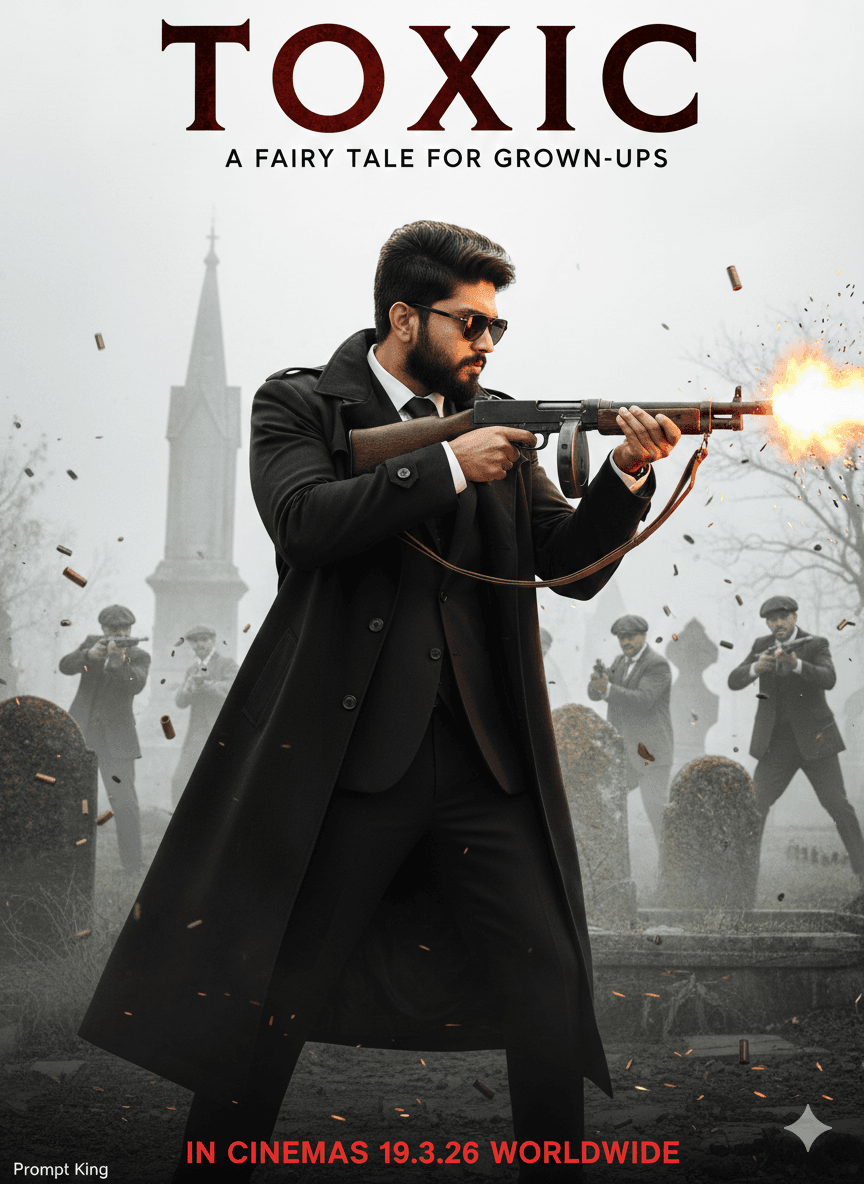
This prompt creates a cinematic movie-style poster of a young man with sharp features, a long groomed beard and dark side-faded messy hair, matched to your reference image. He wears dark vintage sunglasses and a long, flowing black trench coat over formal clothing, and is shown in right-side profile firing a vintage submachine gun with muzzle flash and sparks. Shell casings and debris hang frozen in the air. In the blurred background, armed men in 1920s-style flat caps and suits are caught in a shootout inside a foggy gothic cemetery. The colour palette is desaturated and almost white, with dramatic lighting outlining his silhouette against a hazy sky. The original prompt adds the title of a specific upcoming film, its tagline and a release date, which copies that film's promotion, so it should be adapted with your own title and text. As it centres on weapons and violence, it suits mature audiences only. Reworked, the period costume and foggy setting make a strong base for an original noir poster.
Lighting, colour and composition
Diffused overcast light keeps the scene pale, while muzzle flash adds bright warm points. The palette is washed-out white, grey and black. A side-profile figure dominates the right of the frame, with a busy background shootout softly blurred on the left.
Ways to make it your own
- Remove the gun and show him holding a hat or walking cane for a calmer noir portrait.
- Write your own film title and date in the fog at the top instead of the original.
- Change the cemetery to a rainy 1920s street for a classic noir atmosphere.
Best for
Poster photo ideas and creative portrait inspiration.
Suggested framing
Use the aspect ratio or framing described in the prompt, then adapt it for your intended platform.
Customization ideas
Adjust the clothing, background, lighting, colors and composition to match your own idea.
How to use
Copy the prompt, adapt it to your idea, and paste it into your preferred compatible AI tool. Follow that tool’s instructions for reference photos.
A few helpful answers.
What type of image does this prompt create?
In a compatible AI tool, this prompt is intended as a starting point for this prompt creates a cinematic movie-style poster of a young man with sharp features, a long groomed beard and dark side-faded messy hair, matched to your reference image. He wears dark vintage sunglasses and a long, flowing black trench coat over formal clothing, and is shown in right-side profile firing a vintage submachine gun with muzzle flash and sparks. Shell casings and debris hang frozen in the air. In the blurred background, armed men in 1920s-style flat caps and suits are caught in a shootout inside a foggy gothic cemetery. The colour palette is desaturated and almost white, with dramatic lighting outlining his silhouette against a hazy sky. The original prompt adds the title of a specific upcoming film, its tagline and a release date, which copies that film's promotion, so it should be adapted with your own title and text. As it centres on weapons and violence, it suits mature audiences only. Reworked, the period costume and foggy setting make a strong base for an original noir poster. Results depend on the tool, settings and references you use.
Can I customize the clothing or background?
Yes. Replace the clothing, setting or colors in the prompt with your own choices. Keep descriptions consistent and adjust one detail at a time.
What aspect ratio works best?
Start with Use the aspect ratio or framing described in the prompt, then adapt it for your intended platform.. A 4:5 ratio works well for a portrait feed post. Adjust the crop for your intended platform and your tool’s available settings.
Does Prompt King generate the image?
No. Prompt King helps users discover and copy prompts that can be used with compatible AI tools.
Can I use this for social media ideas?
Yes. Use it as creative inspiration and customize the result for your audience. Use photos you have permission to upload, and check your chosen tool’s terms before publishing.