Double Exposure Style Poster With Two Poses
AI Photo Prompt
Want more trending photo prompts? Discover them in the Prompt King Android app on Google Play.
About this prompt
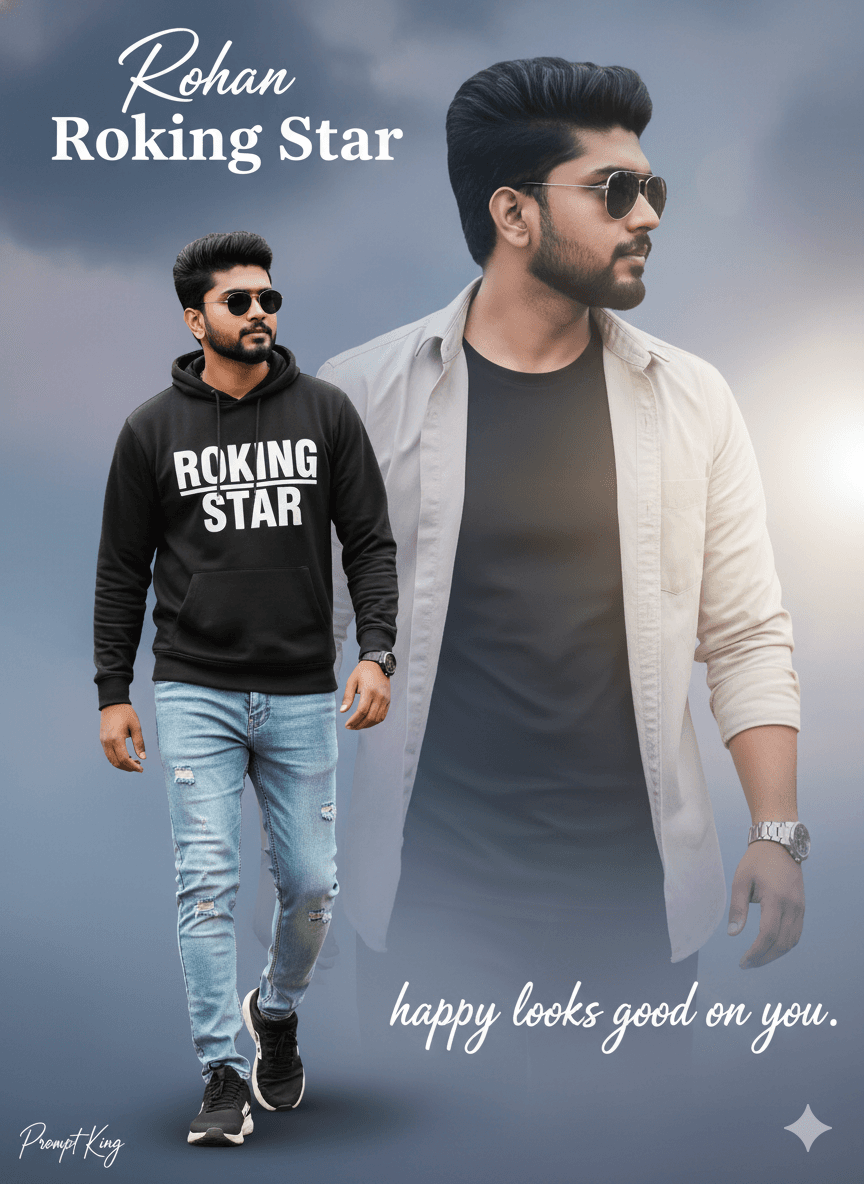
This poster prompt creates a stylised digital composition featuring the same young man twice in one frame. On the left, he walks toward the viewer wearing a black sweatshirt with white lettering, light blue jeans, black and white sneakers and round sunglasses. Behind him, a second, larger image shows him in profile wearing a light-coloured button-down shirt over a black T-shirt, with sunglasses and a watch. He has dark styled hair and light stubble in both versions. The background is a faded, cloud-like wash that ties the two images together, giving the result the look of a film poster or magazine cover. This prompt suits personal branding, birthday posters, YouTube channel art, music cover concepts and portfolio covers. The layered composition is a good way to show two sides of a personality or two outfits in one image. Use a clear face reference so both instances look like you. The original text is cut off at the end, so consider adding details about the colour of the wash and any text you want, such as your name in bold letters.
Lighting, colour and composition
Soft, even lighting keeps both figures clear within a faded, cloud-like background wash. The palette mixes black, white and denim blue with a light neutral backdrop. A layered composition places a full walking figure in the foreground left and a larger profile portrait behind, creating depth and a poster-style hierarchy.
Ways to make it your own
- Add your name in bold letters at the bottom for a personal poster.
- Specify a colour for the background wash, such as soft blue or sepia.
- Use a 2:3 vertical frame for a classic movie-poster shape.
Best for
Poster photo ideas and creative portrait inspiration.
Suggested framing
Use the aspect ratio or framing described in the prompt, then adapt it for your intended platform.
Customization ideas
Adjust the clothing, background, lighting, colors and composition to match your own idea.
How to use
Copy the prompt, adapt it to your idea, and paste it into your preferred compatible AI tool. Follow that tool’s instructions for reference photos.
A few helpful answers.
What type of image does this prompt create?
In a compatible AI tool, this prompt is intended as a starting point for this poster prompt creates a stylised digital composition featuring the same young man twice in one frame. On the left, he walks toward the viewer wearing a black sweatshirt with white lettering, light blue jeans, black and white sneakers and round sunglasses. Behind him, a second, larger image shows him in profile wearing a light-coloured button-down shirt over a black T-shirt, with sunglasses and a watch. He has dark styled hair and light stubble in both versions. The background is a faded, cloud-like wash that ties the two images together, giving the result the look of a film poster or magazine cover. This prompt suits personal branding, birthday posters, YouTube channel art, music cover concepts and portfolio covers. The layered composition is a good way to show two sides of a personality or two outfits in one image. Use a clear face reference so both instances look like you. The original text is cut off at the end, so consider adding details about the colour of the wash and any text you want, such as your name in bold letters. Results depend on the tool, settings and references you use.
Can I customize the clothing or background?
Yes. Replace the clothing, setting or colors in the prompt with your own choices. Keep descriptions consistent and adjust one detail at a time.
What aspect ratio works best?
Start with Use the aspect ratio or framing described in the prompt, then adapt it for your intended platform.. A 4:5 ratio works well for a portrait feed post. Adjust the crop for your intended platform and your tool’s available settings.
Does Prompt King generate the image?
No. Prompt King helps users discover and copy prompts that can be used with compatible AI tools.
Can I use this for social media ideas?
Yes. Use it as creative inspiration and customize the result for your audience. Use photos you have permission to upload, and check your chosen tool’s terms before publishing.