Bengali Bride Over-the-Shoulder Glance With Mukut
AI Photo Prompt
Want more trending photo prompts? Discover them in the Prompt King Android app on Google Play.
About this prompt
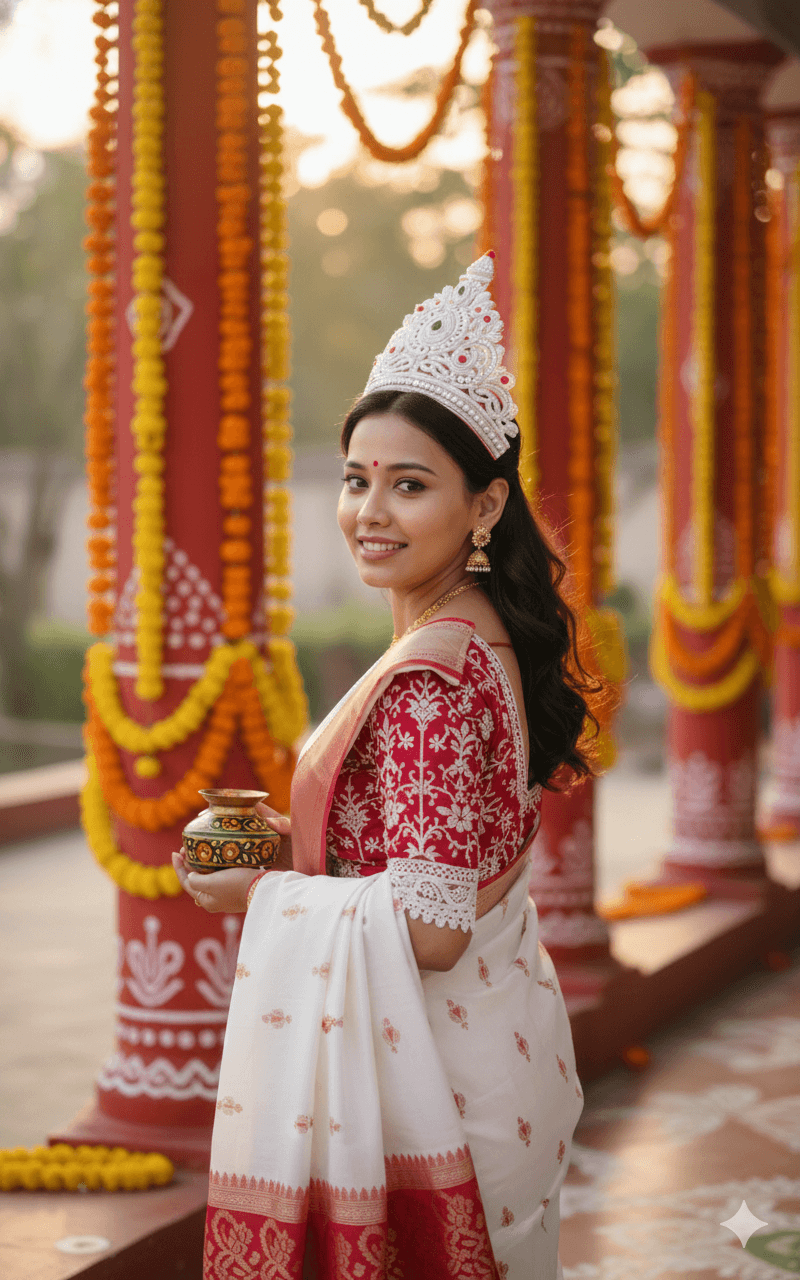
This prompt creates a cinematic portrait of a smiling young woman photographed from behind as she looks back over her shoulder, a pose that shows off both her face and the drape of her outfit. She wears a traditional white and red Bengali saree paired with a vibrant red designer blouse decorated with intricate white embroidery and lace borders. On her head is a Mukut, the traditional white crown worn by Bengali brides, and she holds a decorative Gach Kouto, the bride's vermilion pot. The background shows a festive outdoor setting with large ornate red pillars painted with traditional Alpana patterns and decorated with yellow marigold garlands, all softly blurred. Natural golden-hour light gives a warm glow to her skin and the fabric, and a shallow depth of field keeps the focus on her expression and the bridal details. The colours are vibrant and celebratory, with strong cultural elegance. This style suits Bengali brides, women attending a Bengali wedding, and anyone wanting a cultural portrait for Durga Puja, Poila Baishakh or a pre-wedding shoot. Upload a clear reference photo; a three-quarter face angle will suit the over-the-shoulder pose best.
Lighting, colour and composition
Warm golden-hour light creates a soft glow on skin, lace and the white Mukut. The palette is classic Bengali red and white, with marigold yellow and Alpana-patterned red pillars. An over-the-shoulder composition shows the back of the blouse and saree, with the face turned towards the camera in sharp focus.
Ways to make it your own
- Add sindoor and alta details for a more complete Bengali bridal look.
- Change the background to a Durga Puja pandal for a festive version.
- Ask for a close-up crop to highlight the Mukut and blouse embroidery.
Best for
Bridal photo ideas and creative portrait inspiration.
Suggested framing
Use the aspect ratio or framing described in the prompt, then adapt it for your intended platform.
Customization ideas
Adjust the clothing, background, lighting, colors and composition to match your own idea.
How to use
Copy the prompt, adapt it to your idea, and paste it into your preferred compatible AI tool. Follow that tool’s instructions for reference photos.
A few helpful answers.
What type of image does this prompt create?
In a compatible AI tool, this prompt is intended as a starting point for this prompt creates a cinematic portrait of a smiling young woman photographed from behind as she looks back over her shoulder, a pose that shows off both her face and the drape of her outfit. She wears a traditional white and red Bengali saree paired with a vibrant red designer blouse decorated with intricate white embroidery and lace borders. On her head is a Mukut, the traditional white crown worn by Bengali brides, and she holds a decorative Gach Kouto, the bride's vermilion pot. The background shows a festive outdoor setting with large ornate red pillars painted with traditional Alpana patterns and decorated with yellow marigold garlands, all softly blurred. Natural golden-hour light gives a warm glow to her skin and the fabric, and a shallow depth of field keeps the focus on her expression and the bridal details. The colours are vibrant and celebratory, with strong cultural elegance. This style suits Bengali brides, women attending a Bengali wedding, and anyone wanting a cultural portrait for Durga Puja, Poila Baishakh or a pre-wedding shoot. Upload a clear reference photo; a three-quarter face angle will suit the over-the-shoulder pose best. Results depend on the tool, settings and references you use.
Can I customize the clothing or background?
Yes. Replace the clothing, setting or colors in the prompt with your own choices. Keep descriptions consistent and adjust one detail at a time.
What aspect ratio works best?
Start with Use the aspect ratio or framing described in the prompt, then adapt it for your intended platform.. A 4:5 ratio works well for a portrait feed post. Adjust the crop for your intended platform and your tool’s available settings.
Does Prompt King generate the image?
No. Prompt King helps users discover and copy prompts that can be used with compatible AI tools.
Can I use this for social media ideas?
Yes. Use it as creative inspiration and customize the result for your audience. Use photos you have permission to upload, and check your chosen tool’s terms before publishing.