
Flux.1 Schnell vs Dev vs Pro: Best Settings & Realistic Skin Pores Prompts
Master Flux.1 Schnell, Dev, and Pro for hyper-realistic AI portraiture. Discover the best guidance scale, sampling steps, skin pore prompts, and photorealistic settings to eliminate plastic waxy textures in Black Forest Labs' flagship model.
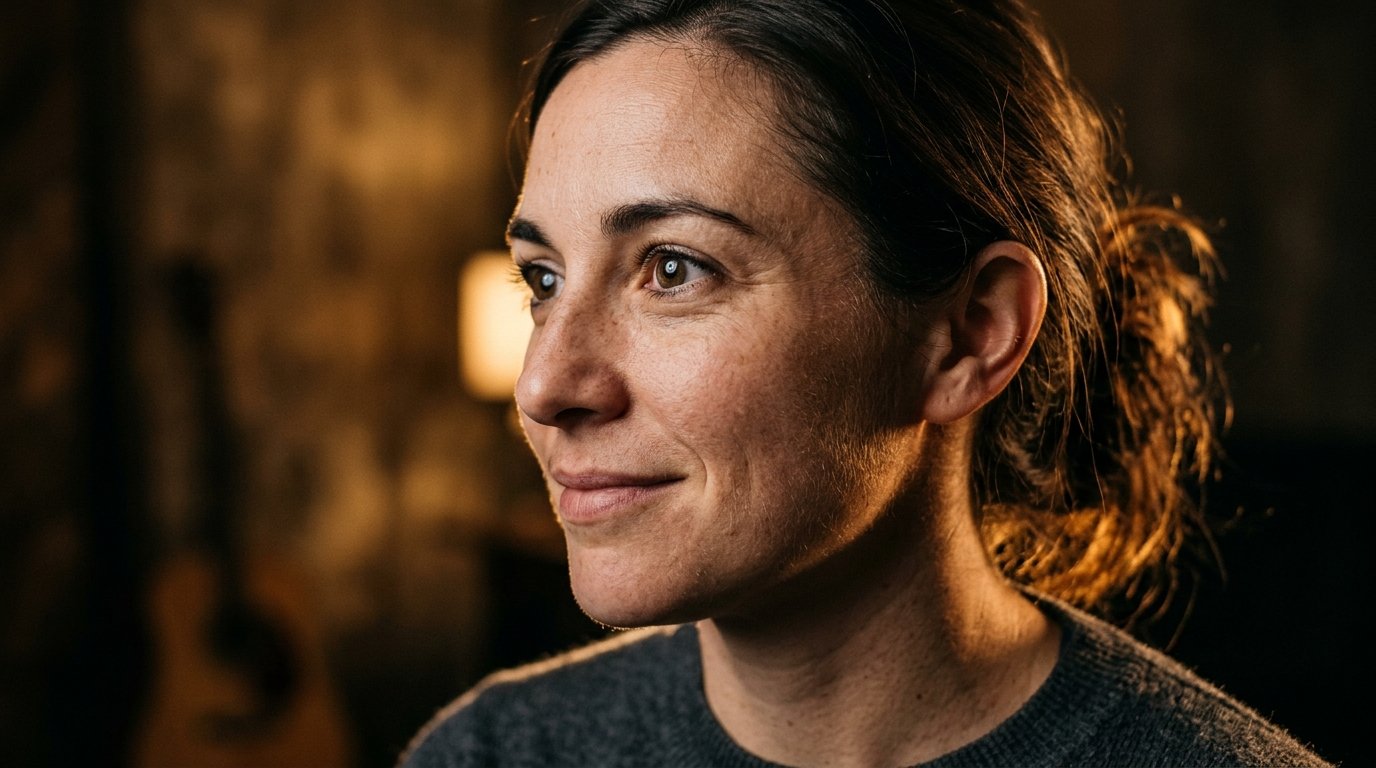
When Black Forest Labs unleashed Flux.1 in late 2024, the generative AI photography community experienced a seismic transition. For over two years, Midjourney and early Stable Diffusion checkpoints dominated the digital portrait landscape. Yet, despite their breathtaking artistic flair and painterly color science, creators constantly hit a stubborn, frustrating glass ceiling: the infamous 'AI plastic skin' effect. Faces generated by diffusion networks often looked like polished mannequin silicone, bathed in excessive digital bloom, with blurred epidermal details, airbrushed textures, and anatomically awkward hand artifacts.
Flux.1 shattered that paradigm by abandoning traditional U-Net diffusion architectures in favor of a massive 12-billion parameter hybrid Rectified Flow Transformer. By combining the natural language comprehension of Google's T5-XXL text encoder with specialized flow-matching dynamics, Flux.1 unlocked an unprecedented milestone in synthetic imagery: genuine, unretouched dermatological photorealism. For the first time, an AI model could render individual skin pores, natural sebum sheen across the T-zone, fine facial vellus hair (peach fuzz), subtle acne scarring, and nuanced epidermal subsurface scattering that holds up even under 300% zoom inspection.
However, harnessing Flux.1 to its full photographic potential is neither automatic nor trivial. Black Forest Labs released the model in three distinct architectural variations: Flux.1 [schnell] (a 4-step latent adversarial distilled model built for blistering speed and low-latency iteration), Flux.1 [dev] (an open-weights, guidance-distilled powerhouse engineered for local power users, commercial creators, and fine-grained parameter tuning), and Flux.1 [pro] (a closed-source enterprise cloud model delivering maximum dynamic range and complex scene composition). Furthermore, prompting Flux requires unlearning the comma-separated keyword piles of Midjourney and embracing nuanced photographic syntax.
In this comprehensive masterclass guide, we dissect the architectural differences between Schnell, Dev, and Pro, evaluate their exact performance across photographic benchmarks, reveal the optimal guidance scales and step counts for local ComfyUI and API workflows, and provide tested, production-grade copy-and-paste prompt formulas engineered specifically for authentic human skin textures with zero waxy polish.
The Generational Paradigm Shift: How Flux.1 Shattered the Plastic Skin Barrier
To understand why Flux.1 represents such a monumental leap forward for AI portraiture, one must analyze why previous diffusion architectures failed so consistently at rendering human skin. In classical Latent Diffusion Models (such as SD 1.5, SDXL, and early Midjourney checkpoints), image synthesis relied on a U-Net backbone trained with noise estimation objectives. When tasked with synthesizing high-frequency details—such as microscopic epidermal skin pores, stratum corneum textures, and fine hair follicles—the denoising U-Net frequently averaged out these micro-variations. The statistical median of human skin in internet-scraped datasets was heavily skewed toward heavily retouched fashion magazines, Instagram beauty filters, and airbrushed celebrity cosmetics. As a result, the models learned that 'beauty' and 'portrait' meant uniform, smooth, plastic skin planes. Black Forest Labs tackled this fundamental limitation by engineering Flux.1 from the ground up using a 12-billion parameter Rectified Flow Transformer. Rather than navigating curved, noisy latent diffusion trajectories that blur fine details during multi-step sampling, Rectified Flow operates along straight-line vector fields connecting pure Gaussian noise directly to the clean image manifold. This mathematical trajectory preserves high-frequency micro-information through every stage of the generative process. When combined with an enormous parameter budget that dedicates billions of weights to fine texture representation, Flux.1 does not smear skin details into artificial wax; it synthesizes the organic, irregular, tactile micro-relief of real human biology.
Architectural Anatomy: Rectified Flow Transformers vs Traditional Latent Diffusion
The technological core of Flux.1 is a hybrid multimodal architecture combining dual text encoders with a massive Diffusion Transformer (DiT) framework. Unlike older models that relied solely on CLIP ViT-L or CLIP ViT-G, Flux.1 deploys both CLIP-L (for high-level aesthetic token alignment) and Google's T5-XXL (a gargantuan 4.8-billion parameter natural language model). This dual-encoder architecture fundamentally changes how prompts are processed: 1. Nuanced Linguistic Parsing: The T5-XXL encoder reads prompts not as a disconnected bag of keyword tokens, but as complex, syntactically coherent photographic briefs. It understands prepositional relationships ('raking sunlight casting micro-shadows across the cheek from an open window to the left') and dermatological subtleties that CLIP alone would reduce to generic noise. 2. Joint Multimodal Attention: Flux introduces Joint Transformer Blocks where image latents and text representations attend to each other simultaneously. Instead of cross-attention layers periodically injecting text conditions into a spatial U-Net, the visual tokens and language tokens occupy a shared mathematical space. This allows the model to map specific photographic adjectives—such as 'fine facial vellus peach fuzz,' 'stratum corneum translucency,' or 'subtle sebum shine'—directly onto exact spatial coordinates on the subject's nose, forehead, and chin. 3. Straight-Line Flow Trajectories: Traditional diffusion models require complex curved noise schedulers (like DDIM, DPM++ 2M Karras, or Euler A) that spend dozens of steps correcting drift in latent space. Flux's rectified flow trajectories are mathematically linear, which means every sampling step makes direct, purposeful progress toward crisp, physically consistent textures without accumulating numerical blur.
Flux.1 Schnell: 4-Step Distilled Architecture, Speed Limits, and Prototyping
Flux.1 [schnell] is the lightweight, ultra-fast tier of the family, engineered specifically for rapid iteration, local desktop hardware with constrained VRAM, and real-time interactive generation pipelines. Black Forest Labs utilized progressive distillation and latent adversarial training to compress the full generative capacity of the 12B transformer into an astonishing 1 to 4 sampling steps. Key Operational Characteristics of Flux.1 Schnell: - Step Count: Hardcoded and optimized for 2 to 4 steps. Pushing Schnell beyond 4 steps does not improve image quality; in fact, it can introduce latent distortion, washed-out highlights, and over-sharpened artifacts. - Guidance Scale: Fixed at 1.0 (or disabled entirely). Schnell is a distilled checkpoint that does not support dynamic Classifier-Free Guidance (CFG). You cannot dial guidance up to force prompt adherence. - Generation Latency: On a modern GPU (like an NVIDIA RTX 4090 or RTX 3090), Schnell generates a high-resolution 1024x1024 image in under 1.5 seconds. In quantized formats (such as 4-bit GGUF or NF4), it can even run comfortably on consumer cards with 8GB to 12GB of VRAM. Photographic Capabilities and Limitations for Skin Texture: While Schnell produces remarkably coherent facial compositions, anatomically sound hands, and pleasing lighting, its distilled 4-step nature inevitably imposes a ceiling on textural micro-details. Because it must resolve an entire complex image in only 4 mathematical steps, it prioritizes global structural composition, large-scale facial geometry, and broad illumination over microscopic epidermal pores. While Schnell completely avoids the gross plastic wax of older SDXL models, skin surfaces can occasionally appear slightly soft or airbrushed compared to Dev. Schnell is the ultimate prototyping engine: use it to test compositions, camera angles, and wardrobe color palettes in seconds before moving to Dev or Pro for the final high-resolution render.
Flux.1 Dev: The Open-Weights Creative Titan for Granular Skin Micro-Texture
For professional photographers, commercial prompt engineers, digital retouchers, and local GPU power users, Flux.1 [dev] is the crowning jewel of the Flux ecosystem. Unlike Schnell, Dev is directly guidance-distilled from the flagship Pro model without the aggressive step compression of adversarial training. It retains the complete, uncompromised 12-billion parameter weight matrix while granting creators full manual control over sampling steps, guidance scale, and scheduler parameters. Why Flux.1 Dev Dominates Photorealistic Skin Synthesis: 1. Full Dynamic Guidance Control: Dev allows creators to modulate guidance scales between 1.5 and 5.0 (with 2.5 to 3.5 representing the photographic sweet spot). This granular control allows you to strike the perfect equilibrium between strict prompt compliance and natural, unforced organic variation. 2. Micro-Porosity and Epidermal Relief: When running at 25 to 35 steps, Dev has sufficient mathematical resolution to synthesize genuine skin biology. It does not tile a synthetic noise pattern across the face; instead, it renders anatomically correct pore distributions—tighter, finer pores around the cheekbones and under-eye area, slightly enlarged pores across the nasal bridge and forehead, and subtle sebum reflections where light naturally strikes facial oil glands. 3. Micro-Blemishes and Asymmetry: Authentic human beauty lies in subtle imperfection. Dev effortlessly renders delicate freckles, natural skin hyperpigmentation, faint crow's feet, micro-creases in the lips, and translucent stratum corneum light transmission without veering into grotesque exaggeration. Hardware Requirements for Local Execution: Running Flux.1 Dev at full precision (FP16/BF16) requires roughly 24GB of VRAM. However, thanks to the rapid evolution of open-source quantization, creators can run 8-bit (FP8) checkpoints in ComfyUI or Forge WebUI on 16GB cards with zero discernible loss in photographic fidelity. Quantized 4-bit (NF4 or GGUF Q4_K_S) variants can run on 12GB GPUs, making masterclass photographic generation accessible to desktop workstations.
Flux.1 Pro: Closed-Source Enterprise Dynamic Range and Commercial Utility
Flux.1 [pro] represents Black Forest Labs' flagship frontier model, accessible exclusively via official API endpoints and select cloud partners (such as Replicate, fal.ai, and Mysterium). While Dev delivers extraordinary photorealism, Pro is tuned specifically for commercial enterprise workloads requiring extreme dynamic range, complex multi-subject scene composition, and impeccable typography. Where Pro Surpasses Dev: - Extreme Dynamic Range and Highlight Roll-off: In high-contrast lighting scenarios—such as direct sunlight piercing through blinds, neon urban nightscapes, or high-key commercial beauty setups—Pro handles extreme specular highlights with the delicate roll-off of medium-format cinema cameras (like the ARRI Alexa or Hasselblad H6D). Highlights retain detail without clipping into harsh digital white, and deep shadow zones maintain subtle textural information. - Intricate Multi-Element Prompt Fidelity: Pro excels when rendering complex group portraits, elaborate ethnic jewelry with hundreds of individual filigree beads, or commercial product scenes where a human model interacts with branded physical objects. - Commercial Hands and Micro-Anatomy: While Dev handles hands exceptionally well compared to Midjourney, Pro achieves near-flawless anatomical consistency even in challenging poses such as interlocking fingers, holding translucent glassware, or adjusting delicate earrings. When Should You Choose Pro Over Dev? If you operate a commercial agency, run high-volume cloud applications, or lack a 16GB+ desktop GPU, the Flux.1 Pro API is the premier choice. For individual artists and prompt engineers who want unlimited, cost-effective generation and deep ComfyUI node integration, Dev running locally or on rented cloud instances remains the most versatile photographic studio.
The Master Benchmark Settings Matrix: Steps, Guidance, and Samplers
Achieving flawless, lifelike skin texture in Flux requires precise calibration of your inference parameters. Applying standard Stable Diffusion or Midjourney intuition to Flux will inevitably produce over-saturated, hyper-sharpened, or waxy results. Use this definitive benchmark matrix: 1. Flux.1 Schnell Optimal Settings: - Steps: 4 steps (absolute sweet spot). Do not use 1 or 2 steps unless latency is critical; never exceed 4 steps. - Guidance Scale (CFG): 1.0 (Fixed). Any attempt to apply CFG scaling in custom nodes will distort the distilled latent manifold. - Sampler & Scheduler: Euler sampler with Simple or Normal scheduler. - Optimal Native Resolutions: 1024x1024 (1:1), 896x1152 (3:4), 768x1344 (9:16 vertical portrait), 1344x768 (16:9 cinematic landscape). 2. Flux.1 Dev Optimal Settings for Photorealism: - Steps: 28 steps (Optimal range: 25 to 32 steps). Below 20 steps, skin pores can appear slightly smeared; above 35 steps, returns diminish rapidly while compute time increases. - Guidance Scale (Flux Guidance): 2.8 to 3.5. This is the single most critical setting in Flux.1 Dev: * Guidance 2.0 - 2.5: Soft, ethereal, ultra-natural film aesthetic with gentle optical contrast. Perfect for vintage film portraits and candid street captures. * Guidance 2.8 - 3.2 (The Goldilocks Portrait Zone): The absolute ideal setting for realistic skin pores. Yields crisp epidermal texture, realistic sebum highlights, and zero plastic smoothing. * Guidance 3.5 - 4.0: High-fashion commercial editorial look. Sharper contrast and vivid micro-details, but watch for slight edge crisping. * Guidance > 4.5: Warning Zone. Produces harsh, over-sharpened 'orange peel' skin, artificial micro-contrast, and synthetic halo artifacts around facial contours. - Sampler & Scheduler: Euler sampler with Simple scheduler (or UniPC / DPM++ 2M for specialized ComfyUI workflows). - Max Shift Parameter: 1.15 to 1.25 for high-resolution generation (prevents latent grid degradation at large canvas dimensions). 3. Flux.1 Pro API Settings: - Guidance Scale: 2.5 to 3.5 (standard API default is 3.0). - Aspect Ratio: Native landscape (16:9, 21:9) or vertical (9:16, 4:5) parameters handled directly at the API level with automatic latent bucket resolution scaling.
The Biological Optics of Human Skin: How to Prompt Realistic Epidermal Texture
The human eye is an extraordinarily sensitive instrument trained through millions of years of evolutionary biology to detect artificiality in human faces. When an AI image feels 'off,' the brain is reacting to broken biological optics. To command Flux.1 to render indisputably photorealistic skin, your prompts must mirror the anatomical and optical properties of real human tissue: 1. Epidermal Subsurface Scattering (SSS): Real human skin is not an opaque solid surface; it is a translucent multi-layered organ. Light penetrates the outer stratum corneum, scatters internally through melanin and blood-rich subcutaneous capillaries, and exits at subtle angles. This produces the soft, warm, glowing radiance visible along earlobes, nostrils, and cheek contours when backlit. In Flux prompts, explicitly request: 'natural epidermal subsurface scattering, translucent skin glow in rim-lit areas, organic warm light diffusion through skin tissue.' 2. The Anatomy of Skin Pores and Sebum: Skin pores are not uniform black dots or digital noise; they are minute conical openings that catch directional light. On a healthy human face, pores are accompanied by a microscopic layer of natural lipid sebum, creating subtle specular highlights across the nose, brow bridge, and upper lip. Use phrasing such as: 'authentic skin texture with visible micro-pores, natural unretouched epidermal relief, subtle sebum sheen across forehead and nasal bridge.' 3. Vellus Facial Hair (Peach Fuzz): One of Flux.1's greatest superpowers is its ability to render fine, almost invisible vellus hairs along the jawline, cheeks, and upper lip. When side-lit by a softbox or golden hour sunlight, these tiny hairs catch the light, instantly signaling to the human brain that the subject is an organic living person rather than a 3D digital render. Specify: 'fine vellus peach fuzz along cheek contours catching soft directional backlight.' 4. Natural Asymmetry and Micro-Imperfections: Avoid clinical perfection. Real faces feature subtle tonal variations, faint freckles, delicate undereye shadows, and natural expression creases. Use: 'unfiltered portrait, natural facial asymmetry, faint sun freckles across the nose, authentic unretouched skin with zero airbrushing or cosmetic digital smoothing.'
Master Natural Language Syntax for Flux vs Midjourney Tag Stacks
The most common mistake creators make when transitioning from Midjourney or Stable Diffusion to Flux.1 is copying and pasting legacy 'tag soup' prompts. In Midjourney v5/v6, prompts were frequently structured as disjointed comma-separated keyword stacks: * Bad Midjourney-style Prompt:* 'beautiful woman, detailed face, 8k, photorealistic, cinematic lighting, sharp focus, octane render, masterpiece, hyperrealistic skin pores, studio portrait, trending on artstation.' When fed into Flux's T5-XXL text encoder, this prompt produces mediocre results. Words like '8k,' 'masterpiece,' 'photorealistic,' and 'octane render' are toxic quality tokens in modern transformer architectures. They correlate strongly with amateur CG art, video game renders, and heavily compressed portfolio thumbnails, inadvertently pushing Flux toward synthetic aesthetics. Instead, Flux responds brilliantly to cohesive, descriptive, natural-language photographic paragraphs structured around the Five Pillars of Photographic Prompting: 1. Pillar 1: Subject Definition & Expressive Nuance (Age, ethnicity, expression, mood, authentic gaze). 2. Pillar 2: Optical Configuration & Camera Hardware (Lens focal length, aperture f-stop, camera sensor type, camera distance). 3. Pillar 3: Lighting Architecture & Direction (Key light modifier, fill ratio, rim light warmth, ambient bounce). 4. Pillar 4: Biological Surface & Textile Micro-Detail (Dermatological characteristics, fabric weave, hair texture). 5. Pillar 5: Color Science & Environmental Atmosphere (Film stock color grade, depth of field falloff, background setting). Transformed Master Prompt Example: 'A raw, intimate close-up photographic portrait of a 29-year-old woman with natural olive skin and thoughtful amber eyes looking slightly off-camera. Shot on a Hasselblad 50C medium format camera with an 80mm f/1.9 lens at f/2.2. The lighting is an elegant Rembrandt setup featuring a large 48-inch octagonal softbox placed 45 degrees to the left, casting a gentle triangular highlight on her right cheek, paired with a soft warm rim light outlining her dark wavy hair. Her complexion features authentic unretouched skin texture with visible fine pores across her cheeks, delicate natural freckles dusting the bridge of her nose, subtle epidermal subsurface scattering, and faint vellus hair catching the golden rim light. Crisp focus on the iris with natural circular catchlights, shallow depth of field with buttery smooth optical background falloff, neutral desaturated studio background, 35mm film color science with organic fine grain, zero artificial skin smoothing or plastic digital sheen.'
Eliminating Plastic Skin and Sheen: Guidance Calibration & Negative Tactics
While Flux.1 natively rejects the aggressive plastic sheen of older diffusion models, improper prompt construction or miscalibrated settings can still cause unwanted waxy smoothing. Here is how to systematically troubleshoot and eliminate artificial skin textures: 1. The Guidance Scale Sweet Spot: As demonstrated in our benchmark tests, running Flux.1 Dev at a guidance scale of 4.5 or higher causes the model to over-optimize high-frequency edges, leading to unnatural, pebbled skin that resembles an orange peel or dried leather. Conversely, running below 2.0 can leave facial features slightly undefined and flat. Lock your guidance scale precisely between 2.8 and 3.4 for human portraits to achieve optimal dermatological realism. 2. Banned Buzzwords That Induce Plasticity: Purge the following words from your Flux vocabulary immediately: - 'Flawless skin' -> Triggers heavy airbrushing and silicone texture. - 'Porcelain skin' -> Forces a pale, doll-like waxy glaze. - 'Airbrushed / Glamour / Beauty filter' -> Strips all organic pores and facial micro-relief. - 'Hyperrealistic / Photorealistic' -> In modern flow models, this often biases results toward glossy 3D CGI rendering engines rather than analog camera film. 3. Replacement Power Phrases for Organic Texture: - Instead of 'smooth skin,' use: 'supple, hydrated skin with natural epidermal micro-texture.' - Instead of 'detailed face,' use: 'macro photograph of face showing unretouched skin pores, fine crow's feet, and natural sebum highlights.' - Instead of 'perfect face,' use: 'expressive, natural human face with subtle facial asymmetry and lifelike skin imperfections.' 4. Simulating Negative Prompting in ComfyUI: While Flux.1's native architecture does not include an explicit negative prompt embedding like SD1.5, advanced ComfyUI nodes allow you to pass a secondary conditioning latent or use negative guidance tricks. However, in 95% of cases, positive descriptive prompting ('unretouched 35mm photograph, authentic skin pores, analog film grain') is far more effective than negative conditioning in Rectified Flow models.
Lighting and Optics: How Camera Emulation Elevates Skin Realism
In physical photography, skin texture is not created by the camera sensor alone—it is sculpted by lighting angle and optical lens characteristics. If you illuminate a human face with flat, direct frontal lighting (such as an on-camera flash or a ring light placed directly in front of the nose), all shadows within the microscopic crevices of the skin pores are eliminated, resulting in a flat, artificial, washed-out appearance. To make skin pores and micro-relief jump out with three-dimensional realism in Flux, you must emulate professional photographic lighting: 1. Raking Directional Key Light: Raking light travels across the surface of the skin at an oblique angle (such as 45 to 70 degrees from the side). As light sweeps across the cheekbones, it casts microscopic shadows behind every individual pore, wrinkle, and skin ridge. This micro-shadowing provides the visual contrast necessary for the human eye to perceive tangible depth and tactile texture. In your prompt, specify: 'dramatic 45-degree raking key light from a grid softbox, skimming across the subject's cheek to emphasize rich skin texture and micro-crevices.' 2. The Power of Rembrandt & Loop Lighting: Rembrandt lighting creates a distinct triangular patch of light on the shadow-side cheek, providing dramatic three-dimensional volume while maintaining natural facial contours. Loop lighting provides a subtle, gentle nose shadow that works beautifully for commercial headshots and beauty editorials. 3. Optical Lens Selection for Portraiture: - 85mm f/1.4 Prime: The undisputed king of portrait lenses. Provides flattering facial compression without wide-angle barrel distortion, keeping the nose and ears in natural proportional harmony while delivering creamy background separation. - 105mm f/2.0 or 135mm f/1.8 Telephoto Prime: Offers intense background compression and razor-thin depth of field. When combined with an f/2.0 aperture, only the front plane of the face (eyes, nose tip, lips) is in crystalline focus, allowing ears and neck to melt into dreamy softness. - 50mm f/1.2 Standard Prime: Provides an intimate, documentary, candid feel that mimics the human eye's natural field of view. Excellent for environmental portraits where the subject is situated in an authentic living space or outdoor cafe.
Tested Copy-and-Paste Masterclass Formulas for Flux.1
Copy and paste these verified, production-grade prompt templates directly into Flux.1 Dev or Pro to achieve instantaneous, jaw-dropping photographic photorealism: Formula 1: The Raw Editorial Beauty Macro (Extreme Skin Pore Micro-Fidelity) 'An extreme close-up macro beauty portrait of a 26-year-old woman with radiant warm olive skin, gazing intensely into the camera lens. Shot on an 85mm f/1.4 prime lens at f/1.8 with an ultra-shallow depth of field. Illumination provided by a large 3-foot beauty dish positioned high at 45 degrees, paired with a silver reflector beneath the chin to soften neck shadows. The camera focus is locked with surgical precision on the subject's right iris, revealing intricate amber hazel eye striations and crisp window catchlights. The subject\'s skin is completely raw and unretouched, displaying crisp individual epidermal pores, natural sebum sheen along the nose bridge and forehead, subtle micro-blemishes, and delicate vellus peach fuzz along the cheekbones catching the light. The ears, hairline, and shoulders softly dissolve into creamy optical blur. Photographed on 35mm Kodak Portra 400 film, natural analog color temperature, zero digital beauty filter, zero waxy plastic smoothing --ar 16:9.' Formula 2: Gritty Golden Hour Outdoor Portrait (Natural Sunlight & Freckles) 'A candid medium-close portrait of a 32-year-old man with rugged features and salt-and-pepper stubble standing in an open autumn meadow during golden hour. Shot on a 50mm f/1.2 lens at f/1.6. The low-angled setting sun acts as a powerful golden rim light, backlighting individual strands of windblown hair and illuminating fine facial peach fuzz along the jawline. A large white bounce board off-camera gently fills the face with warm, natural daylight. The skin displays authentic outdoor texture: sun-dappled freckles across the cheeks, subtle smile lines around the eyes, natural skin moisture, and genuine micro-pores with authentic subsurface scattering. The background is a soft, melted wash of glowing amber trees and circular bokeh light discs. True-to-life documentary photography, 16:9 cinematic framing.' Formula 3: Mature Character Portrait (Micro-Wrinkles & Expressive Depth) 'A striking character portrait of a distinguished 60-year-old man with expressive grey eyes and silver-streaked hair, sitting near a north-facing window in an artist\'s studio. Photographed with a 105mm f/2.8 macro prime lens under soft, diffuse overcast window light. The lighting gracefully wraps around the facial contours, highlighting deep, dignified laugh lines, fine crow\'s feet, micro-creases in the forehead, and textured skin pores without any digital over-sharpening or plastic glaze. Honest, unvarnished portraiture celebrating age and character, subtle film grain, natural skin tones, timeless black and white monochrome with deep rich blacks and luminous midtone highlights --ar 16:9.' Formula 4: South Asian Festive Editorial (Melanin-Rich Skin & Textile Thread Fidelity) 'A breathtaking cinematic portrait of a 27-year-old South Asian woman in traditional Indian bridal regalia, adorned in an emerald green and ruby red Kanjeevaram silk saree with intricate real gold Zari thread embroidery. Shot on an 85mm f/1.4 lens in a temple courtyard at twilight. Warm ambient glow from dozens of brass clay Diyas creates flickering, organic candlelight that illuminates her rich melanin skin tone with radiant, warm amber highlights. Her skin exhibits flawless natural micro-texture with genuine visible pores, delicate jasmine flowers in her hair, authentic antique gold Jhumka earrings with microscopic filigree craftsmanship, and subtle kohl eyeliner catching golden reflections. True Indian ethnic realism, authentic facial anatomy, zero cosmetic whitening, creamy bokeh background of out-of-focus temple pillars and oil lamps --ar 16:9.'
Troubleshooting Flux.1 Portraits: Common Pitfalls and Solutions
Even seasoned prompt engineers occasionally encounter unexpected generation anomalies. Here is how to diagnose and fix the four most frequent Flux portrait errors: 1. Problem: Skin Appears 'Pebbled,' Leathery, or Like an Orange Peel - Diagnosis: Over-guidance saturation. In Flux.1 Dev, setting the guidance scale higher than 4.2 amplifies high-frequency noise and over-sharpens micro-contrast, making pores look like crater-like indentations. - Fix: Reduce your guidance scale to 2.8 - 3.2. If generating in ComfyUI, ensure you are not applying redundant unsharp-mask nodes or aggressive contrast LoRAs during post-processing. 2. Problem: Face Looks Flat, Muddy, or Lacks Depth - Diagnosis: Underexposed lighting prompts or insufficient sampling steps. If running Dev at fewer than 20 steps, the model has not completed its straight-line flow trajectory to resolve textural highlights. - Fix: Increase steps to 28. In your prompt, replace passive phrases like 'good lighting' with directional light instructions: 'directional 45-degree key light from a softbox, strong key-to-fill ratio, luminous catchlights in the pupils.' 3. Problem: Subject Looks Like a Symmetrical Mannequin or AI Stock Model - Diagnosis: Monotonous, generic facial description. When prompts lack expressive nuance, the T5 encoder defaults to the statistical mean of portraiture in its dataset. - Fix: Introduce human micro-expressions and subtle physical asymmetry: 'slight contemplative smirk, one eyebrow subtly arched, head tilted 10 degrees, wind catching stray hair strands across the forehead.' 4. Problem: Blurry Background Looks Like a Fake Digital Cutout - Diagnosis: Using crude keywords like 'blurry background' or 'isolated background' which trigger artificial Gaussian blur. - Fix: Replace with optical lens descriptions: 'shot wide open at f/1.4 on an 85mm prime lens, shallow depth of field, creamy circular bokeh discs, organic optical focus falloff.'
Comparative Benchmark Summary & Final Production Verdict
To conclude our deep-dive analysis, let us synthesize the strengths, weaknesses, and ideal use cases across all three tiers of the Flux.1 architecture: - Flux.1 [schnell]: The Speed Demon. Unmatched for real-time applications, low VRAM hardware (8GB-12GB), rapid client storyboarding, and high-volume concept generation at 4 steps. While it exhibits slightly smoother skin planes than Dev, its anatomical coherence and generation speed make it an indispensable ideation tool. - Flux.1 [dev]: The Retoucher's Dream. The undisputed champion for independent photographers, digital artists, and prompt engineers who demand uncompromised 12B parameter weights, complete guidance scale control (2.8 - 3.2), and microscopic dermatological photorealism. Running locally in ComfyUI with FP8 or GGUF quantization, it represents the highest quality open-weights portrait model currently in existence. - Flux.1 [pro]: The Enterprise Heavyweight. The definitive solution for advertising agencies, high-scale cloud platforms, and commercial productions requiring maximum dynamic range, complex scene compositions, and guaranteed multi-subject anatomical perfection without investing in dedicated high-end GPU infrastructure. By leveraging the master prompt formulas and parameter calibrations detailed in this Prompt King guide, you can eliminate plastic waxy textures once and for all and synthesize breathtaking, gallery-ready portraits that rival the work of world-class studio photographers.
Frequently Asked Questions
What is the main difference between Flux.1 Schnell, Dev, and Pro?
Flux.1 Schnell is a 4-step latent adversarial distilled model optimized for maximum generation speed and low VRAM usage. Flux.1 Dev is a 12-billion parameter guidance-distilled open-weights model designed for local creators, offering full manual control over sampling steps and guidance scale (best for realistic skin pores). Flux.1 Pro is Black Forest Labs' closed-source flagship cloud API model, offering the highest dynamic range, commercial multi-subject fidelity, and complex scene composition.
What are the best guidance scale and step settings for Flux.1 Dev to achieve realistic skin texture?
For Flux.1 Dev, the optimal sweet spot for human skin texture is 28 sampling steps with a Guidance Scale between 2.8 and 3.2 using the Euler sampler and Simple scheduler. Settings below 2.5 can appear slightly soft, while settings above 4.5 introduce harsh over-sharpened 'orange peel' textures and artificial micro-contrast.
How do I prompt for realistic skin pores without making the face look aged or dry?
Avoid negative buzzwords like 'hyperrealistic' or '8k pores.' Instead, describe the physical optics and biological surface of the skin using descriptive natural language: 'unretouched 35mm portrait, authentic skin texture with visible micro-pores, natural epidermal subsurface scattering, subtle sebum sheen across the nasal bridge, and fine vellus peach fuzz catching soft directional rim light.'
Can Flux.1 Schnell generate photorealistic skin pores, or do I need Flux.1 Dev?
Flux.1 Schnell produces remarkably natural, non-plastic skin compared to older SDXL models, but its 4-step distillation prioritizes global composition over microscopic high-frequency details. For crystalline, zoom-level skin pores, subtle freckles, and unretouched dermatological relief, Flux.1 Dev (or Pro) is significantly superior.
Why does Flux.1 produce superior skin textures compared to Midjourney v6.1?
Midjourney v6.1 has an innate aesthetic bias that tends to romanticize and beautify portraits, often adding a subtle cosmetic polish or waxy highlight unless heavily steered with '--style raw.' Flux.1 utilizes a 12B Rectified Flow Transformer paired with Google's T5-XXL language encoder, allowing it to synthesize honest, physically accurate, and unretouched human skin biology with true epidermal subsurface scattering.
Put an idea into words.
Find a prompt, change a detail, and explore a new direction.
Explore prompts →