
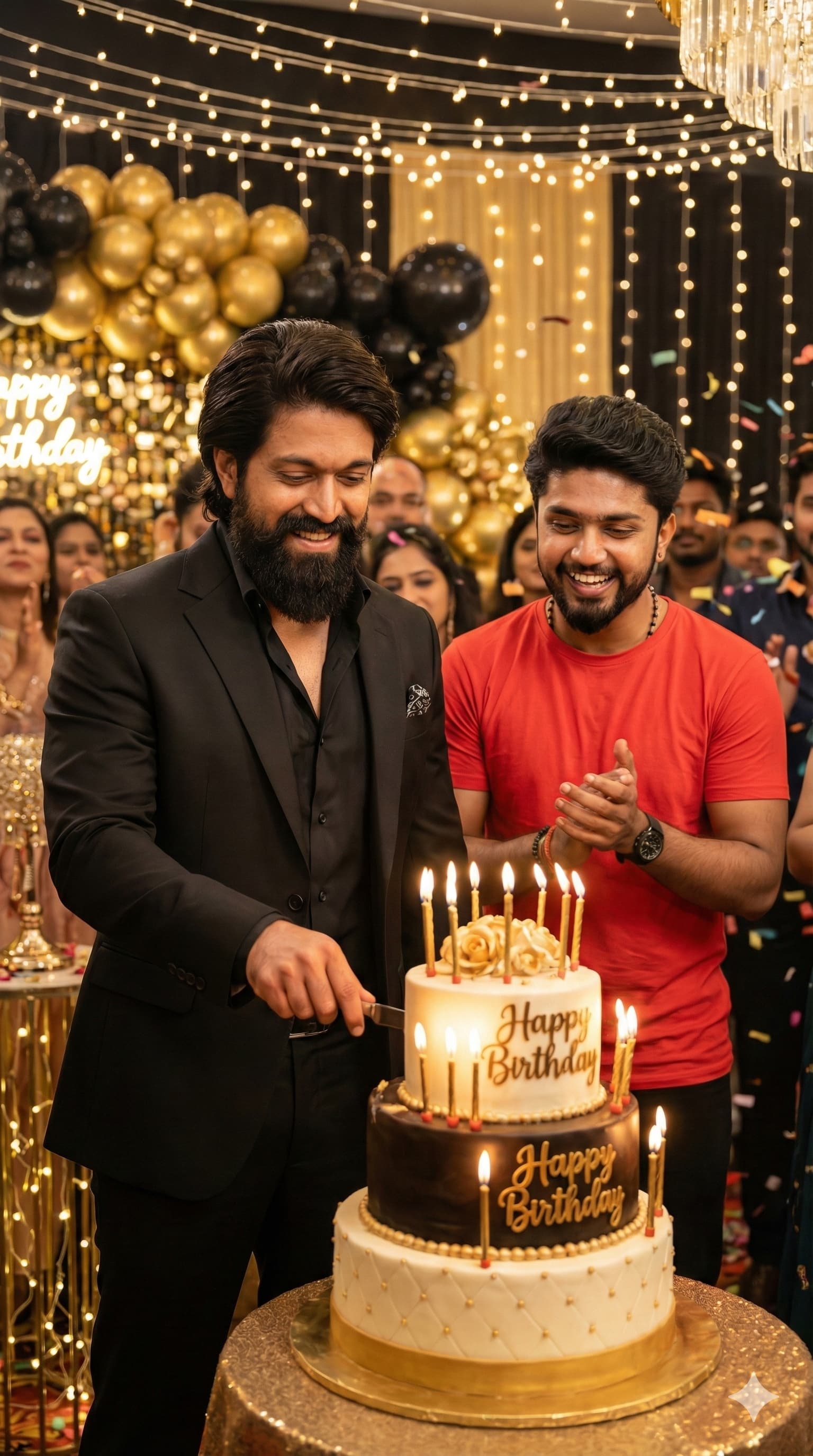
Two People Celebrating Around a Decorated Cake Table
AI Photo Prompt
Want more trending photo prompts? Discover them in the Prompt King Android app on Google Play.
About this prompt
This prompt version describes an ultra-realistic birthday celebration scene in a vertical 9:16 frame, set at a decorated indoor party. A large birthday cake with candles and 'Happy Birthday' written on it sits on a decorated table, and a person in a classy black outfit stands in front cutting the cake while smiling. The person from the uploaded reference image stands nearby, joining in the celebration. Balloons, warm party lights and other guests fill the background, creating a festive, joyful atmosphere. The lighting is warm and cinematic, with soft highlights on faces and the cake. Because the original prompt centres on a real, named film actor and other real public figures, it is listed here for reference rather than recommended, as generating images of real celebrities with yourself can be misleading. The same birthday setup works well without any real celebrity: for example, with your own family member, friend or partner cutting the cake beside you. That version suits birthday posts, family celebration memories and greeting images. Use reference photos of people who have agreed to be included, and avoid presenting generated images as real meetings or events.
Lighting, colour and composition
Warm, golden party lighting flatters faces and makes the candles glow. The palette uses black and neutral outfits with a pastel and gold cake table and colourful decorations. A balanced vertical composition centres the cake, with both people standing close behind it and the party background softly out of focus.
Ways to make it your own
- Use a parent or partner in place of the celebrity for a meaningful family photo.
- Change the outfits to matching white or traditional wear for a festive theme.
- Add a 'Happy Birthday' banner on the back wall for extra context.
Best for
Trending photo ideas and creative portrait inspiration.
Suggested framing
Use the aspect ratio or framing described in the prompt, then adapt it for your intended platform.
Customization ideas
Adjust the clothing, background, lighting, colors and composition to match your own idea.
How to use
Copy the prompt, adapt it to your idea, and paste it into your preferred compatible AI tool. Follow that tool’s instructions for reference photos.
A few helpful answers.
What type of image does this prompt create?
In a compatible AI tool, this prompt is intended as a starting point for this prompt version describes an ultra-realistic birthday celebration scene in a vertical 9:16 frame, set at a decorated indoor party. A large birthday cake with candles and 'Happy Birthday' written on it sits on a decorated table, and a person in a classy black outfit stands in front cutting the cake while smiling. The person from the uploaded reference image stands nearby, joining in the celebration. Balloons, warm party lights and other guests fill the background, creating a festive, joyful atmosphere. The lighting is warm and cinematic, with soft highlights on faces and the cake. Because the original prompt centres on a real, named film actor and other real public figures, it is listed here for reference rather than recommended, as generating images of real celebrities with yourself can be misleading. The same birthday setup works well without any real celebrity: for example, with your own family member, friend or partner cutting the cake beside you. That version suits birthday posts, family celebration memories and greeting images. Use reference photos of people who have agreed to be included, and avoid presenting generated images as real meetings or events. Results depend on the tool, settings and references you use.
Can I customize the clothing or background?
Yes. Replace the clothing, setting or colors in the prompt with your own choices. Keep descriptions consistent and adjust one detail at a time.
What aspect ratio works best?
Start with Use the aspect ratio or framing described in the prompt, then adapt it for your intended platform.. A 4:5 ratio works well for a portrait feed post. Adjust the crop for your intended platform and your tool’s available settings.
Does Prompt King generate the image?
No. Prompt King helps users discover and copy prompts that can be used with compatible AI tools.
Can I use this for social media ideas?
Yes. Use it as creative inspiration and customize the result for your audience. Use photos you have permission to upload, and check your chosen tool’s terms before publishing.




