
Red Embroidered Saree Smile in a Mustard Field
AI Photo Prompt
Want more trending photo prompts? Discover them in the Prompt King Android app on Google Play.
About this prompt
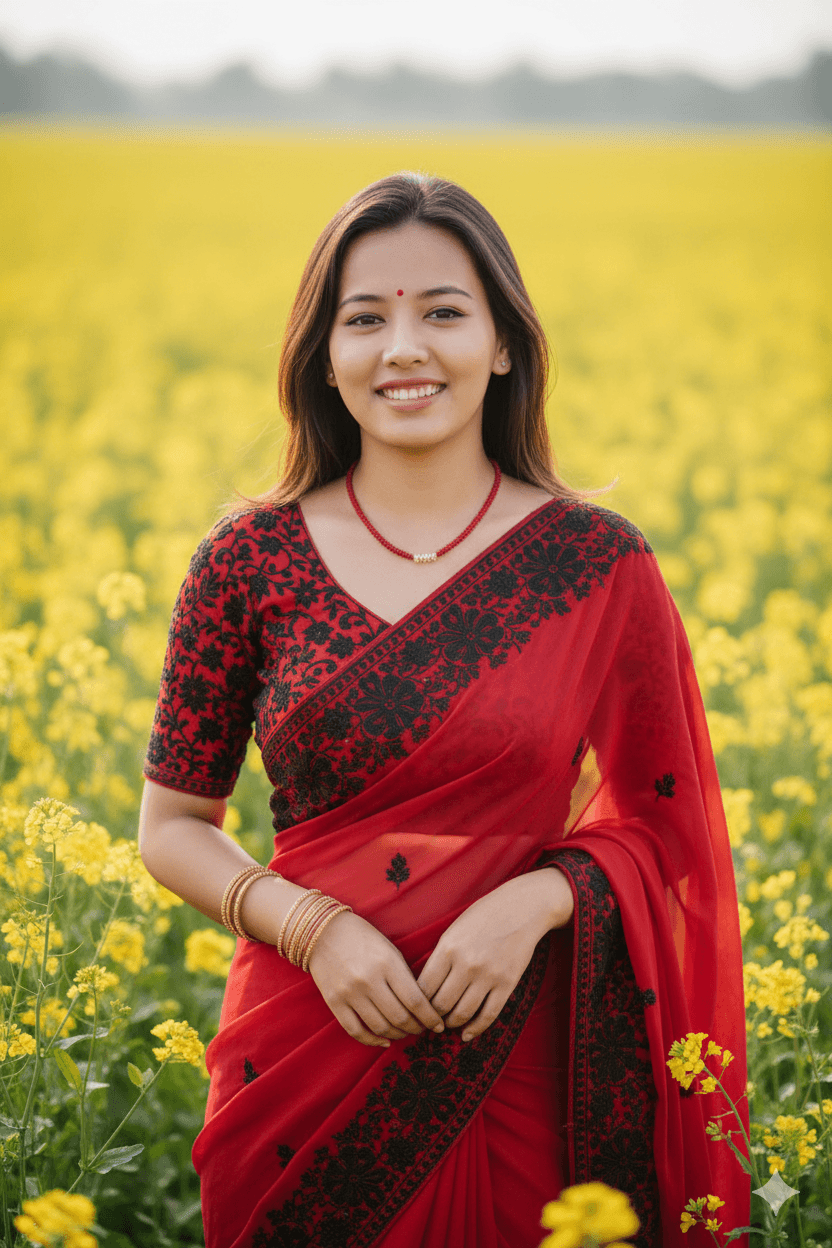
This prompt creates a cinematic portrait of a young woman smiling gracefully in a blooming mustard field. She wears a vibrant red traditional saree with black embroidered motifs and a matching blouse with detailed sleeve patterns. Her medium-length dark hair frames her face, and she wears a delicate red bead necklace with gold bangles. The background is a soft-focus sea of bright yellow mustard flowers under gentle, diffused daylight, which creates a strong, cheerful contrast with the red saree. The composition is a medium shot, capturing her from around the waist up with a shallow depth of field that produces a soft bokeh effect behind her. The mood is warm and joyful, with natural expressions rather than a stiff pose. This style suits women who want a bright, festive portrait for Basant Panchami, Lohri, Makar Sankranti, spring festivals or a colourful profile picture. It also works well for village or countryside themed photo series and cultural posts. Upload a clear, front-facing reference photo with good light for the best likeness, and consider changing the saree colour to match an outfit you already own if you want the image to feel more personal.
Lighting, colour and composition
Soft, diffused daylight provides even skin tones and a gentle glow. The palette is a bold pairing of saturated red and black embroidery against bright mustard yellow, with small gold accents. A medium, waist-up composition centres the subject, with creamy yellow bokeh filling the background and edges.
Ways to make it your own
- Swap the red saree for a yellow one for a Basant Panchami theme.
- Add a light breeze moving the pallu for more movement in the frame.
- Use golden-hour light for deeper, warmer tones across the field.
Best for
Trending photo ideas and creative portrait inspiration.
Suggested framing
Use the aspect ratio or framing described in the prompt, then adapt it for your intended platform.
Customization ideas
Adjust the clothing, background, lighting, colors and composition to match your own idea.
How to use
Copy the prompt, adapt it to your idea, and paste it into your preferred compatible AI tool. Follow that tool’s instructions for reference photos.
A few helpful answers.
What type of image does this prompt create?
In a compatible AI tool, this prompt is intended as a starting point for this prompt creates a cinematic portrait of a young woman smiling gracefully in a blooming mustard field. She wears a vibrant red traditional saree with black embroidered motifs and a matching blouse with detailed sleeve patterns. Her medium-length dark hair frames her face, and she wears a delicate red bead necklace with gold bangles. The background is a soft-focus sea of bright yellow mustard flowers under gentle, diffused daylight, which creates a strong, cheerful contrast with the red saree. The composition is a medium shot, capturing her from around the waist up with a shallow depth of field that produces a soft bokeh effect behind her. The mood is warm and joyful, with natural expressions rather than a stiff pose. This style suits women who want a bright, festive portrait for Basant Panchami, Lohri, Makar Sankranti, spring festivals or a colourful profile picture. It also works well for village or countryside themed photo series and cultural posts. Upload a clear, front-facing reference photo with good light for the best likeness, and consider changing the saree colour to match an outfit you already own if you want the image to feel more personal. Results depend on the tool, settings and references you use.
Can I customize the clothing or background?
Yes. Replace the clothing, setting or colors in the prompt with your own choices. Keep descriptions consistent and adjust one detail at a time.
What aspect ratio works best?
Start with Use the aspect ratio or framing described in the prompt, then adapt it for your intended platform.. A 4:5 ratio works well for a portrait feed post. Adjust the crop for your intended platform and your tool’s available settings.
Does Prompt King generate the image?
No. Prompt King helps users discover and copy prompts that can be used with compatible AI tools.
Can I use this for social media ideas?
Yes. Use it as creative inspiration and customize the result for your audience. Use photos you have permission to upload, and check your chosen tool’s terms before publishing.




