
Rain-Soaked Man With a Majestic Owl Close Up
AI Photo Prompt
Want more trending photo prompts? Discover them in the Prompt King Android app on Google Play.
About this prompt
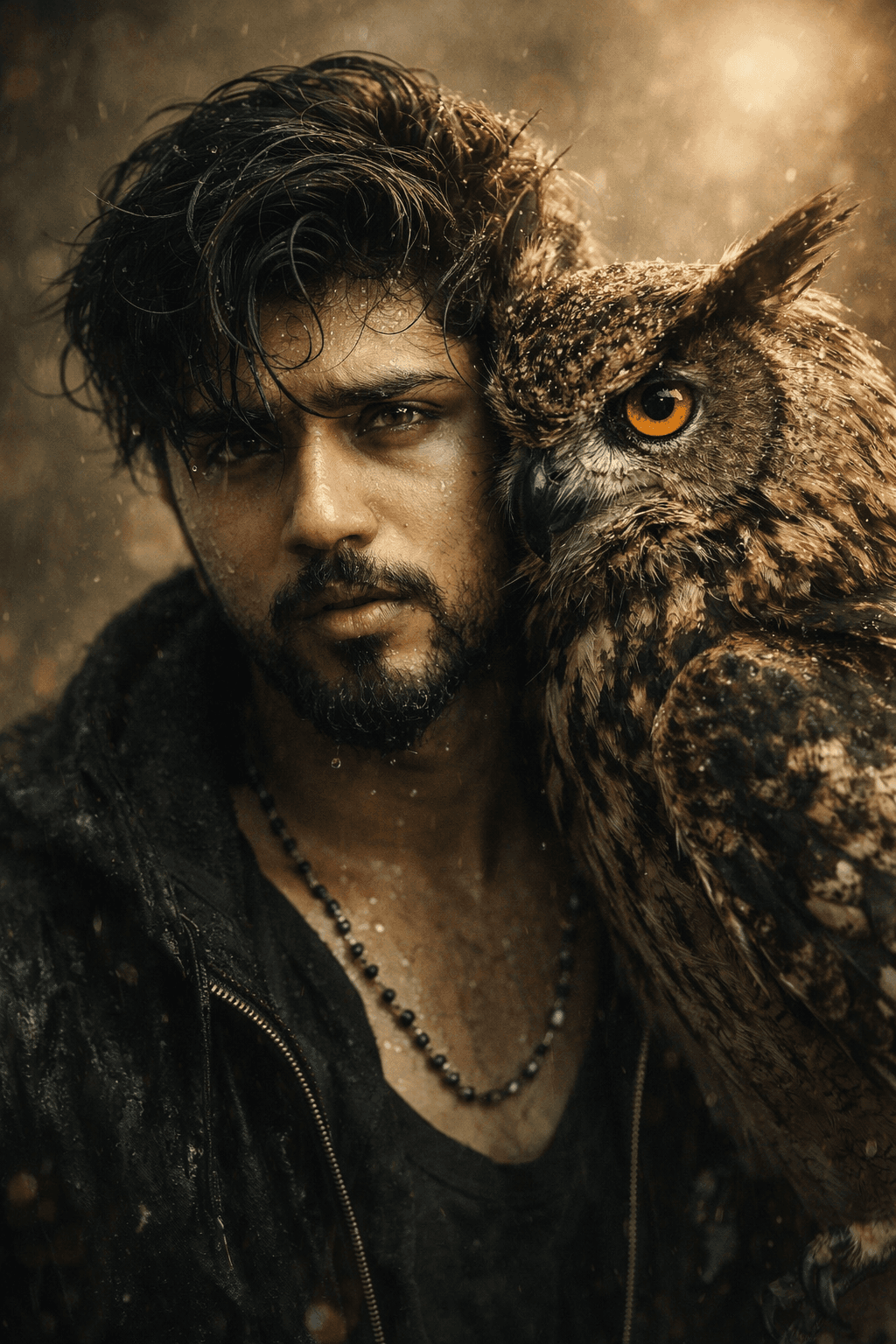
This prompt creates an artistic, highly detailed portrait of a man with loose, wet hair partly covered by a large owl perched close to his face. Water droplets sparkle on his skin, suggesting recent rain or an emotional moment, and his eyes are wide and expressive with his mouth slightly open. The owl sits so close that its vibrant orange eye seems to mirror the man's gaze, and the fine patterns and textures of its feathers are rendered in detail. The background is softly blurred to emphasise the connection between the man and the bird, creating an ethereal, almost mystical atmosphere. The colour palette is warm, built on earthy browns, ambers and soft golds that echo the owl's plumage and the man's skin tones. The prompt asks the model to keep facial features unchanged from the uploaded image. This style suits men who want a unique, conceptual portrait for a profile picture, a creative social media post or a fantasy-themed art piece. It also works well as a poster or album-cover style image. Upload a clear, close-up reference photo with your face well lit, since the composition is tight and focuses on facial detail.
Lighting, colour and composition
Soft, warm directional light picks out water droplets and feather texture. The palette is earthy and warm, with browns, ochres, amber and a vivid orange owl eye as the focal accent. A tight close-up places the face and owl side by side, with a heavily blurred background enhancing the intimate, dreamlike mood.
Ways to make it your own
- Swap the owl for a falcon or raven for a different mood and colour scheme.
- Use cooler blue tones instead of warm earth tones for a rainy-night version.
- Ask for a black background to make the water droplets and feathers stand out.
Best for
Trending photo ideas and creative portrait inspiration.
Suggested framing
Use the aspect ratio or framing described in the prompt, then adapt it for your intended platform.
Customization ideas
Adjust the clothing, background, lighting, colors and composition to match your own idea.
How to use
Copy the prompt, adapt it to your idea, and paste it into your preferred compatible AI tool. Follow that tool’s instructions for reference photos.
A few helpful answers.
What type of image does this prompt create?
In a compatible AI tool, this prompt is intended as a starting point for this prompt creates an artistic, highly detailed portrait of a man with loose, wet hair partly covered by a large owl perched close to his face. Water droplets sparkle on his skin, suggesting recent rain or an emotional moment, and his eyes are wide and expressive with his mouth slightly open. The owl sits so close that its vibrant orange eye seems to mirror the man's gaze, and the fine patterns and textures of its feathers are rendered in detail. The background is softly blurred to emphasise the connection between the man and the bird, creating an ethereal, almost mystical atmosphere. The colour palette is warm, built on earthy browns, ambers and soft golds that echo the owl's plumage and the man's skin tones. The prompt asks the model to keep facial features unchanged from the uploaded image. This style suits men who want a unique, conceptual portrait for a profile picture, a creative social media post or a fantasy-themed art piece. It also works well as a poster or album-cover style image. Upload a clear, close-up reference photo with your face well lit, since the composition is tight and focuses on facial detail. Results depend on the tool, settings and references you use.
Can I customize the clothing or background?
Yes. Replace the clothing, setting or colors in the prompt with your own choices. Keep descriptions consistent and adjust one detail at a time.
What aspect ratio works best?
Start with Use the aspect ratio or framing described in the prompt, then adapt it for your intended platform.. A 4:5 ratio works well for a portrait feed post. Adjust the crop for your intended platform and your tool’s available settings.
Does Prompt King generate the image?
No. Prompt King helps users discover and copy prompts that can be used with compatible AI tools.
Can I use this for social media ideas?
Yes. Use it as creative inspiration and customize the result for your audience. Use photos you have permission to upload, and check your chosen tool’s terms before publishing.




