
Protective Hero Pose in Black Denim Outfit
AI Photo Prompt
Want more trending photo prompts? Discover them in the Prompt King Android app on Google Play.
About this prompt
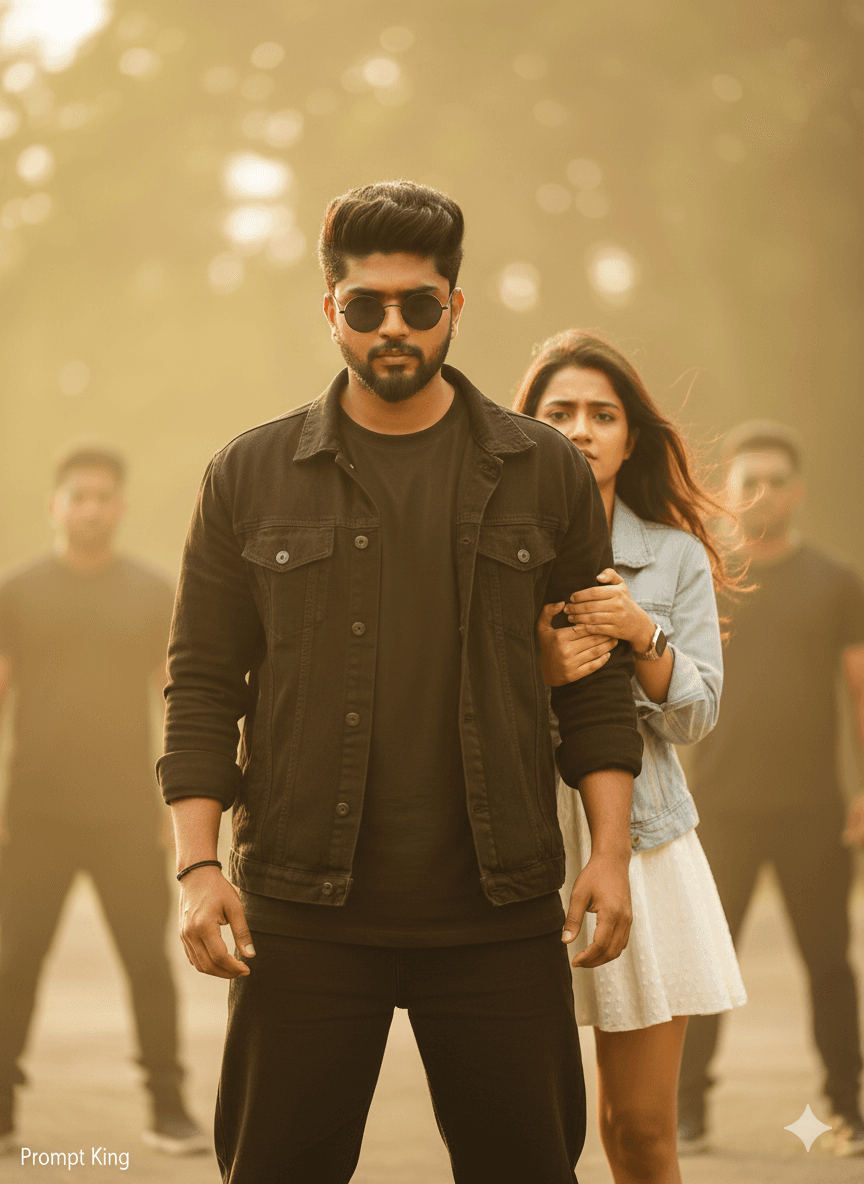
This prompt creates a cinematic half-body portrait of a young Indian man standing protectively in front of a young woman, using the uploaded selfie for an identical face and hairstyle. He wears a black oversized t-shirt under a black denim jacket, black baggy jeans, round black sunglasses and a black thread tied on his wrist. His shoulders are squared and his posture is strong and still, with a focused expression as he stares toward a blurred villain ahead. Behind him, the woman holds his arm tightly; she wears a light blue denim jacket over a white frock, and half of her face is visible beside his shoulder, showing a mix of fear and trust. The scene borrows from South Indian mass-action films, where the hero shields someone just before a confrontation. It is a good fit for film fans, couple edits, reel covers or a poster-style status image. The all-black outfit makes the man the clear focal point, while the woman's lighter clothing adds contrast.
Lighting, colour and composition
Moody cinematic light with a strong key on the hero's face and softer fill on the woman behind. The palette pairs all-black clothing with light denim blue and muted background tones. The hero stands centre in half body, the woman is partly hidden over his shoulder, and the blurred villain frames the foreground.
Ways to make it your own
- Replace the blurred villain with rain or a crowd for a less confrontational scene.
- Change the woman's outfit to a saree or kurta for a traditional film look.
- Use 4:5 or 9:16 framing to keep both faces large in the frame.
Best for
Trending photo ideas and creative portrait inspiration.
Suggested framing
Use the aspect ratio or framing described in the prompt, then adapt it for your intended platform.
Customization ideas
Adjust the clothing, background, lighting, colors and composition to match your own idea.
How to use
Copy the prompt, adapt it to your idea, and paste it into your preferred compatible AI tool. Follow that tool’s instructions for reference photos.
A few helpful answers.
What type of image does this prompt create?
In a compatible AI tool, this prompt is intended as a starting point for this prompt creates a cinematic half-body portrait of a young Indian man standing protectively in front of a young woman, using the uploaded selfie for an identical face and hairstyle. He wears a black oversized t-shirt under a black denim jacket, black baggy jeans, round black sunglasses and a black thread tied on his wrist. His shoulders are squared and his posture is strong and still, with a focused expression as he stares toward a blurred villain ahead. Behind him, the woman holds his arm tightly; she wears a light blue denim jacket over a white frock, and half of her face is visible beside his shoulder, showing a mix of fear and trust. The scene borrows from South Indian mass-action films, where the hero shields someone just before a confrontation. It is a good fit for film fans, couple edits, reel covers or a poster-style status image. The all-black outfit makes the man the clear focal point, while the woman's lighter clothing adds contrast. Results depend on the tool, settings and references you use.
Can I customize the clothing or background?
Yes. Replace the clothing, setting or colors in the prompt with your own choices. Keep descriptions consistent and adjust one detail at a time.
What aspect ratio works best?
Start with Use the aspect ratio or framing described in the prompt, then adapt it for your intended platform.. A 4:5 ratio works well for a portrait feed post. Adjust the crop for your intended platform and your tool’s available settings.
Does Prompt King generate the image?
No. Prompt King helps users discover and copy prompts that can be used with compatible AI tools.
Can I use this for social media ideas?
Yes. Use it as creative inspiration and customize the result for your audience. Use photos you have permission to upload, and check your chosen tool’s terms before publishing.




