
Night Walk With a Glowing Neon Rose Girl
AI Photo Prompt
Want more trending photo prompts? Discover them in the Prompt King Android app on Google Play.
About this prompt
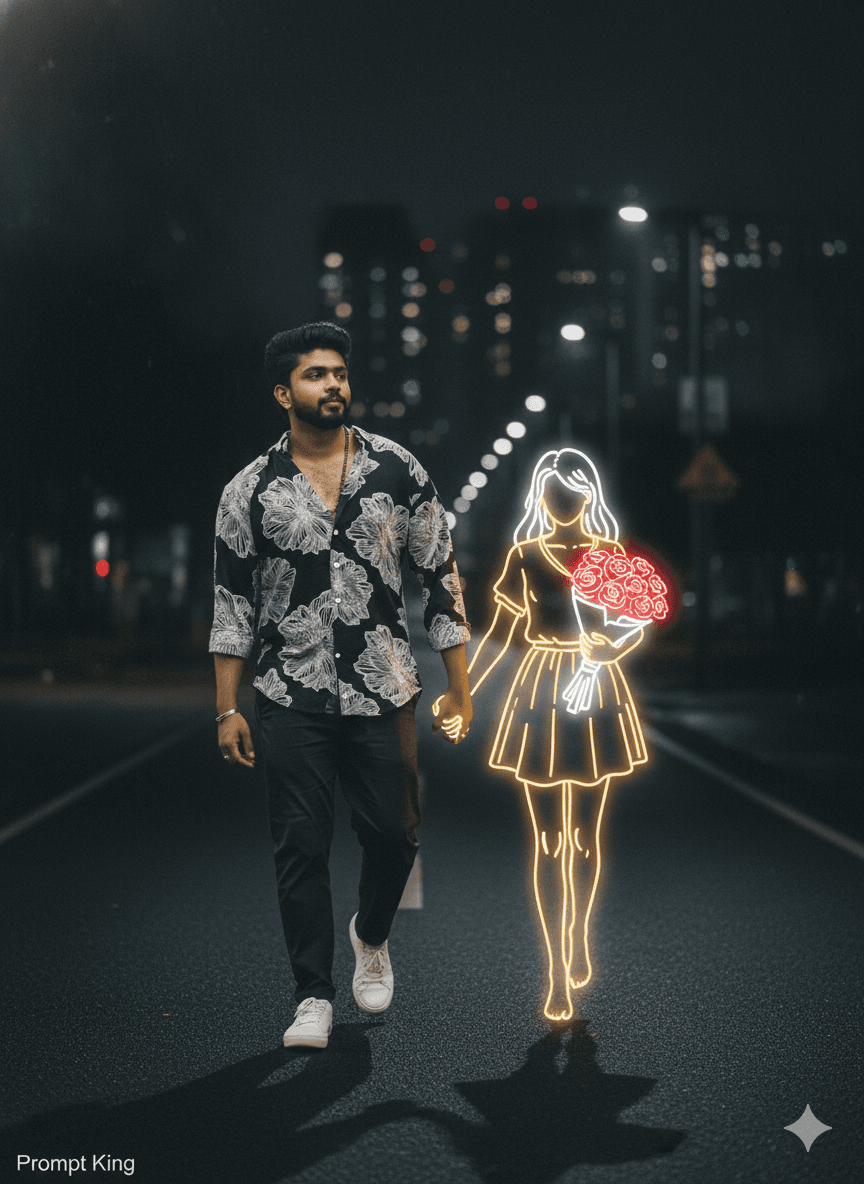
A surreal, melancholic night scene in which a young man in dark casual clothes and white sneakers walks along a dimly lit path. Beside him appears a golden, glowing neon-style illustration of a girl holding a bouquet of bright red roses, and the two hold hands in the middle of the road. The neon figure emits a soft light that contrasts with the dark, blurred background of distant city lights. The mood is calm and wistful, blending reality and imagination, as though the girl is a memory or a daydream walking with him. The prompt contains some typos, so tidying the wording will help the model render both figures consistently. It suits romantic or heartbreak themed posts, a song or poetry visual, Valentine's Day content, a long-distance relationship message, or a reel cover for an emotional edit. The glowing outline style can also represent a friend, a parent or a pet, making it adaptable for remembrance or tribute content. Keeping the man photorealistic and the girl illustrated is what gives the image its distinctive dreamlike contrast.
Lighting, colour and composition
Low, dim street lighting keeps the man in soft shadow while the neon figure provides a warm golden glow. The palette is dark navy and black, with glowing gold lines and bright red roses as accents. A side-by-side composition on the road leads the eye into blurred city lights in the distance.
Ways to make it your own
- Change the neon colour to soft blue or pink to shift the emotional tone.
- Replace the roses with a balloon or umbrella to suit a different story.
- Correct the typos in the prompt so both figures render more reliably.
Best for
Trending photo ideas and creative portrait inspiration.
Suggested framing
Use the aspect ratio or framing described in the prompt, then adapt it for your intended platform.
Customization ideas
Adjust the clothing, background, lighting, colors and composition to match your own idea.
How to use
Copy the prompt, adapt it to your idea, and paste it into your preferred compatible AI tool. Follow that tool’s instructions for reference photos.
A few helpful answers.
What type of image does this prompt create?
In a compatible AI tool, this prompt is intended as a starting point for a surreal, melancholic night scene in which a young man in dark casual clothes and white sneakers walks along a dimly lit path. Beside him appears a golden, glowing neon-style illustration of a girl holding a bouquet of bright red roses, and the two hold hands in the middle of the road. The neon figure emits a soft light that contrasts with the dark, blurred background of distant city lights. The mood is calm and wistful, blending reality and imagination, as though the girl is a memory or a daydream walking with him. The prompt contains some typos, so tidying the wording will help the model render both figures consistently. It suits romantic or heartbreak themed posts, a song or poetry visual, Valentine's Day content, a long-distance relationship message, or a reel cover for an emotional edit. The glowing outline style can also represent a friend, a parent or a pet, making it adaptable for remembrance or tribute content. Keeping the man photorealistic and the girl illustrated is what gives the image its distinctive dreamlike contrast. Results depend on the tool, settings and references you use.
Can I customize the clothing or background?
Yes. Replace the clothing, setting or colors in the prompt with your own choices. Keep descriptions consistent and adjust one detail at a time.
What aspect ratio works best?
Start with Use the aspect ratio or framing described in the prompt, then adapt it for your intended platform.. A 4:5 ratio works well for a portrait feed post. Adjust the crop for your intended platform and your tool’s available settings.
Does Prompt King generate the image?
No. Prompt King helps users discover and copy prompts that can be used with compatible AI tools.
Can I use this for social media ideas?
Yes. Use it as creative inspiration and customize the result for your audience. Use photos you have permission to upload, and check your chosen tool’s terms before publishing.




