
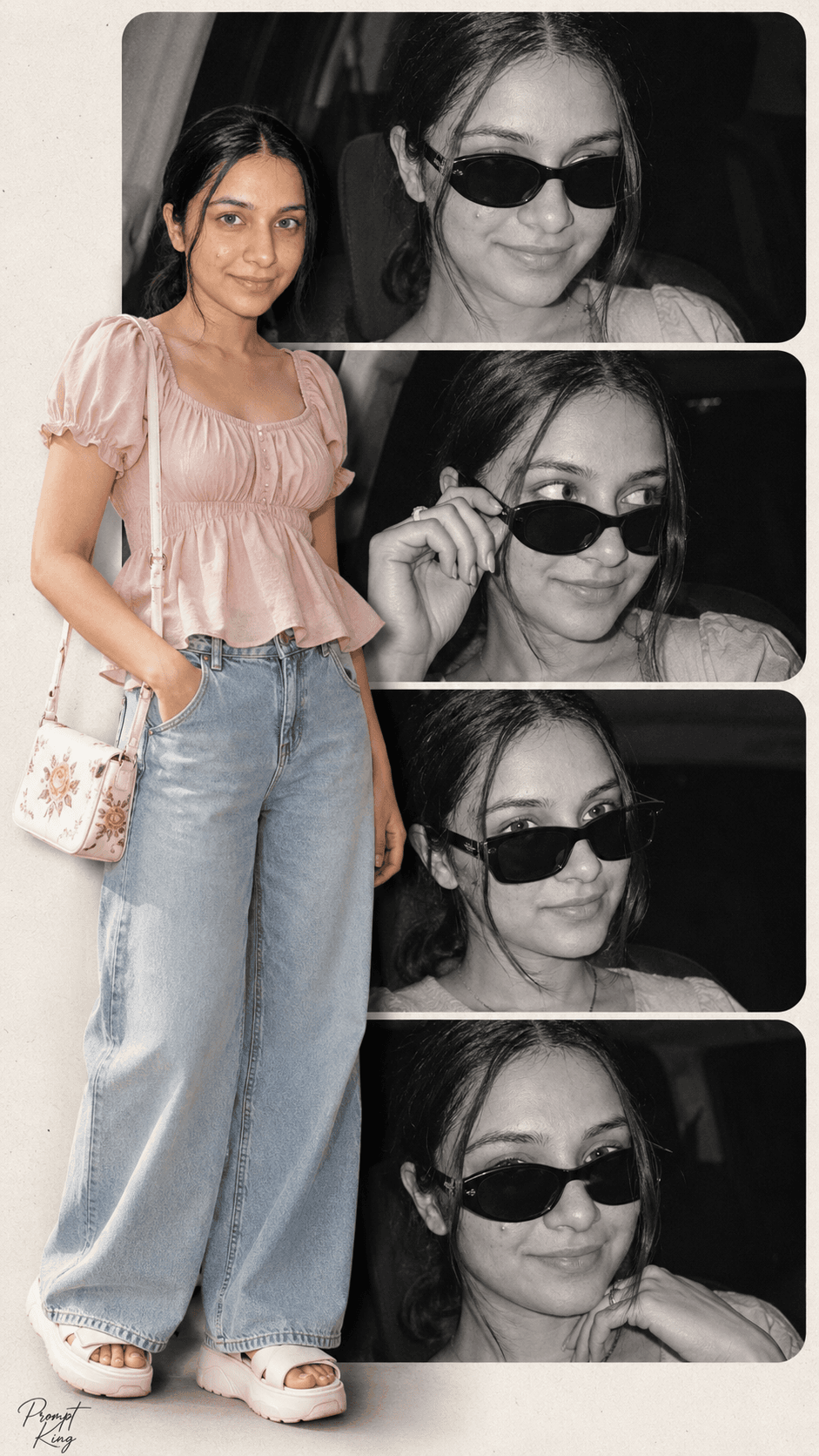
Monochrome Panel Collage With Pink Peplum Top Cutout
AI Photo Prompt
Want more trending photo prompts? Discover them in the Prompt King Android app on Google Play.
About this prompt
This prompt builds a vertical fashion collage in a clean 9:16 layout. The background is made of four stacked horizontal rounded rectangles, each holding a black-and-white cinematic shot of a young woman with dark, slightly messy hair and stylish sunglasses in different expressive poses. In front of these panels, on the left side, sits a full-colour cutout of the same woman. She wears a light pink short-sleeved peasant top with a sweetheart neckline, puffed sleeves and a softly ruffled peplum hem, paired with light-wash high-waisted wide-leg jeans and white platform sandals with thick textured soles. An off-white rectangular shoulder bag with floral or embroidered detailing hangs from her right shoulder. The strong contrast between the monochrome panels and the colourful foreground figure gives the image an editorial, magazine-style feel. The prompt uses your uploaded photo for facial accuracy, so the person stays recognisable across all frames. It suits fashion lovers, content creators sharing an outfit of the day, college students wanting a stylish profile picture and anyone who wants a poster-like portrait for Instagram Stories or a phone wallpaper.
Lighting, colour and composition
The panels use high-contrast black and white with cinematic grain, while the cutout keeps soft natural colour in blush pink, light denim blue and off-white. The figure overlaps the panels on the left, creating depth and a clear focal point against the stacked rounded shapes.
Ways to make it your own
- Swap the pink top for a white shirt or a floral dress and keep the monochrome panels for contrast.
- Ask for three panels instead of four for a cleaner layout on smaller screens.
- Tint the background panels sepia or soft blue if pure black and white feels too stark.
Best for
Trending photo ideas and creative portrait inspiration.
Suggested framing
Use the aspect ratio or framing described in the prompt, then adapt it for your intended platform.
Customization ideas
Adjust the clothing, background, lighting, colors and composition to match your own idea.
How to use
Copy the prompt, adapt it to your idea, and paste it into your preferred compatible AI tool. Follow that tool’s instructions for reference photos.
A few helpful answers.
What type of image does this prompt create?
In a compatible AI tool, this prompt is intended as a starting point for this prompt builds a vertical fashion collage in a clean 9:16 layout. The background is made of four stacked horizontal rounded rectangles, each holding a black-and-white cinematic shot of a young woman with dark, slightly messy hair and stylish sunglasses in different expressive poses. In front of these panels, on the left side, sits a full-colour cutout of the same woman. She wears a light pink short-sleeved peasant top with a sweetheart neckline, puffed sleeves and a softly ruffled peplum hem, paired with light-wash high-waisted wide-leg jeans and white platform sandals with thick textured soles. An off-white rectangular shoulder bag with floral or embroidered detailing hangs from her right shoulder. The strong contrast between the monochrome panels and the colourful foreground figure gives the image an editorial, magazine-style feel. The prompt uses your uploaded photo for facial accuracy, so the person stays recognisable across all frames. It suits fashion lovers, content creators sharing an outfit of the day, college students wanting a stylish profile picture and anyone who wants a poster-like portrait for Instagram Stories or a phone wallpaper. Results depend on the tool, settings and references you use.
Can I customize the clothing or background?
Yes. Replace the clothing, setting or colors in the prompt with your own choices. Keep descriptions consistent and adjust one detail at a time.
What aspect ratio works best?
Start with Use the aspect ratio or framing described in the prompt, then adapt it for your intended platform.. A 4:5 ratio works well for a portrait feed post. Adjust the crop for your intended platform and your tool’s available settings.
Does Prompt King generate the image?
No. Prompt King helps users discover and copy prompts that can be used with compatible AI tools.
Can I use this for social media ideas?
Yes. Use it as creative inspiration and customize the result for your audience. Use photos you have permission to upload, and check your chosen tool’s terms before publishing.




