
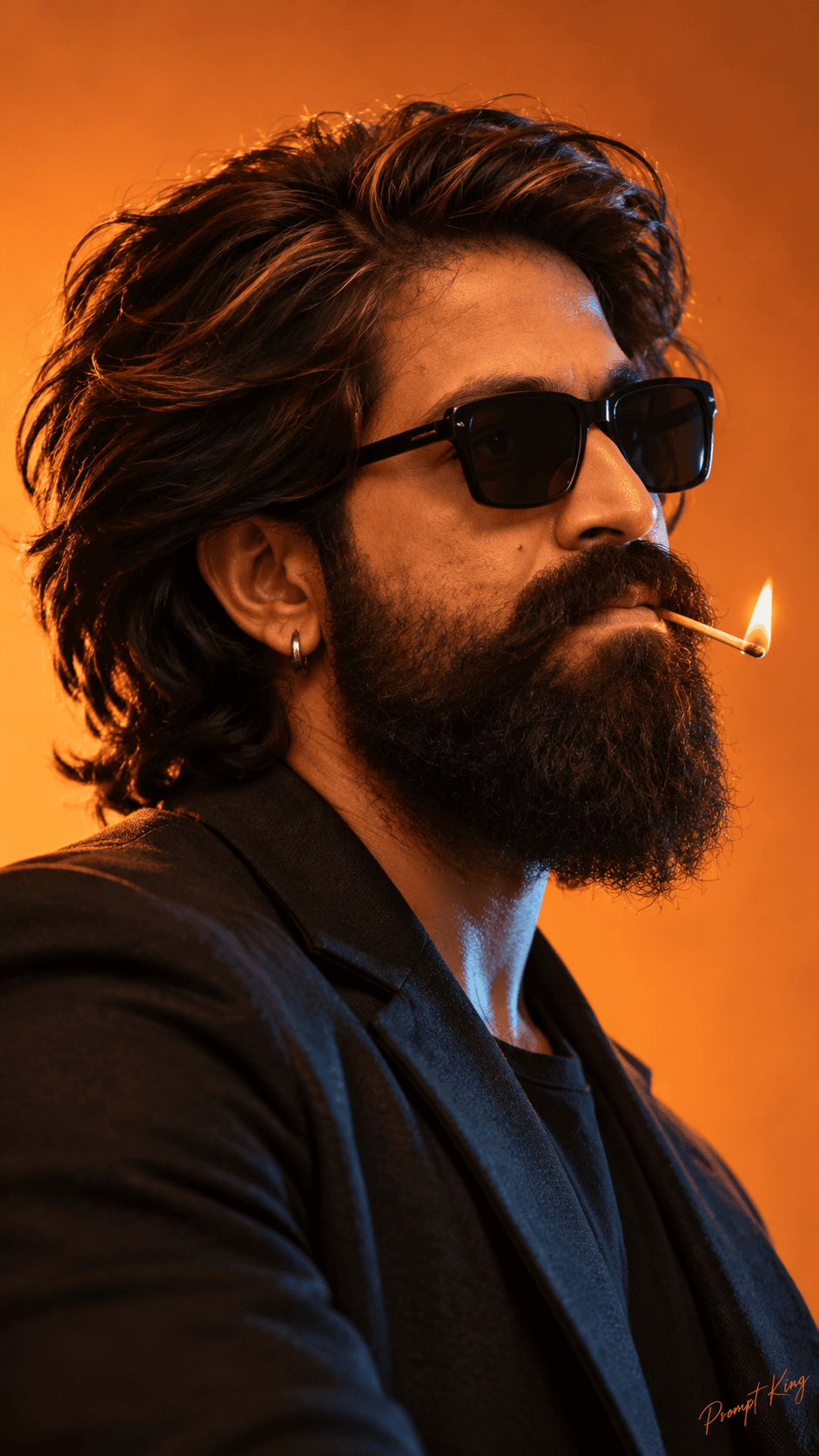
Matchstick Side Profile With Orange And Blue Light
AI Photo Prompt
Want more trending photo prompts? Discover them in the Prompt King Android app on Google Play.
About this prompt
This prompt creates a moody close-up side-profile portrait of a young man with messy, naturally curly black hair, a groomed beard, black rectangular sunglasses and a small hoop earring. He holds a lit matchstick between his lips, head tilted slightly upward and gaze turned sideways, giving a calm but intense expression. He wears a sleek black blazer and no hands appear in the frame. The backdrop is a solid warm orange studio wall, lit with a two-tone setup: an orange key light from the rear and side, plus a cool blue rim light along the face and neck. The tiny flame adds a soft warm glow on the lower face. The prompt asks for detailed skin texture, individual hair strands, realistic beard texture, shallow depth of field and fine film grain, with an 85mm telephoto feel. It is set in a vertical 9:16 ratio for stories and reels. This look suits an attitude-style profile picture, a cover image for music or fashion content, or a bold birthday post. Upload a reference with a clear side or three-quarter angle for the closest match.
Lighting, colour and composition
Two-tone lighting does most of the work: warm orange from behind and a cool blue rim on the face create strong colour contrast. The palette is orange, teal-blue and black with warm skin tones. A tight side-profile crop with shallow focus and fine grain gives an editorial, cinematic feel.
Ways to make it your own
- Replace the matchstick with a rose stem or simply remove it for a cleaner portrait.
- Swap the orange backdrop for deep red or teal to change the colour mood.
- Ask for a front-facing angle if your reference photo is not in profile.
Best for
Trending photo ideas and creative portrait inspiration.
Suggested framing
Use the aspect ratio or framing described in the prompt, then adapt it for your intended platform.
Customization ideas
Adjust the clothing, background, lighting, colors and composition to match your own idea.
How to use
Copy the prompt, adapt it to your idea, and paste it into your preferred compatible AI tool. Follow that tool’s instructions for reference photos.
A few helpful answers.
What type of image does this prompt create?
In a compatible AI tool, this prompt is intended as a starting point for this prompt creates a moody close-up side-profile portrait of a young man with messy, naturally curly black hair, a groomed beard, black rectangular sunglasses and a small hoop earring. He holds a lit matchstick between his lips, head tilted slightly upward and gaze turned sideways, giving a calm but intense expression. He wears a sleek black blazer and no hands appear in the frame. The backdrop is a solid warm orange studio wall, lit with a two-tone setup: an orange key light from the rear and side, plus a cool blue rim light along the face and neck. The tiny flame adds a soft warm glow on the lower face. The prompt asks for detailed skin texture, individual hair strands, realistic beard texture, shallow depth of field and fine film grain, with an 85mm telephoto feel. It is set in a vertical 9:16 ratio for stories and reels. This look suits an attitude-style profile picture, a cover image for music or fashion content, or a bold birthday post. Upload a reference with a clear side or three-quarter angle for the closest match. Results depend on the tool, settings and references you use.
Can I customize the clothing or background?
Yes. Replace the clothing, setting or colors in the prompt with your own choices. Keep descriptions consistent and adjust one detail at a time.
What aspect ratio works best?
Start with Use the aspect ratio or framing described in the prompt, then adapt it for your intended platform.. A 4:5 ratio works well for a portrait feed post. Adjust the crop for your intended platform and your tool’s available settings.
Does Prompt King generate the image?
No. Prompt King helps users discover and copy prompts that can be used with compatible AI tools.
Can I use this for social media ideas?
Yes. Use it as creative inspiration and customize the result for your audience. Use photos you have permission to upload, and check your chosen tool’s terms before publishing.




