
Leather Jacket Walk Out of Thick White Smoke
AI Photo Prompt
Want more trending photo prompts? Discover them in the Prompt King Android app on Google Play.
About this prompt
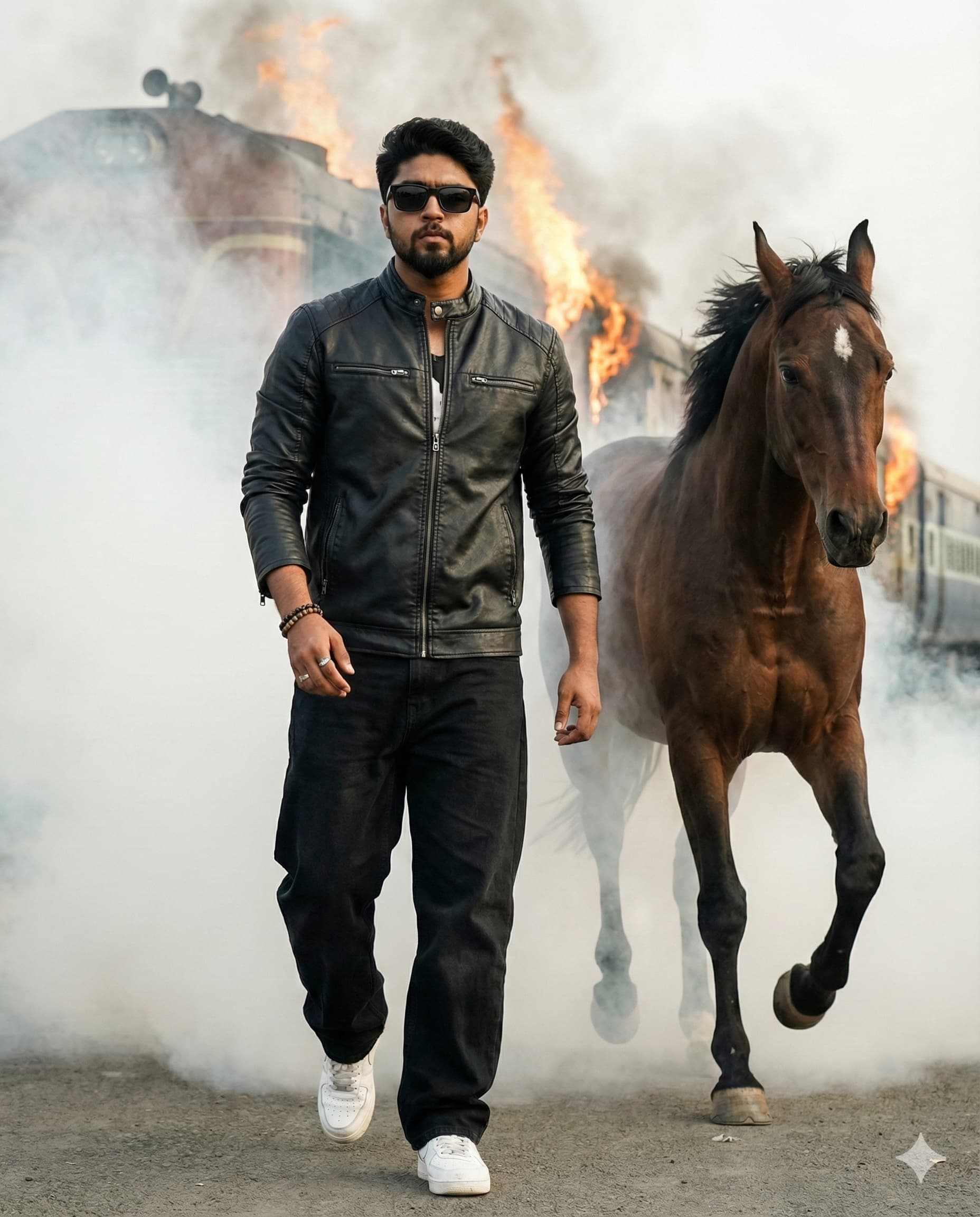
This prompt creates a realistic DSLR-style portrait of a stylish young man walking confidently out of thick white smoke. He wears a black leather jacket, black baggy jeans, white sneakers, black sunglasses and a bracelet, giving him a bold, attitude-driven look. The smoke surrounds him and trails behind as he steps forward, creating a dramatic entry similar to a film or music-video scene. The prompt emphasises natural skin texture, real shadows and a no-plastic finish, so the image looks like a genuine photograph rather than a heavily edited one. Natural daylight lights the scene, and the frame is set to a 4:5 ratio, which suits social media feed posts. The contrast between the dark outfit, white sneakers and white smoke gives the picture strong visual impact. The pose is an action-mode confident walk rather than a static stance, adding movement and energy. This style suits young men who want a bold profile picture, an entry-style reel cover, a birthday post with attitude or a fashion-inspired photo. It needs no festival theme. Upload a sharp reference photo; a standing or walking pose in the reference will help keep proportions natural.
Lighting, colour and composition
Natural daylight diffused through dense smoke gives soft, even light with real shadows. The palette is high-contrast black leather and denim against bright white smoke and sneakers. A 4:5 vertical frame centres the walking figure, with smoke billowing on both sides and trailing behind for depth.
Ways to make it your own
- Use coloured smoke, such as red or blue, for a more dramatic music-video look.
- Swap the leather jacket for a white shirt for a lighter contrast variation.
- Ask for a low camera angle to make the walk look more powerful.
Best for
Trending photo ideas and creative portrait inspiration.
Suggested framing
Use the aspect ratio or framing described in the prompt, then adapt it for your intended platform.
Customization ideas
Adjust the clothing, background, lighting, colors and composition to match your own idea.
How to use
Copy the prompt, adapt it to your idea, and paste it into your preferred compatible AI tool. Follow that tool’s instructions for reference photos.
A few helpful answers.
What type of image does this prompt create?
In a compatible AI tool, this prompt is intended as a starting point for this prompt creates a realistic DSLR-style portrait of a stylish young man walking confidently out of thick white smoke. He wears a black leather jacket, black baggy jeans, white sneakers, black sunglasses and a bracelet, giving him a bold, attitude-driven look. The smoke surrounds him and trails behind as he steps forward, creating a dramatic entry similar to a film or music-video scene. The prompt emphasises natural skin texture, real shadows and a no-plastic finish, so the image looks like a genuine photograph rather than a heavily edited one. Natural daylight lights the scene, and the frame is set to a 4:5 ratio, which suits social media feed posts. The contrast between the dark outfit, white sneakers and white smoke gives the picture strong visual impact. The pose is an action-mode confident walk rather than a static stance, adding movement and energy. This style suits young men who want a bold profile picture, an entry-style reel cover, a birthday post with attitude or a fashion-inspired photo. It needs no festival theme. Upload a sharp reference photo; a standing or walking pose in the reference will help keep proportions natural. Results depend on the tool, settings and references you use.
Can I customize the clothing or background?
Yes. Replace the clothing, setting or colors in the prompt with your own choices. Keep descriptions consistent and adjust one detail at a time.
What aspect ratio works best?
Start with Use the aspect ratio or framing described in the prompt, then adapt it for your intended platform.. A 4:5 ratio works well for a portrait feed post. Adjust the crop for your intended platform and your tool’s available settings.
Does Prompt King generate the image?
No. Prompt King helps users discover and copy prompts that can be used with compatible AI tools.
Can I use this for social media ideas?
Yes. Use it as creative inspiration and customize the result for your audience. Use photos you have permission to upload, and check your chosen tool’s terms before publishing.




