
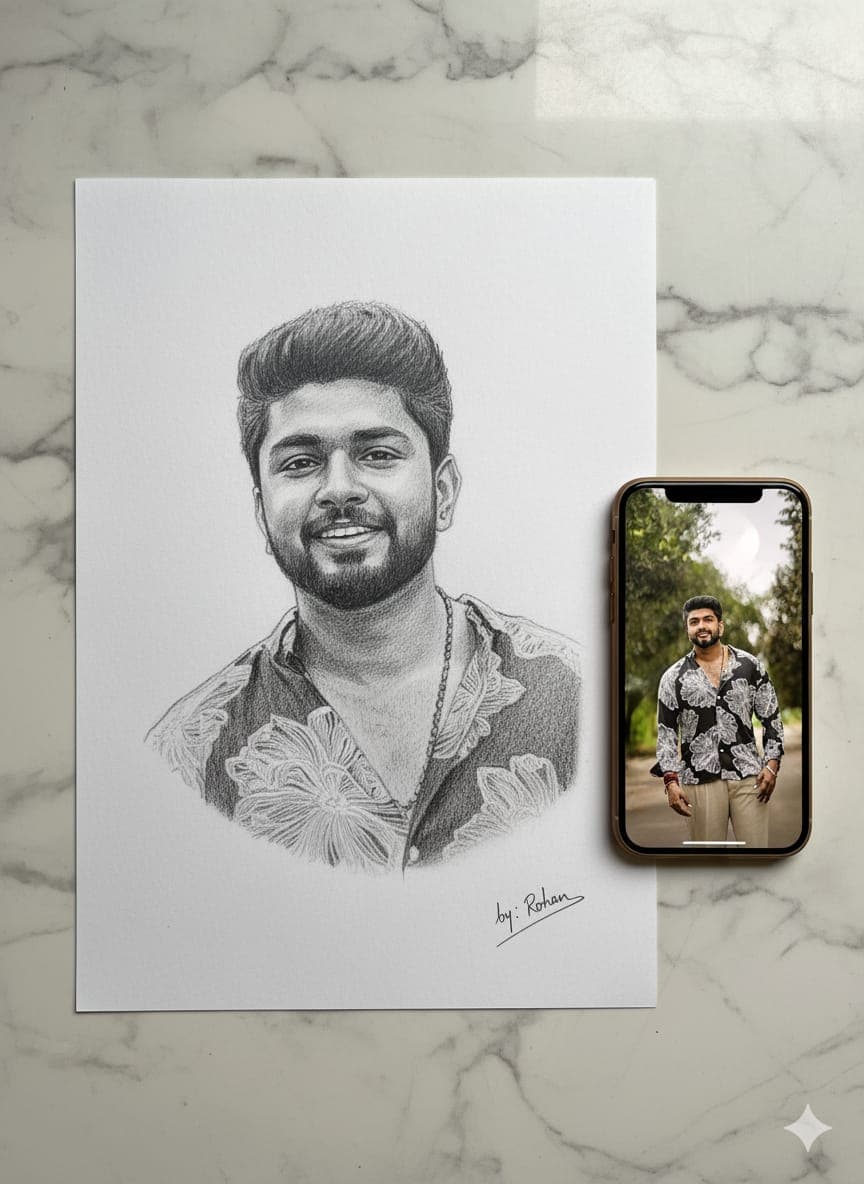
Graphite Portrait Sketch on Marble With Phone Reference
AI Photo Prompt
Want more trending photo prompts? Discover them in the Prompt King Android app on Google Play.
About this prompt
This prompt creates a hyper-realistic graphite pencil portrait on clean, textured white paper, placed neatly on a marble table. Soft, diffused studio lighting falls across the scene, and a smartphone lies beside the notebook displaying the original reference portrait with natural glare and reflections on the screen. The sketch looks three-dimensional, with detailed shading and realistic pencil strokes, and subtle shadows add depth to the paper. A small artist signature is written in pencil with light scratch marks. Showing the phone beside the drawing tells a little story: the photo on the screen is being turned into hand-drawn art. This style suits artistic profile pictures, gifts, art page content and posts celebrating a loved one, such as birthdays or anniversaries. It is also a good option for people who like a clean, minimal desk aesthetic. The prompt does not mention a face reference directly, so add 'of the face from my uploaded photo' to make sure your likeness is used. You can replace the signature with your own name or remove it entirely for a cleaner image.
Lighting, colour and composition
Soft, diffused studio light creates gentle shadows across the paper and marble. A monochrome graphite sketch sits on white paper and grey-veined marble, with the phone screen adding a small area of colour. A top-down or angled desk composition places the notebook centrally, with the phone beside it.
Ways to make it your own
- Add 'of the face from my uploaded photo' so the sketch uses your likeness.
- Change marble to a wooden desk for a warmer, cosier look.
- Replace the signature with your own name or remove it.
Best for
Trending photo ideas and creative portrait inspiration.
Suggested framing
Use the aspect ratio or framing described in the prompt, then adapt it for your intended platform.
Customization ideas
Adjust the clothing, background, lighting, colors and composition to match your own idea.
How to use
Copy the prompt, adapt it to your idea, and paste it into your preferred compatible AI tool. Follow that tool’s instructions for reference photos.
A few helpful answers.
What type of image does this prompt create?
In a compatible AI tool, this prompt is intended as a starting point for this prompt creates a hyper-realistic graphite pencil portrait on clean, textured white paper, placed neatly on a marble table. Soft, diffused studio lighting falls across the scene, and a smartphone lies beside the notebook displaying the original reference portrait with natural glare and reflections on the screen. The sketch looks three-dimensional, with detailed shading and realistic pencil strokes, and subtle shadows add depth to the paper. A small artist signature is written in pencil with light scratch marks. Showing the phone beside the drawing tells a little story: the photo on the screen is being turned into hand-drawn art. This style suits artistic profile pictures, gifts, art page content and posts celebrating a loved one, such as birthdays or anniversaries. It is also a good option for people who like a clean, minimal desk aesthetic. The prompt does not mention a face reference directly, so add 'of the face from my uploaded photo' to make sure your likeness is used. You can replace the signature with your own name or remove it entirely for a cleaner image. Results depend on the tool, settings and references you use.
Can I customize the clothing or background?
Yes. Replace the clothing, setting or colors in the prompt with your own choices. Keep descriptions consistent and adjust one detail at a time.
What aspect ratio works best?
Start with Use the aspect ratio or framing described in the prompt, then adapt it for your intended platform.. A 4:5 ratio works well for a portrait feed post. Adjust the crop for your intended platform and your tool’s available settings.
Does Prompt King generate the image?
No. Prompt King helps users discover and copy prompts that can be used with compatible AI tools.
Can I use this for social media ideas?
Yes. Use it as creative inspiration and customize the result for your audience. Use photos you have permission to upload, and check your chosen tool’s terms before publishing.




