
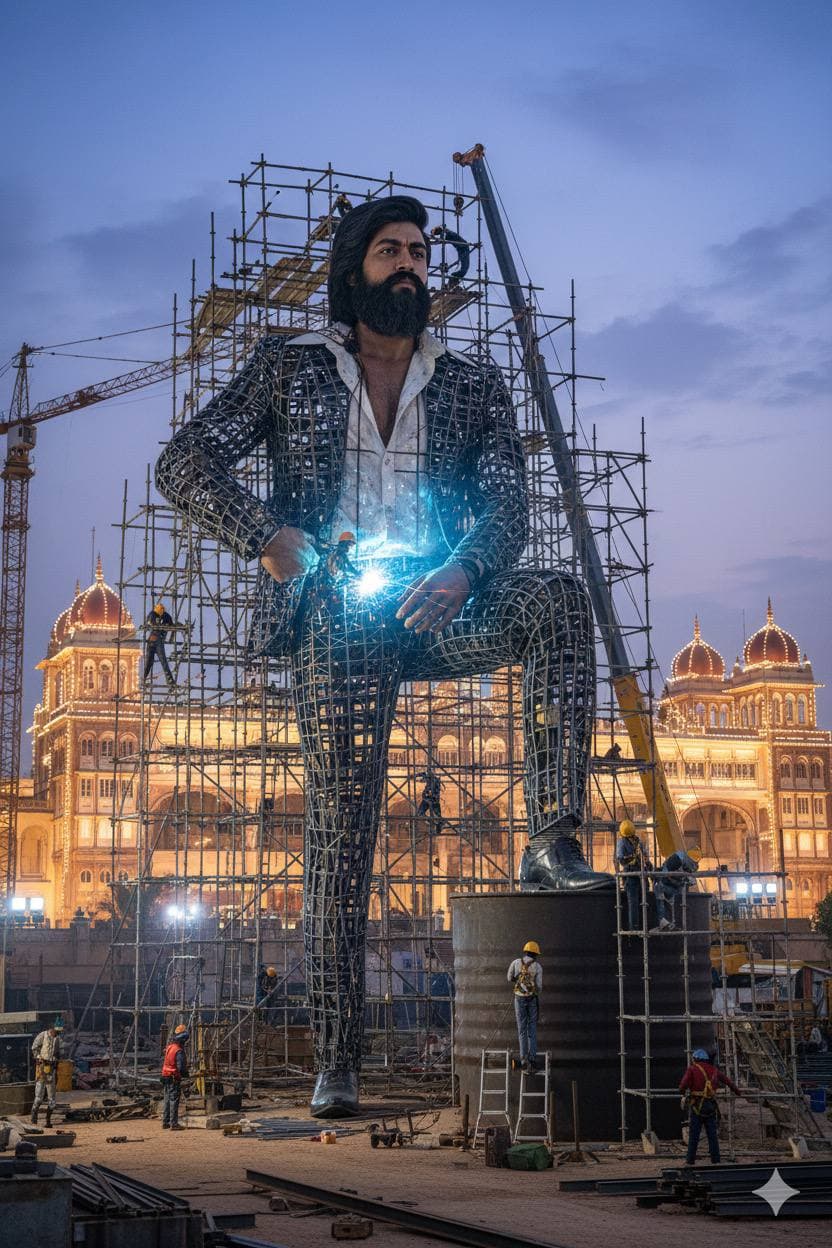
Giant Statue Under Construction Near Mysore Palace
AI Photo Prompt
Want more trending photo prompts? Discover them in the Prompt King Android app on Google Play.
About this prompt
This prompt imagines a giant, realistic statue being built near Mysore Palace in Karnataka. The statue is surrounded by scaffolding, with workers welding steel frames and sparks visible around the structure, giving a sense of scale and ongoing work. Behind it, the illuminated domes and arches of Mysore Palace glow against the sky, forming a grand backdrop that instantly places the scene in Mysuru. The contrast between the industrial scaffolding and the ornate palace architecture makes the image interesting to look at and easy to recognise. The prompt does not fix who or what the statue depicts, so users can describe their own subject, such as their own likeness, a family elder, a mascot or a symbolic figure. This works well for Dasara season posts, Karnataka Rajyotsava content, local pride pages, creative edits for friends or a playful birthday surprise showing someone honoured with a monument. It is also useful for creators who want a recognisable Mysuru landmark in their artwork without needing a real photograph of the palace.
Lighting, colour and composition
Evening lighting with the palace illuminated in warm gold contrasts with the cooler sky and bright welding sparks. The palette includes deep blue, warm amber and steel grey. The statue rises in the foreground, framed by scaffolding lines, while the palace spreads horizontally behind it to show scale.
Ways to make it your own
- Describe the statue clearly, for example a seated figure or your own likeness, for better results.
- Ask for Dasara lighting with the full palace lit up for a festival version.
- Use a tall 9:16 frame to emphasise the statue's height above the scaffolding.
Best for
Trending photo ideas and creative portrait inspiration.
Suggested framing
Use the aspect ratio or framing described in the prompt, then adapt it for your intended platform.
Customization ideas
Adjust the clothing, background, lighting, colors and composition to match your own idea.
How to use
Copy the prompt, adapt it to your idea, and paste it into your preferred compatible AI tool. Follow that tool’s instructions for reference photos.
A few helpful answers.
What type of image does this prompt create?
In a compatible AI tool, this prompt is intended as a starting point for this prompt imagines a giant, realistic statue being built near Mysore Palace in Karnataka. The statue is surrounded by scaffolding, with workers welding steel frames and sparks visible around the structure, giving a sense of scale and ongoing work. Behind it, the illuminated domes and arches of Mysore Palace glow against the sky, forming a grand backdrop that instantly places the scene in Mysuru. The contrast between the industrial scaffolding and the ornate palace architecture makes the image interesting to look at and easy to recognise. The prompt does not fix who or what the statue depicts, so users can describe their own subject, such as their own likeness, a family elder, a mascot or a symbolic figure. This works well for Dasara season posts, Karnataka Rajyotsava content, local pride pages, creative edits for friends or a playful birthday surprise showing someone honoured with a monument. It is also useful for creators who want a recognisable Mysuru landmark in their artwork without needing a real photograph of the palace. Results depend on the tool, settings and references you use.
Can I customize the clothing or background?
Yes. Replace the clothing, setting or colors in the prompt with your own choices. Keep descriptions consistent and adjust one detail at a time.
What aspect ratio works best?
Start with Use the aspect ratio or framing described in the prompt, then adapt it for your intended platform.. A 4:5 ratio works well for a portrait feed post. Adjust the crop for your intended platform and your tool’s available settings.
Does Prompt King generate the image?
No. Prompt King helps users discover and copy prompts that can be used with compatible AI tools.
Can I use this for social media ideas?
Yes. Use it as creative inspiration and customize the result for your audience. Use photos you have permission to upload, and check your chosen tool’s terms before publishing.




