
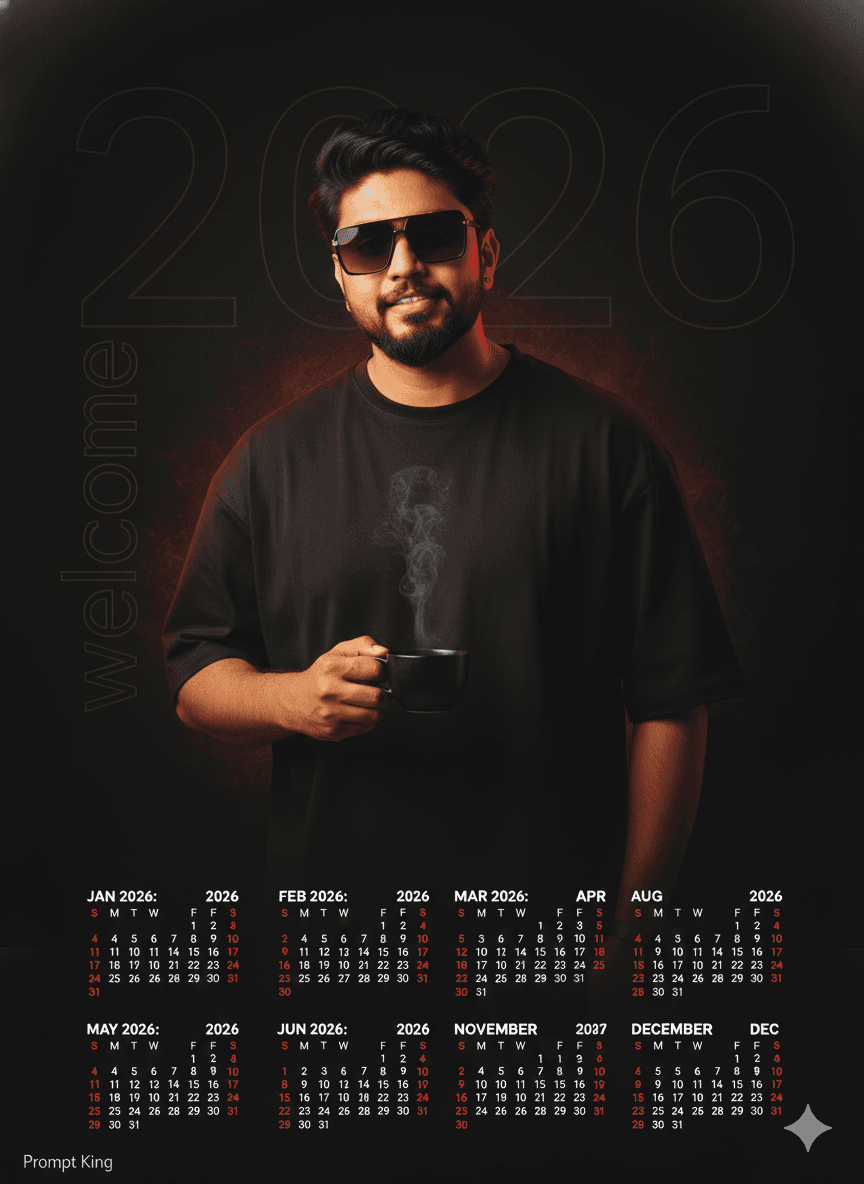
Dark Luxury Calendar Poster With Coffee and Red Aura
AI Photo Prompt
Want more trending photo prompts? Discover them in the Prompt King Android app on Google Play.
About this prompt
This detailed prompt describes a vertical 9:16 premium calendar poster with a dark, minimal luxury style. The background is deep matte black with a subtle vignette. Behind the subject, a large ultra-thin '2026' watermark appears in soft white at very low opacity, and the word 'welcome' runs along the left edge in an elegant hairline typeface at partial opacity. Slightly right of centre stands a confident man in an oversized, logo-free black cotton T-shirt and reflective sunglasses, holding a matte black coffee cup with a wisp of steam curling into warm light. Lighting is cinematic: a soft key light from the upper front-left sculpts his form with chiaroscuro, a gentle rim light separates him from the darkness, and a restrained red aura glows behind him to suggest energy and renewal. The lower third holds a complete calendar for the year. The face is kept identical to your uploaded photo. It suits men who like understated, editorial design for a new year post, a printable wall calendar, a personal brand announcement, or a phone wallpaper. Specific opacity values and colour codes make it easy to fine-tune.
Lighting, colour and composition
A soft key light from the upper left and a subtle rim light carve the figure out of matte black. A diffused red glow at low intensity adds warmth behind him. The palette is black, charcoal and soft white with a muted red accent, arranged in a vertical layout with faint typography and a calendar in the lower third.
Ways to make it your own
- Change the red aura to deep blue or gold to shift the poster's mood.
- Replace the coffee cup with a book or phone to suit your personal routine.
- Raise the watermark opacity if you want the year to be more visible on small screens.
Best for
Trending photo ideas and creative portrait inspiration.
Suggested framing
Use the aspect ratio or framing described in the prompt, then adapt it for your intended platform.
Customization ideas
Adjust the clothing, background, lighting, colors and composition to match your own idea.
How to use
Copy the prompt, adapt it to your idea, and paste it into your preferred compatible AI tool. Follow that tool’s instructions for reference photos.
A few helpful answers.
What type of image does this prompt create?
In a compatible AI tool, this prompt is intended as a starting point for this detailed prompt describes a vertical 9:16 premium calendar poster with a dark, minimal luxury style. The background is deep matte black with a subtle vignette. Behind the subject, a large ultra-thin '2026' watermark appears in soft white at very low opacity, and the word 'welcome' runs along the left edge in an elegant hairline typeface at partial opacity. Slightly right of centre stands a confident man in an oversized, logo-free black cotton T-shirt and reflective sunglasses, holding a matte black coffee cup with a wisp of steam curling into warm light. Lighting is cinematic: a soft key light from the upper front-left sculpts his form with chiaroscuro, a gentle rim light separates him from the darkness, and a restrained red aura glows behind him to suggest energy and renewal. The lower third holds a complete calendar for the year. The face is kept identical to your uploaded photo. It suits men who like understated, editorial design for a new year post, a printable wall calendar, a personal brand announcement, or a phone wallpaper. Specific opacity values and colour codes make it easy to fine-tune. Results depend on the tool, settings and references you use.
Can I customize the clothing or background?
Yes. Replace the clothing, setting or colors in the prompt with your own choices. Keep descriptions consistent and adjust one detail at a time.
What aspect ratio works best?
Start with Use the aspect ratio or framing described in the prompt, then adapt it for your intended platform.. A 4:5 ratio works well for a portrait feed post. Adjust the crop for your intended platform and your tool’s available settings.
Does Prompt King generate the image?
No. Prompt King helps users discover and copy prompts that can be used with compatible AI tools.
Can I use this for social media ideas?
Yes. Use it as creative inspiration and customize the result for your audience. Use photos you have permission to upload, and check your chosen tool’s terms before publishing.




