
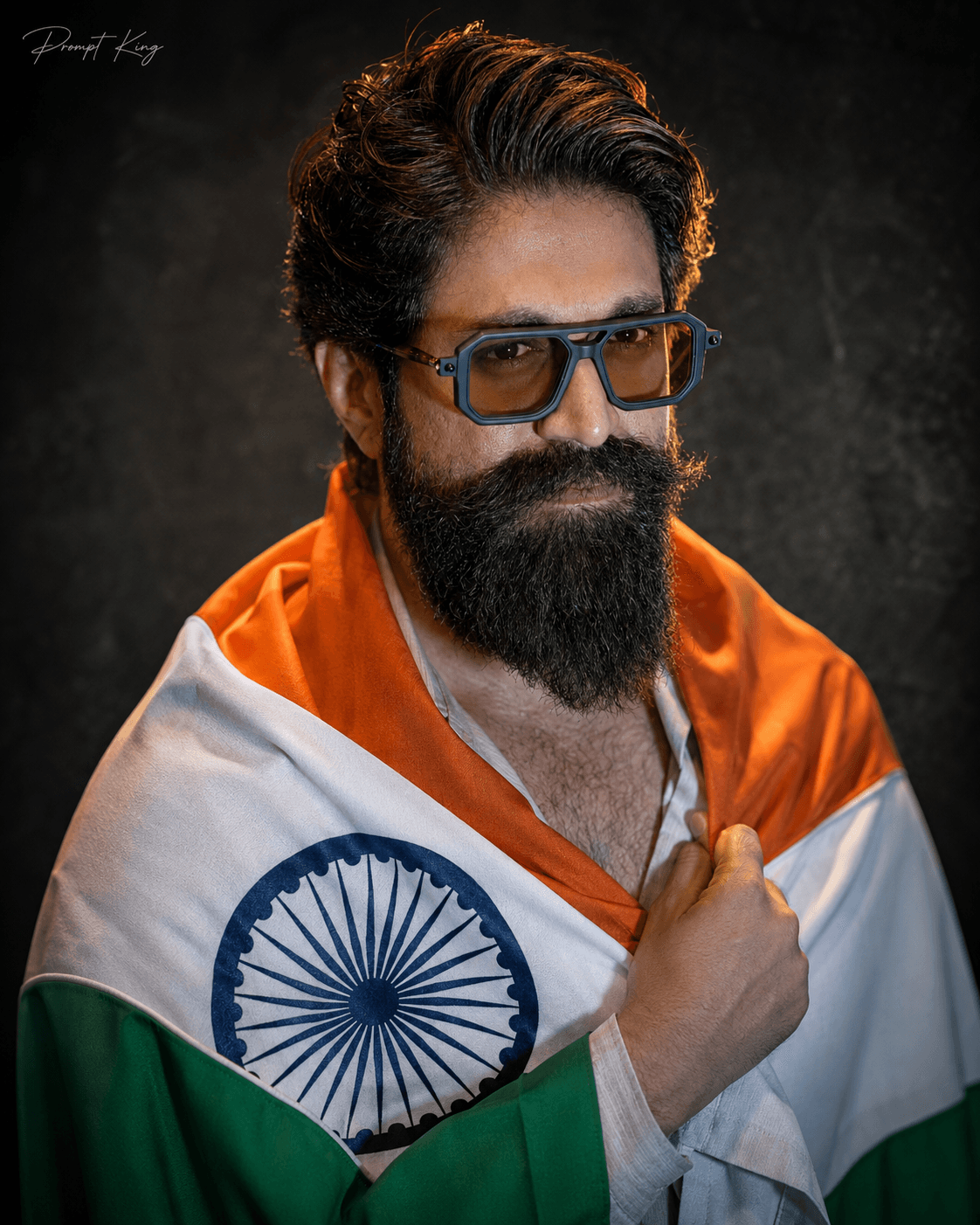
Dark Charcoal Studio Portrait Holding The Flag
AI Photo Prompt
Want more trending photo prompts? Discover them in the Prompt King Android app on Google Play.
About this prompt
This prompt creates a cinematic studio portrait of a person wrapped gracefully in the Indian national flag, holding it close to the chest with one hand and looking directly into the camera with a calm, confident and patriotic expression. It works for any gender, because the prompt keeps your exact face, hairstyle, skin tone and natural look from your uploaded photo. The background is a dark charcoal textured studio wall with a subtle vignette. Lighting follows a soft Rembrandt style, with a small triangle of light on the shadow side of the face, plus a warm golden rim light around the hair. The flag fabric is rendered realistically with a detailed Ashoka Chakra. The prompt asks for natural skin texture, shallow depth of field, an 85mm f/1.8 look, HDR detail and cinematic colour grading in a vertical 4:5 frame. The result is serious and dignified rather than festive. It suits an Independence Day or Republic Day profile picture, a tribute post, or a respectful patriotic message for colleagues and family.
Lighting, colour and composition
Soft Rembrandt lighting sculpts the face, and a warm golden rim light separates the hair from the dark backdrop. The palette is charcoal and deep shadow with the saffron, white and green of the flag. A centred chest-up composition with direct eye contact and a vignette creates a focused, dignified portrait.
Ways to make it your own
- Ask for a slight smile if you want a warmer, less serious expression.
- Change the charcoal wall to deep blue for a cooler, modern studio look.
- Include a lapel flag pin instead of wrapping for a more formal office version.
Best for
Trending photo ideas and creative portrait inspiration.
Suggested framing
Use the aspect ratio or framing described in the prompt, then adapt it for your intended platform.
Customization ideas
Adjust the clothing, background, lighting, colors and composition to match your own idea.
How to use
Copy the prompt, adapt it to your idea, and paste it into your preferred compatible AI tool. Follow that tool’s instructions for reference photos.
A few helpful answers.
What type of image does this prompt create?
In a compatible AI tool, this prompt is intended as a starting point for this prompt creates a cinematic studio portrait of a person wrapped gracefully in the Indian national flag, holding it close to the chest with one hand and looking directly into the camera with a calm, confident and patriotic expression. It works for any gender, because the prompt keeps your exact face, hairstyle, skin tone and natural look from your uploaded photo. The background is a dark charcoal textured studio wall with a subtle vignette. Lighting follows a soft Rembrandt style, with a small triangle of light on the shadow side of the face, plus a warm golden rim light around the hair. The flag fabric is rendered realistically with a detailed Ashoka Chakra. The prompt asks for natural skin texture, shallow depth of field, an 85mm f/1.8 look, HDR detail and cinematic colour grading in a vertical 4:5 frame. The result is serious and dignified rather than festive. It suits an Independence Day or Republic Day profile picture, a tribute post, or a respectful patriotic message for colleagues and family. Results depend on the tool, settings and references you use.
Can I customize the clothing or background?
Yes. Replace the clothing, setting or colors in the prompt with your own choices. Keep descriptions consistent and adjust one detail at a time.
What aspect ratio works best?
Start with Use the aspect ratio or framing described in the prompt, then adapt it for your intended platform.. A 4:5 ratio works well for a portrait feed post. Adjust the crop for your intended platform and your tool’s available settings.
Does Prompt King generate the image?
No. Prompt King helps users discover and copy prompts that can be used with compatible AI tools.
Can I use this for social media ideas?
Yes. Use it as creative inspiration and customize the result for your audience. Use photos you have permission to upload, and check your chosen tool’s terms before publishing.




