
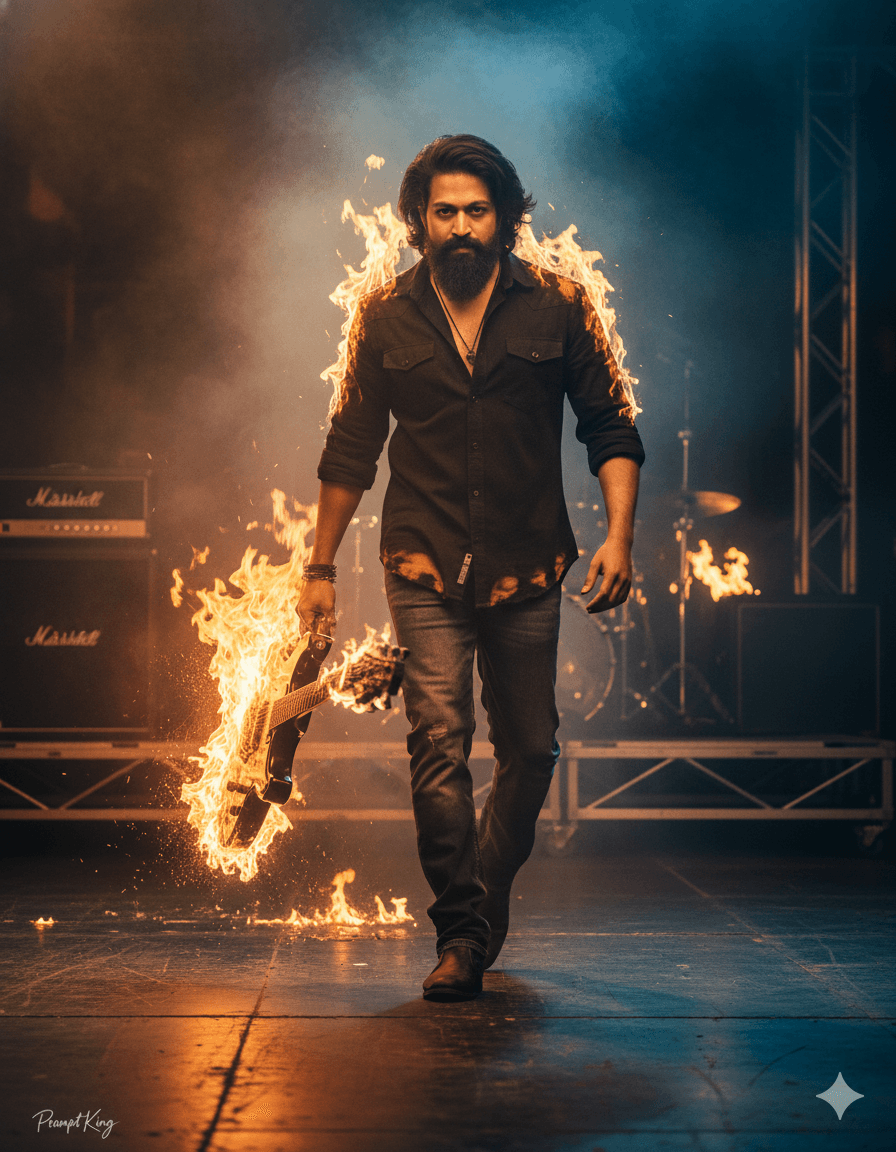
Concert Stage Walk With Flaming Guitar and Sparks
AI Photo Prompt
Want more trending photo prompts? Discover them in the Prompt King Android app on Google Play.
About this prompt
This high-energy prompt creates a cinematic close-up of a young man walking with intensity across a concert stage. His black shirt is partly on fire with glowing orange flames, and he drags a burning guitar behind him, leaving a trail of fire. Sparks scatter in motion blur, the air is thick with smoke, and faint firelight glows in the background. The lighting mixes moody golden-orange highlights with cool shadows, giving the image an aggressive, dramatic look like a rock music video or film poster. The expression requested is intense and action-focused. This style is a good fit for musicians, band promotions, gaming or action-themed profile images, YouTube thumbnails and fan-art style posters. Because it is a dramatic fantasy scene, it works best for creative and entertainment uses. The face is requested to match the uploaded photo, so a clear, front-facing reference with good light is recommended. If you prefer something less intense, reduce the fire to just the guitar and keep the shirt intact. HDR realism is requested, so expect strong contrast and vivid detail in the flames.
Lighting, colour and composition
Golden-orange firelight contrasts with cool blue-grey shadows for a dramatic, high-contrast look. Black clothing and dark stage tones make the flames and sparks stand out. A close, slightly low-angle composition shows the subject walking toward the camera, with motion-blurred sparks and smoke filling the frame.
Ways to make it your own
- Keep the fire only on the guitar for a less intense version.
- Add a crowd silhouette and stage lights for a live-concert feel.
- Use a 16:9 frame when making YouTube thumbnails or wide concert posters.
Best for
Trending photo ideas and creative portrait inspiration.
Suggested framing
Use the aspect ratio or framing described in the prompt, then adapt it for your intended platform.
Customization ideas
Adjust the clothing, background, lighting, colors and composition to match your own idea.
How to use
Copy the prompt, adapt it to your idea, and paste it into your preferred compatible AI tool. Follow that tool’s instructions for reference photos.
A few helpful answers.
What type of image does this prompt create?
In a compatible AI tool, this prompt is intended as a starting point for this high-energy prompt creates a cinematic close-up of a young man walking with intensity across a concert stage. His black shirt is partly on fire with glowing orange flames, and he drags a burning guitar behind him, leaving a trail of fire. Sparks scatter in motion blur, the air is thick with smoke, and faint firelight glows in the background. The lighting mixes moody golden-orange highlights with cool shadows, giving the image an aggressive, dramatic look like a rock music video or film poster. The expression requested is intense and action-focused. This style is a good fit for musicians, band promotions, gaming or action-themed profile images, YouTube thumbnails and fan-art style posters. Because it is a dramatic fantasy scene, it works best for creative and entertainment uses. The face is requested to match the uploaded photo, so a clear, front-facing reference with good light is recommended. If you prefer something less intense, reduce the fire to just the guitar and keep the shirt intact. HDR realism is requested, so expect strong contrast and vivid detail in the flames. Results depend on the tool, settings and references you use.
Can I customize the clothing or background?
Yes. Replace the clothing, setting or colors in the prompt with your own choices. Keep descriptions consistent and adjust one detail at a time.
What aspect ratio works best?
Start with Use the aspect ratio or framing described in the prompt, then adapt it for your intended platform.. A 4:5 ratio works well for a portrait feed post. Adjust the crop for your intended platform and your tool’s available settings.
Does Prompt King generate the image?
No. Prompt King helps users discover and copy prompts that can be used with compatible AI tools.
Can I use this for social media ideas?
Yes. Use it as creative inspiration and customize the result for your audience. Use photos you have permission to upload, and check your chosen tool’s terms before publishing.




