
Candid Celebrity Moment Surrounded by Camera Crowd
AI Photo Prompt
Want more trending photo prompts? Discover them in the Prompt King Android app on Google Play.
About this prompt
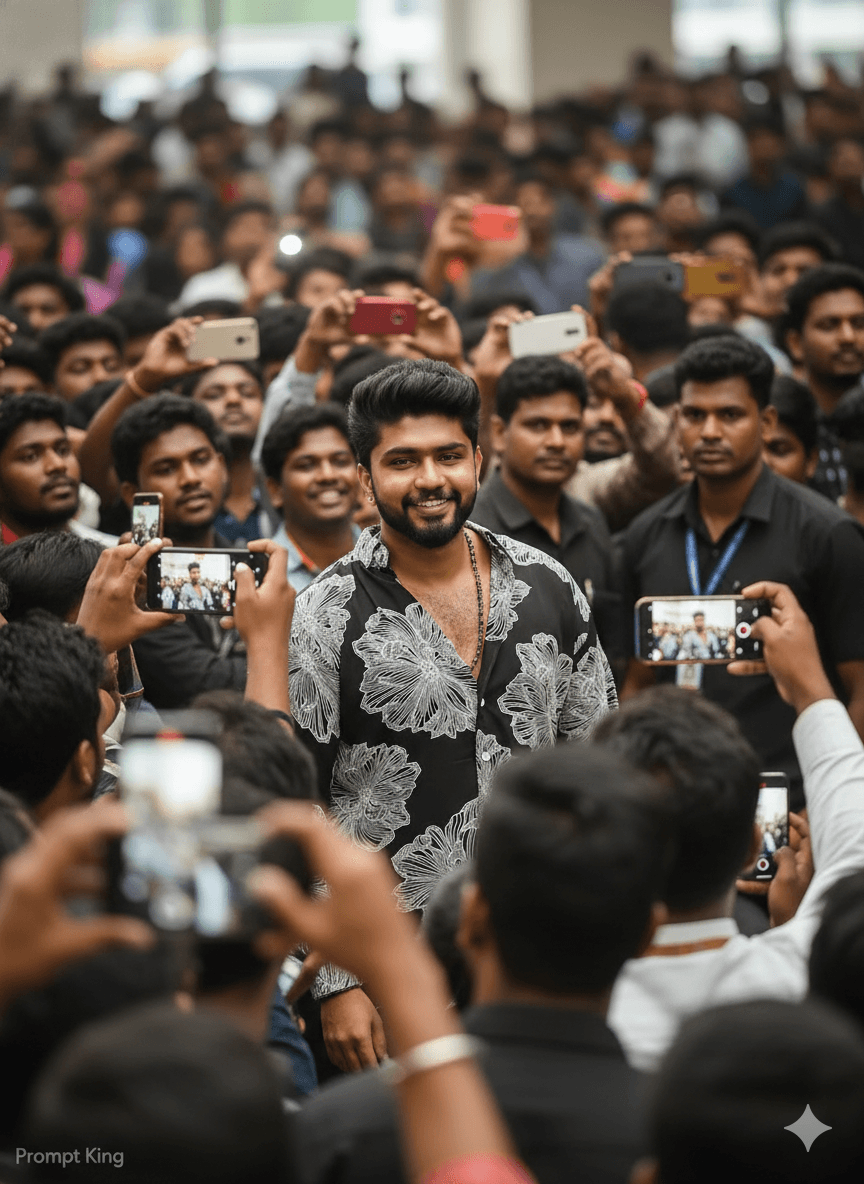
This playful prompt makes you look like a celebrity caught on camera. The subject, based on your uploaded photo, stands in a crowded place while people around hold cameras and phones to take pictures. Fans fill the background, and the slight chaos of the crowd gives the image a lively, red-carpet or airport-arrival feel. The prompt asks for a candid, real-life moment with natural lighting and sharp details, so the result should look like a press photo rather than a posed studio portrait. It is a fun choice for birthday posts, celebration announcements, achievement updates such as passing an exam or landing a job, and light-hearted social media content. It also works for creators who want a thumbnail showing a 'famous' moment. The prompt is short, so adding details about your outfit, time of day and location can improve consistency, such as 'wearing a black blazer at night outside a theatre'. A clear, front-facing reference photo will help your face stay recognisable among the crowd. A small Prompt King signature is requested in the lower left corner and can be removed.
Lighting, colour and composition
Natural ambient lighting with occasional camera-flash highlights adds realism. The palette is driven by the subject's outfit against a varied, busy crowd. The subject is placed centrally in sharp focus, while surrounding photographers and fans fill the frame with motion and soft blur.
Ways to make it your own
- Describe a red carpet and evening gown or suit for an awards-night version.
- Set the scene at an airport arrival gate for a travel-style paparazzi shot.
- Add camera flashes in the background to make the moment feel more dramatic.
Best for
Trending photo ideas and creative portrait inspiration.
Suggested framing
Use the aspect ratio or framing described in the prompt, then adapt it for your intended platform.
Customization ideas
Adjust the clothing, background, lighting, colors and composition to match your own idea.
How to use
Copy the prompt, adapt it to your idea, and paste it into your preferred compatible AI tool. Follow that tool’s instructions for reference photos.
A few helpful answers.
What type of image does this prompt create?
In a compatible AI tool, this prompt is intended as a starting point for this playful prompt makes you look like a celebrity caught on camera. The subject, based on your uploaded photo, stands in a crowded place while people around hold cameras and phones to take pictures. Fans fill the background, and the slight chaos of the crowd gives the image a lively, red-carpet or airport-arrival feel. The prompt asks for a candid, real-life moment with natural lighting and sharp details, so the result should look like a press photo rather than a posed studio portrait. It is a fun choice for birthday posts, celebration announcements, achievement updates such as passing an exam or landing a job, and light-hearted social media content. It also works for creators who want a thumbnail showing a 'famous' moment. The prompt is short, so adding details about your outfit, time of day and location can improve consistency, such as 'wearing a black blazer at night outside a theatre'. A clear, front-facing reference photo will help your face stay recognisable among the crowd. A small Prompt King signature is requested in the lower left corner and can be removed. Results depend on the tool, settings and references you use.
Can I customize the clothing or background?
Yes. Replace the clothing, setting or colors in the prompt with your own choices. Keep descriptions consistent and adjust one detail at a time.
What aspect ratio works best?
Start with Use the aspect ratio or framing described in the prompt, then adapt it for your intended platform.. A 4:5 ratio works well for a portrait feed post. Adjust the crop for your intended platform and your tool’s available settings.
Does Prompt King generate the image?
No. Prompt King helps users discover and copy prompts that can be used with compatible AI tools.
Can I use this for social media ideas?
Yes. Use it as creative inspiration and customize the result for your audience. Use photos you have permission to upload, and check your chosen tool’s terms before publishing.




