
Burning Rose Forced Perspective Portrait In Red Light
AI Photo Prompt
Want more trending photo prompts? Discover them in the Prompt King Android app on Google Play.
About this prompt
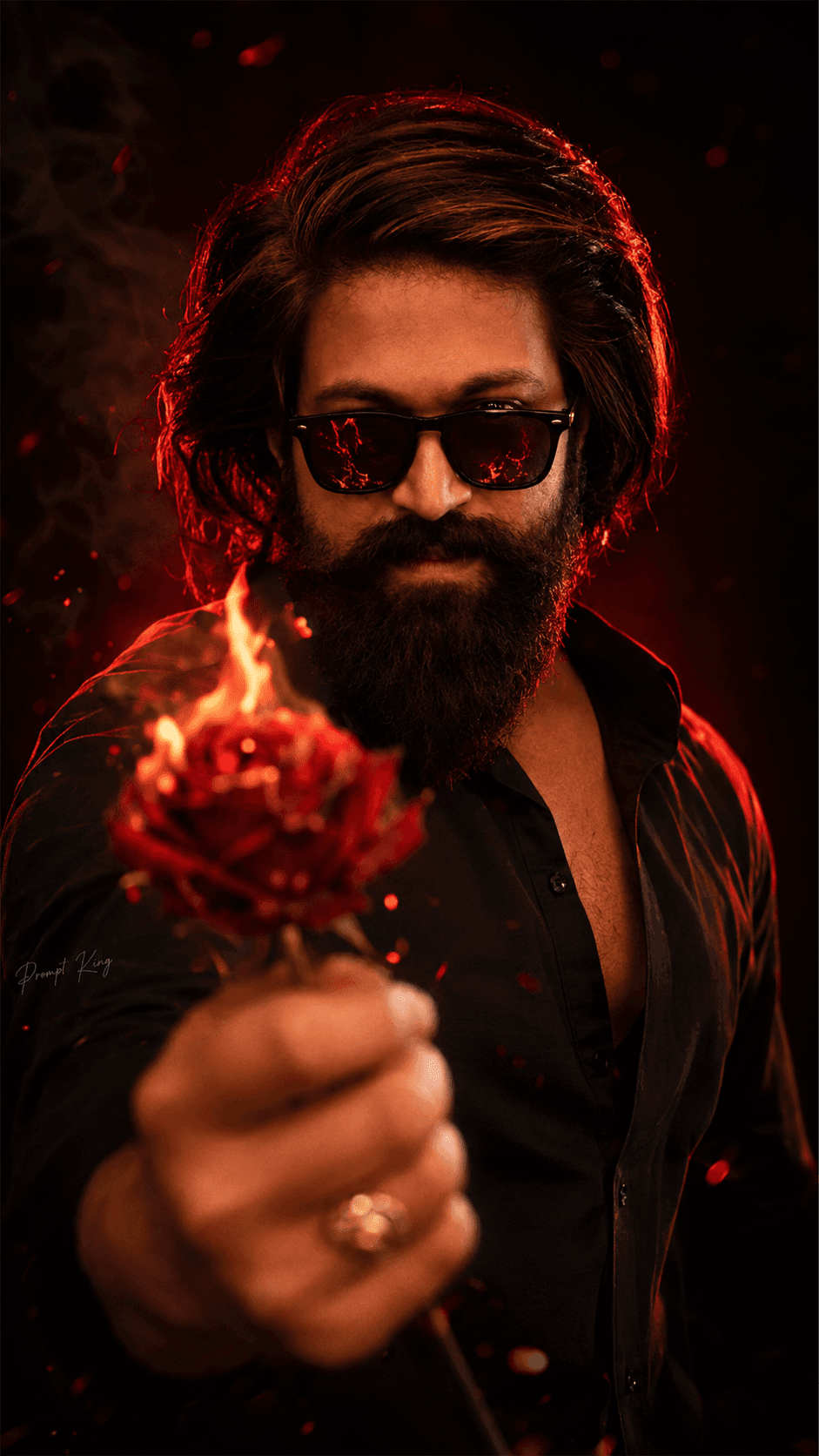
This prompt creates a dramatic studio portrait of a young man in a fitted black shirt and matte black sunglasses that reflect fire. He extends one hand toward the camera in a forced perspective pose, holding a burning red rose covered in glowing embers, ash particles and light smoke. Because the hand is close to the lens, it appears large and softly blurred in the foreground while his face stays in sharp focus. His head tilts slightly down and his body is angled, giving the pose a confident, mysterious attitude. The lighting is high contrast red and black, with a neon red rim light tracing his hair, jawline, shoulders and outline. The background is a deep matte black with a soft red gradient glow. The prompt asks for full facial identity preservation from your uploaded photo, keeping face shape, skin tone, proportions and hairstyle the same. The vertical 9:16 format works well for profile pictures, reel covers, attitude posts and Valentine's Day or breakup themed edits. A sharp, front-facing reference photo with even lighting gives the best match.
Lighting, colour and composition
Strong red rim lighting against a deep black background creates bold contrast and clean edge highlights. The palette is limited to black, red and orange ember tones. Forced perspective places the hand and rose large in the foreground, with shallow depth of field keeping the face sharp.
Ways to make it your own
- Use an evenly lit front photo so the red light does not distort your skin tone.
- Ask for a white rose with embers if you want a softer colour contrast.
- Remove the sunglasses to show your eyes while keeping the fire reflection idea.
Best for
Trending photo ideas and creative portrait inspiration.
Suggested framing
Use the aspect ratio or framing described in the prompt, then adapt it for your intended platform.
Customization ideas
Adjust the clothing, background, lighting, colors and composition to match your own idea.
How to use
Copy the prompt, adapt it to your idea, and paste it into your preferred compatible AI tool. Follow that tool’s instructions for reference photos.
A few helpful answers.
What type of image does this prompt create?
In a compatible AI tool, this prompt is intended as a starting point for this prompt creates a dramatic studio portrait of a young man in a fitted black shirt and matte black sunglasses that reflect fire. He extends one hand toward the camera in a forced perspective pose, holding a burning red rose covered in glowing embers, ash particles and light smoke. Because the hand is close to the lens, it appears large and softly blurred in the foreground while his face stays in sharp focus. His head tilts slightly down and his body is angled, giving the pose a confident, mysterious attitude. The lighting is high contrast red and black, with a neon red rim light tracing his hair, jawline, shoulders and outline. The background is a deep matte black with a soft red gradient glow. The prompt asks for full facial identity preservation from your uploaded photo, keeping face shape, skin tone, proportions and hairstyle the same. The vertical 9:16 format works well for profile pictures, reel covers, attitude posts and Valentine's Day or breakup themed edits. A sharp, front-facing reference photo with even lighting gives the best match. Results depend on the tool, settings and references you use.
Can I customize the clothing or background?
Yes. Replace the clothing, setting or colors in the prompt with your own choices. Keep descriptions consistent and adjust one detail at a time.
What aspect ratio works best?
Start with Use the aspect ratio or framing described in the prompt, then adapt it for your intended platform.. A 4:5 ratio works well for a portrait feed post. Adjust the crop for your intended platform and your tool’s available settings.
Does Prompt King generate the image?
No. Prompt King helps users discover and copy prompts that can be used with compatible AI tools.
Can I use this for social media ideas?
Yes. Use it as creative inspiration and customize the result for your audience. Use photos you have permission to upload, and check your chosen tool’s terms before publishing.




