
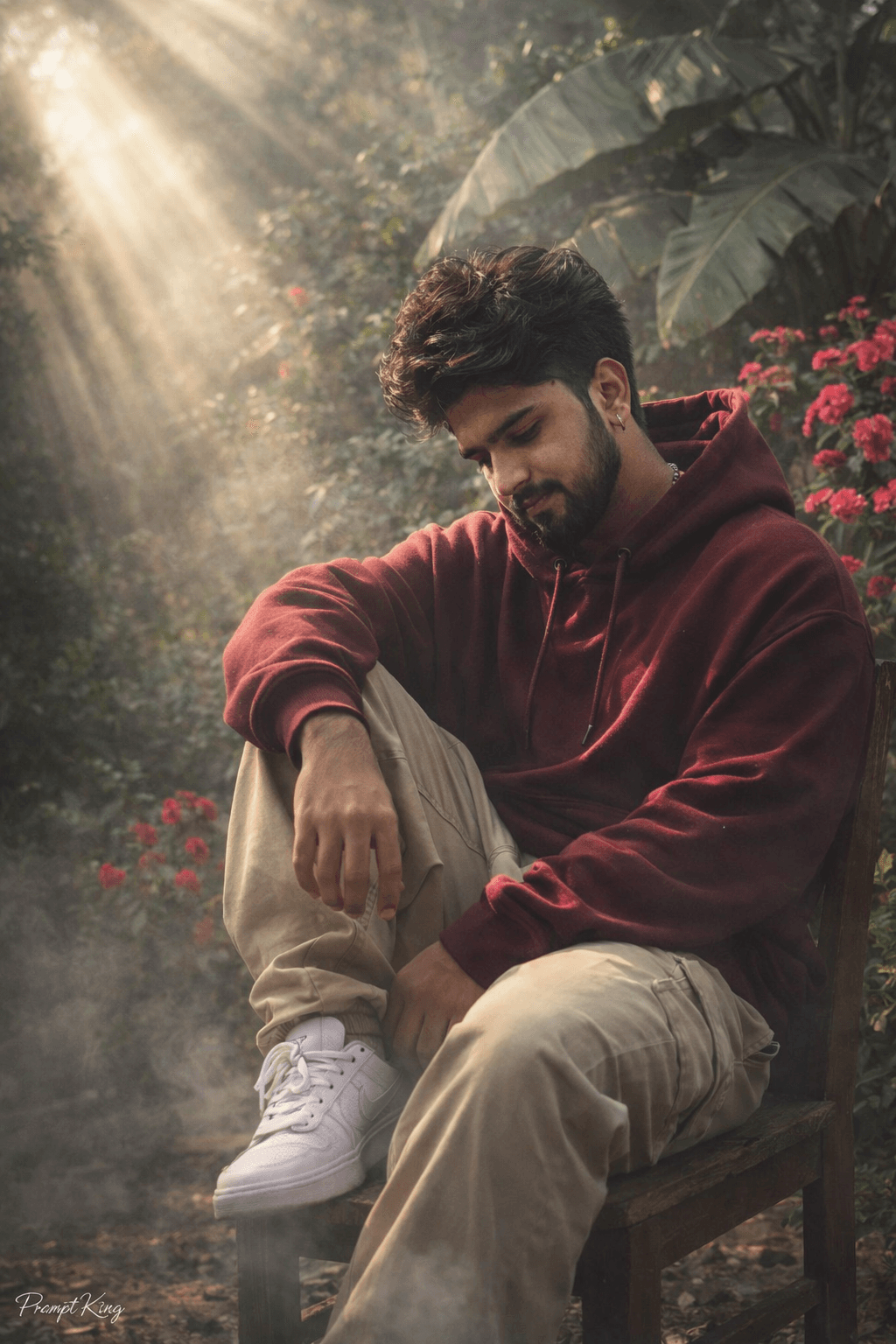
Burgundy Hoodie on a Chair in a Tropical Garden
AI Photo Prompt
Want more trending photo prompts? Discover them in the Prompt King Android app on Google Play.
About this prompt
This prompt creates a photorealistic shot of a young man sitting casually on a wooden chair in an overgrown garden. He wears relaxed streetwear: a burgundy oversized hoodie, baggy beige pants and white sneakers, with a voluminous, messy hairstyle matched to the reference photo. One leg is pulled up onto the chair and he looks downward, giving the image a calm, thoughtful mood. The background is filled with dense tropical foliage, large banana leaves and a bush of bright pink roses. Hazy sunbeams stream down from the top left corner, lighting up mist in the air and creating dreamy god rays across the scene. The lighting is high-contrast and cinematic, making the burgundy hoodie stand out against the deep greens. The prompt also allows a second uploaded image to guide the background. This style suits young men who want a stylish, aesthetic profile picture, a social media post with a nature-meets-streetwear vibe, or a moody portrait for a portfolio. It works well year-round and does not depend on a festival. Upload a clear reference photo; a seated pose in a similar outfit will help the result look natural and consistent.
Lighting, colour and composition
Diagonal sunbeams through mist create strong god rays and high contrast. The palette pairs burgundy and beige clothing with deep tropical greens and pops of bright pink roses. A full-body composition places the seated subject slightly off-centre, with light streaming from the top left guiding the eye down to him.
Ways to make it your own
- Change the hoodie colour to olive or mustard to vary contrast with the greenery.
- Remove the mist if you want a cleaner, sharper daylight look.
- Upload a second image of a garden you like to guide the background.
Best for
Trending photo ideas and creative portrait inspiration.
Suggested framing
Use the aspect ratio or framing described in the prompt, then adapt it for your intended platform.
Customization ideas
Adjust the clothing, background, lighting, colors and composition to match your own idea.
How to use
Copy the prompt, adapt it to your idea, and paste it into your preferred compatible AI tool. Follow that tool’s instructions for reference photos.
A few helpful answers.
What type of image does this prompt create?
In a compatible AI tool, this prompt is intended as a starting point for this prompt creates a photorealistic shot of a young man sitting casually on a wooden chair in an overgrown garden. He wears relaxed streetwear: a burgundy oversized hoodie, baggy beige pants and white sneakers, with a voluminous, messy hairstyle matched to the reference photo. One leg is pulled up onto the chair and he looks downward, giving the image a calm, thoughtful mood. The background is filled with dense tropical foliage, large banana leaves and a bush of bright pink roses. Hazy sunbeams stream down from the top left corner, lighting up mist in the air and creating dreamy god rays across the scene. The lighting is high-contrast and cinematic, making the burgundy hoodie stand out against the deep greens. The prompt also allows a second uploaded image to guide the background. This style suits young men who want a stylish, aesthetic profile picture, a social media post with a nature-meets-streetwear vibe, or a moody portrait for a portfolio. It works well year-round and does not depend on a festival. Upload a clear reference photo; a seated pose in a similar outfit will help the result look natural and consistent. Results depend on the tool, settings and references you use.
Can I customize the clothing or background?
Yes. Replace the clothing, setting or colors in the prompt with your own choices. Keep descriptions consistent and adjust one detail at a time.
What aspect ratio works best?
Start with Use the aspect ratio or framing described in the prompt, then adapt it for your intended platform.. A 4:5 ratio works well for a portrait feed post. Adjust the crop for your intended platform and your tool’s available settings.
Does Prompt King generate the image?
No. Prompt King helps users discover and copy prompts that can be used with compatible AI tools.
Can I use this for social media ideas?
Yes. Use it as creative inspiration and customize the result for your audience. Use photos you have permission to upload, and check your chosen tool’s terms before publishing.




