
Black and White Sunglasses Portrait With City Reflection
AI Photo Prompt
Want more trending photo prompts? Discover them in the Prompt King Android app on Google Play.
About this prompt
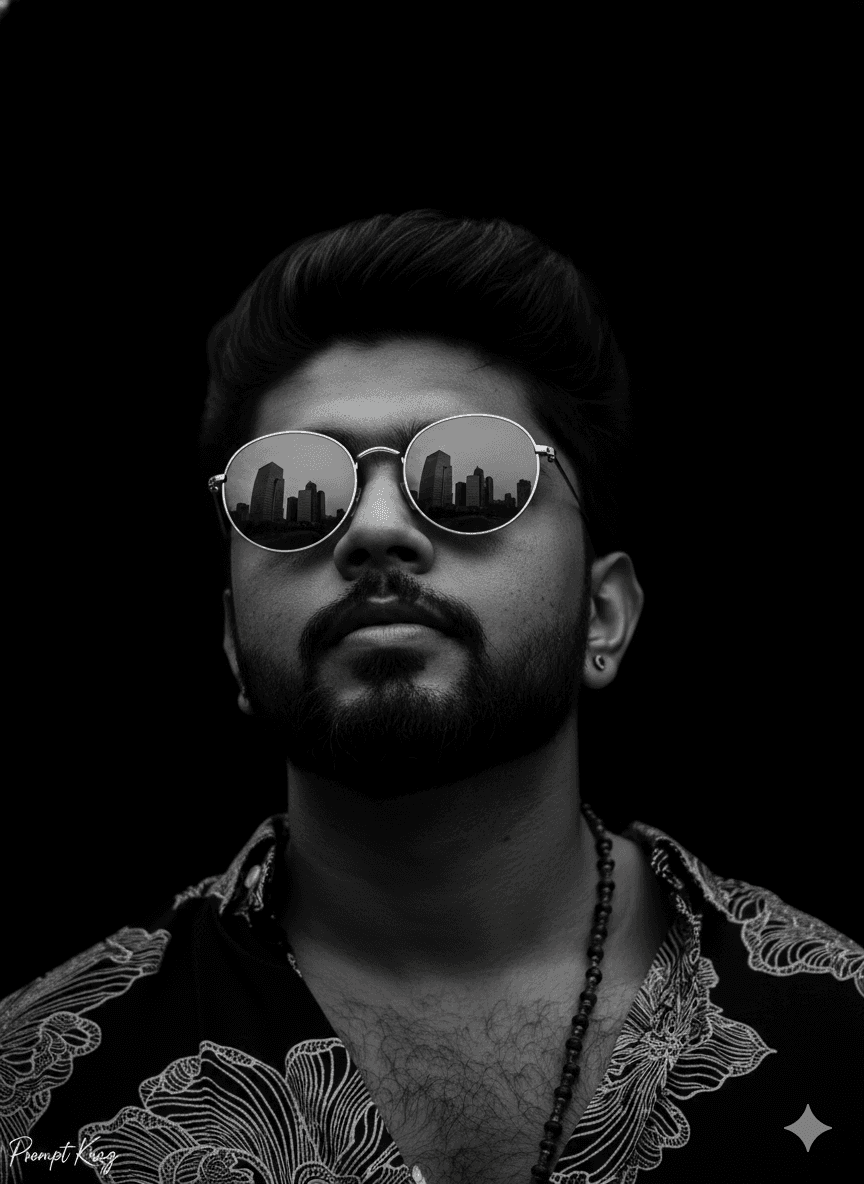
This prompt creates a dramatic black and white close-up of a man looking confidently upward into a dark void. Strong side lighting carves out the contours of his face and beard, leaving deep shadows on the opposite side. He wears round reflective sunglasses, and the lenses mirror a towering city skyline, adding a story element to an otherwise minimal frame. The background is plain black, so there is nothing to compete with the face and the reflection. The prompt asks to keep the exact facial structure and hair texture from the uploaded photo, so the person stays recognisable while the styling becomes moody and editorial. This kind of image works well as a profile picture for WhatsApp, Instagram or LinkedIn when someone wants a striking but simple look, and it also suits album covers, personal branding or a minimalist poster. Because it is monochrome, it pairs easily with any feed style. Men with beards or defined jawlines get the most from the side lighting, although the setup also suits clean-shaven faces.
Lighting, colour and composition
A single hard light from the side creates high contrast with deep shadow on the far cheek. The palette is strictly monochrome, from pure black to bright highlights on skin and lenses. The face is framed tightly, tilted upward, with the reflective sunglasses as the visual centre and generous negative space above the head.
Ways to make it your own
- Replace the city skyline reflection with mountains, ocean waves or a sunset for a different story.
- Use a square 1:1 crop if the image is meant purely as a profile picture.
- Add a faint blue or amber tint for a duotone look instead of strict black and white.
Best for
Trending photo ideas and creative portrait inspiration.
Suggested framing
Use the aspect ratio or framing described in the prompt, then adapt it for your intended platform.
Customization ideas
Adjust the clothing, background, lighting, colors and composition to match your own idea.
How to use
Copy the prompt, adapt it to your idea, and paste it into your preferred compatible AI tool. Follow that tool’s instructions for reference photos.
A few helpful answers.
What type of image does this prompt create?
In a compatible AI tool, this prompt is intended as a starting point for this prompt creates a dramatic black and white close-up of a man looking confidently upward into a dark void. Strong side lighting carves out the contours of his face and beard, leaving deep shadows on the opposite side. He wears round reflective sunglasses, and the lenses mirror a towering city skyline, adding a story element to an otherwise minimal frame. The background is plain black, so there is nothing to compete with the face and the reflection. The prompt asks to keep the exact facial structure and hair texture from the uploaded photo, so the person stays recognisable while the styling becomes moody and editorial. This kind of image works well as a profile picture for WhatsApp, Instagram or LinkedIn when someone wants a striking but simple look, and it also suits album covers, personal branding or a minimalist poster. Because it is monochrome, it pairs easily with any feed style. Men with beards or defined jawlines get the most from the side lighting, although the setup also suits clean-shaven faces. Results depend on the tool, settings and references you use.
Can I customize the clothing or background?
Yes. Replace the clothing, setting or colors in the prompt with your own choices. Keep descriptions consistent and adjust one detail at a time.
What aspect ratio works best?
Start with Use the aspect ratio or framing described in the prompt, then adapt it for your intended platform.. A 4:5 ratio works well for a portrait feed post. Adjust the crop for your intended platform and your tool’s available settings.
Does Prompt King generate the image?
No. Prompt King helps users discover and copy prompts that can be used with compatible AI tools.
Can I use this for social media ideas?
Yes. Use it as creative inspiration and customize the result for your audience. Use photos you have permission to upload, and check your chosen tool’s terms before publishing.




