
Barefoot Ocean Portrait Holding Tricolour Flag
AI Photo Prompt
Want more trending photo prompts? Discover them in the Prompt King Android app on Google Play.
About this prompt
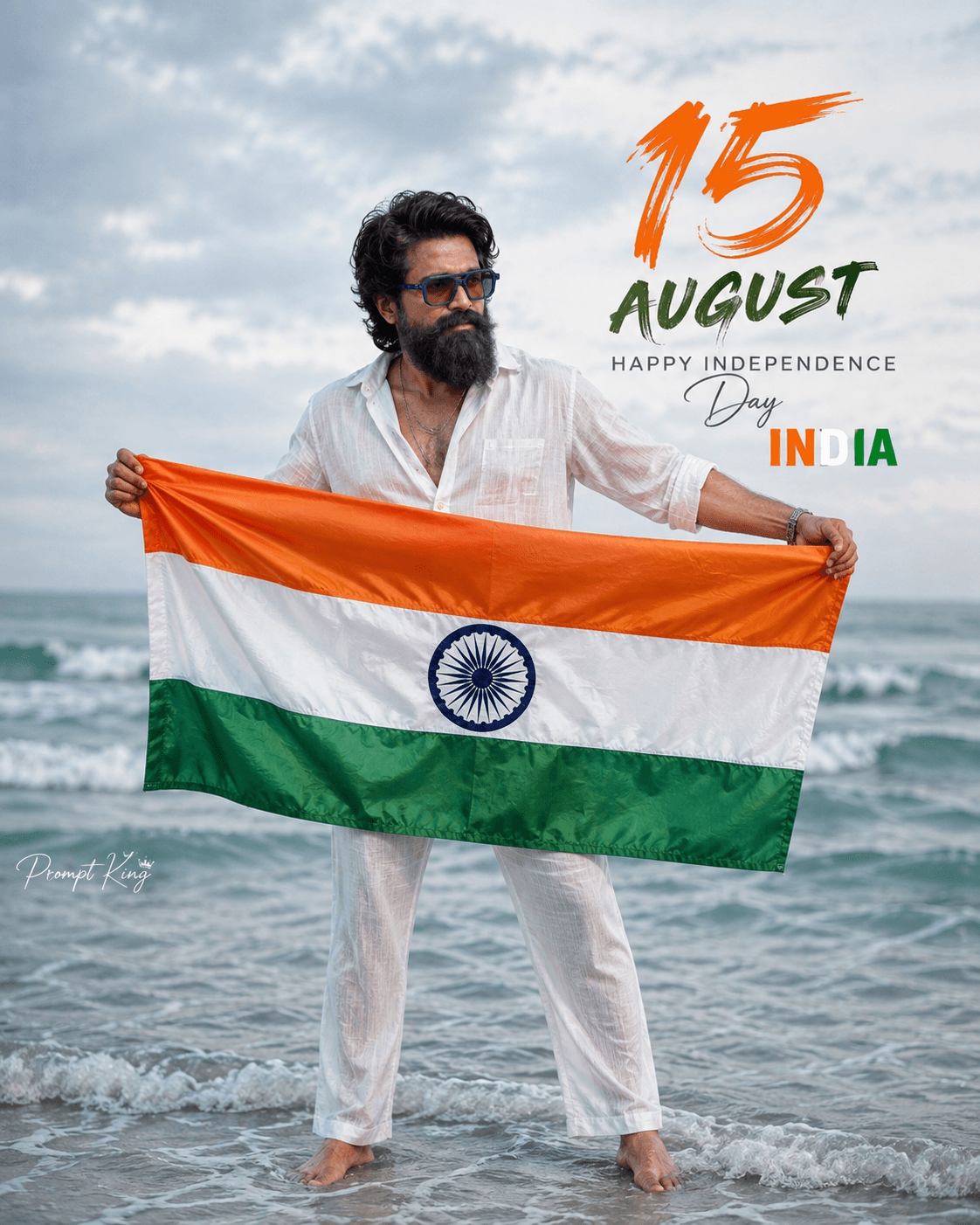
This prompt creates a realistic full-body Independence Day portrait of a young Indian man standing barefoot in shallow ocean water, holding the Indian national flag stretched horizontally in both hands. He wears a slightly loose white linen shirt with rolled-up sleeves and matching white trousers, with a subtle chain necklace, wristwatch and bracelet. His hair is thick, naturally wavy and slightly messy, with a neatly groomed light beard, and he has a warm, relaxed smile. Behind him is a calm sea with soft waves under a bright overcast sky. Elegant typography in the upper background reads '15 AUGUST', 'HAPPY INDEPENDENCE DAY' and 'INDIA'. The prompt asks for accurate flag colours with a clear navy Ashoka Chakra, realistic fabric movement, soft cinematic daylight, shallow depth of field with an 85mm f/1.8 look, and subtle ocean mist, in a vertical 4:5 frame. Your uploaded photo guides the face. This is suited to Independence Day and Republic Day greetings, a patriotic profile picture or a WhatsApp status.
Lighting, colour and composition
Soft overcast daylight gives even light on the white outfit and keeps the sea calm and silvery. The palette is white and ocean blue-grey, with the saffron, white and green of the flag as the main accent. A centred full-body pose with the flag held across the frame creates a strong horizontal line.
Ways to make it your own
- Change the typography to 26 JANUARY to reuse the image for Republic Day.
- Ask for sunrise light over the sea for warmer, golden tones.
- Swap the white trousers for light denim for a more casual beach look.
Best for
Trending photo ideas and creative portrait inspiration.
Suggested framing
Use the aspect ratio or framing described in the prompt, then adapt it for your intended platform.
Customization ideas
Adjust the clothing, background, lighting, colors and composition to match your own idea.
How to use
Copy the prompt, adapt it to your idea, and paste it into your preferred compatible AI tool. Follow that tool’s instructions for reference photos.
A few helpful answers.
What type of image does this prompt create?
In a compatible AI tool, this prompt is intended as a starting point for this prompt creates a realistic full-body Independence Day portrait of a young Indian man standing barefoot in shallow ocean water, holding the Indian national flag stretched horizontally in both hands. He wears a slightly loose white linen shirt with rolled-up sleeves and matching white trousers, with a subtle chain necklace, wristwatch and bracelet. His hair is thick, naturally wavy and slightly messy, with a neatly groomed light beard, and he has a warm, relaxed smile. Behind him is a calm sea with soft waves under a bright overcast sky. Elegant typography in the upper background reads '15 AUGUST', 'HAPPY INDEPENDENCE DAY' and 'INDIA'. The prompt asks for accurate flag colours with a clear navy Ashoka Chakra, realistic fabric movement, soft cinematic daylight, shallow depth of field with an 85mm f/1.8 look, and subtle ocean mist, in a vertical 4:5 frame. Your uploaded photo guides the face. This is suited to Independence Day and Republic Day greetings, a patriotic profile picture or a WhatsApp status. Results depend on the tool, settings and references you use.
Can I customize the clothing or background?
Yes. Replace the clothing, setting or colors in the prompt with your own choices. Keep descriptions consistent and adjust one detail at a time.
What aspect ratio works best?
Start with Use the aspect ratio or framing described in the prompt, then adapt it for your intended platform.. A 4:5 ratio works well for a portrait feed post. Adjust the crop for your intended platform and your tool’s available settings.
Does Prompt King generate the image?
No. Prompt King helps users discover and copy prompts that can be used with compatible AI tools.
Can I use this for social media ideas?
Yes. Use it as creative inspiration and customize the result for your audience. Use photos you have permission to upload, and check your chosen tool’s terms before publishing.




