
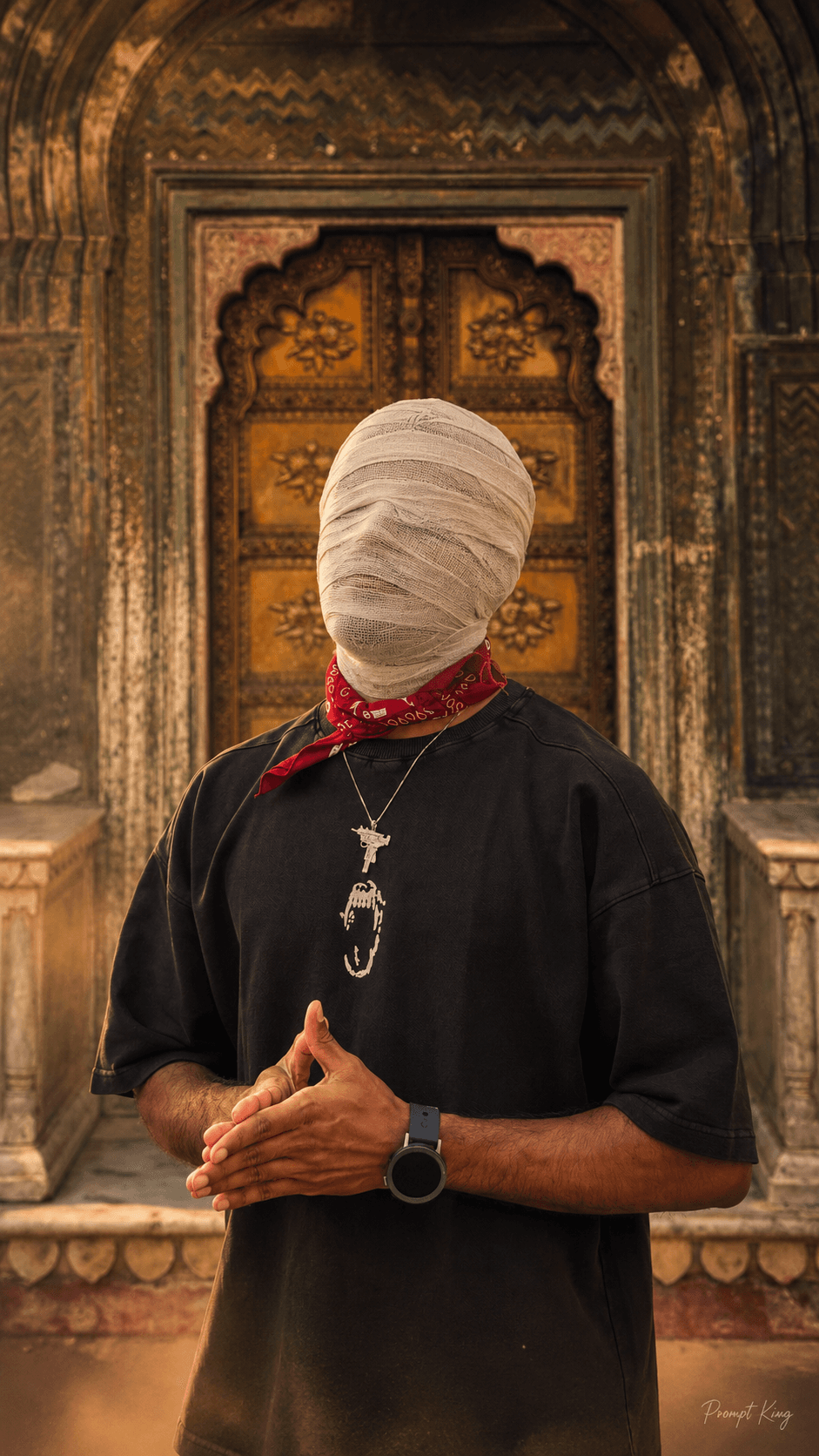
Bandage Wrapped Face Portrait With Black Horse
AI Photo Prompt
Want more trending photo prompts? Discover them in the Prompt King Android app on Google Play.
About this prompt
This prompt transforms an existing photo into a dark, mysterious cinematic portrait in which the subject's entire head and face are wrapped in thick, opaque off-white cotton bandages with overlapping layers. Hair, forehead, eyes, nose, mouth, jawline and ears are fully covered, so no facial features show through. Everything else from your photo is kept unchanged, including body proportions, pose, hands, clothing, accessories, camera angle and framing, and the original background stays in place. The example version shows the figure standing beside a black horse in warm golden-hour light, which adds to the eerie, story-like mood. A dark cinematic colour grade is applied, with deep shadows, subtle warm highlights, atmospheric haze, natural HDR contrast and visible film grain. The output is a 9:16 vertical portrait. This concept works for Halloween posts, horror or thriller-style cover art, music video stills, short film posters, or an anonymous profile image when you prefer not to show your face. Because the face is hidden, the strength of the result depends on a striking pose, outfit and background in your original photo.
Lighting, colour and composition
A dark grade with crushed shadows and gentle warm highlights keeps the off-white bandages as the brightest element. The palette is muted: charcoal, earthy browns and cream, with optional golden-hour warmth. The original framing is preserved, and haze plus film grain give depth and a vintage cinematic texture.
Ways to make it your own
- Change the bandage colour to grey or stained beige for a grittier horror-film look.
- Ask for cold blue grading instead of warm tones for a winter thriller atmosphere.
- Use a full-body original photo so the pose carries the mood while the face is hidden.
Best for
Trending photo ideas and creative portrait inspiration.
Suggested framing
Use the aspect ratio or framing described in the prompt, then adapt it for your intended platform.
Customization ideas
Adjust the clothing, background, lighting, colors and composition to match your own idea.
How to use
Copy the prompt, adapt it to your idea, and paste it into your preferred compatible AI tool. Follow that tool’s instructions for reference photos.
A few helpful answers.
What type of image does this prompt create?
In a compatible AI tool, this prompt is intended as a starting point for this prompt transforms an existing photo into a dark, mysterious cinematic portrait in which the subject's entire head and face are wrapped in thick, opaque off-white cotton bandages with overlapping layers. Hair, forehead, eyes, nose, mouth, jawline and ears are fully covered, so no facial features show through. Everything else from your photo is kept unchanged, including body proportions, pose, hands, clothing, accessories, camera angle and framing, and the original background stays in place. The example version shows the figure standing beside a black horse in warm golden-hour light, which adds to the eerie, story-like mood. A dark cinematic colour grade is applied, with deep shadows, subtle warm highlights, atmospheric haze, natural HDR contrast and visible film grain. The output is a 9:16 vertical portrait. This concept works for Halloween posts, horror or thriller-style cover art, music video stills, short film posters, or an anonymous profile image when you prefer not to show your face. Because the face is hidden, the strength of the result depends on a striking pose, outfit and background in your original photo. Results depend on the tool, settings and references you use.
Can I customize the clothing or background?
Yes. Replace the clothing, setting or colors in the prompt with your own choices. Keep descriptions consistent and adjust one detail at a time.
What aspect ratio works best?
Start with Use the aspect ratio or framing described in the prompt, then adapt it for your intended platform.. A 4:5 ratio works well for a portrait feed post. Adjust the crop for your intended platform and your tool’s available settings.
Does Prompt King generate the image?
No. Prompt King helps users discover and copy prompts that can be used with compatible AI tools.
Can I use this for social media ideas?
Yes. Use it as creative inspiration and customize the result for your audience. Use photos you have permission to upload, and check your chosen tool’s terms before publishing.




