
Action Confrontation Hero Stopping a Villain Strike
AI Photo Prompt
Want more trending photo prompts? Discover them in the Prompt King Android app on Google Play.
About this prompt
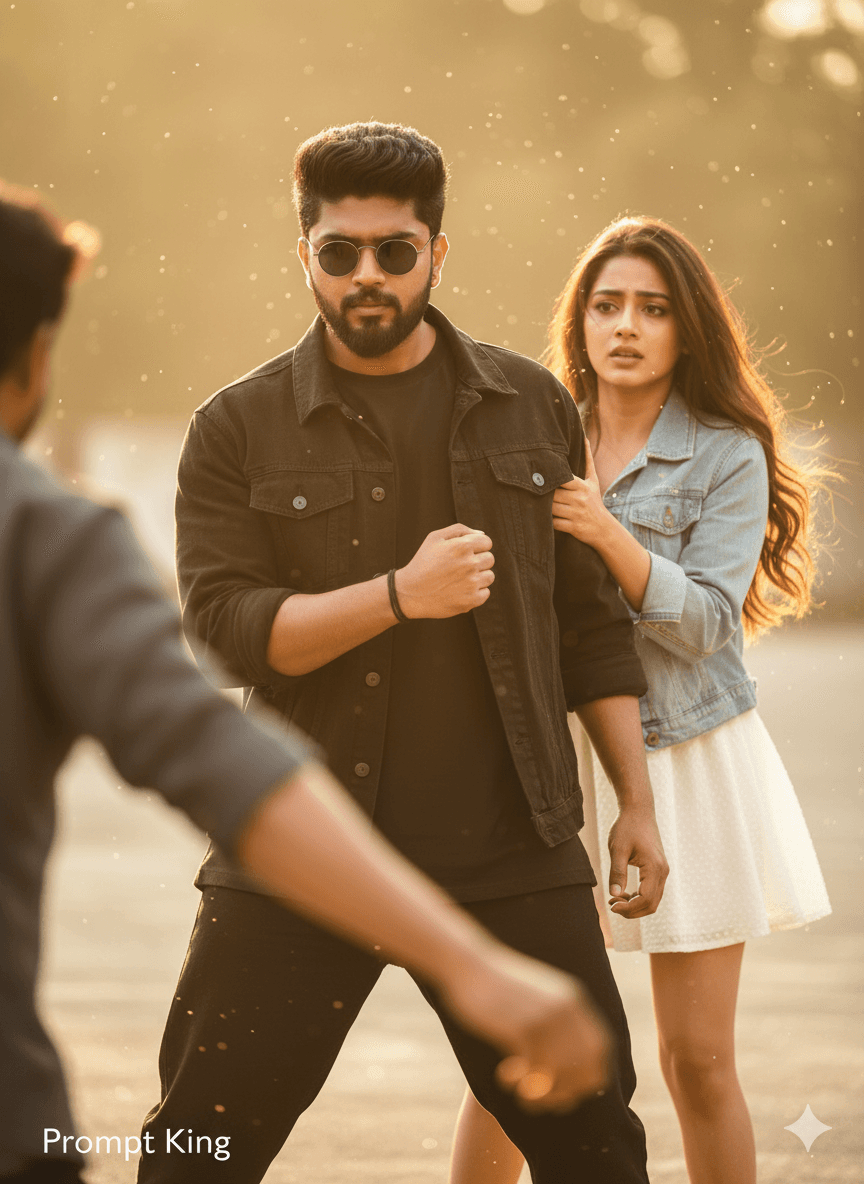
This prompt shows a young Indian man in a tense confrontation, catching a villain's wrist mid-strike and freezing the attack. The face and hairstyle come from the uploaded selfie. He wears a black oversized t-shirt layered with a black denim jacket, black baggy jeans, round black sunglasses and a thin black thread on his wrist. His posture is angled with controlled power, arm muscles visibly tense, and his expression is sharp and fearless. The villain in front is motion-blurred to add cinematic depth, while a young woman stands behind the hero, half hidden behind his shoulder and holding on to him. The whole frame resembles a dramatic still from a regional action film, focused on the moment just before a fight. This prompt suits movie fans, people creating fun hero edits for friends, reel thumbnails or a poster for a short film project. It pairs naturally with the companion protective pose prompt if you want a two-image set telling a short story.
Lighting, colour and composition
Hard directional light picks out the hero's face and tense forearm, while background shadows stay deep. The palette is black and charcoal with soft skin tones and pale accents from the woman's outfit. The diagonal line of the gripping arm leads the eye across the frame toward the blurred villain.
Ways to make it your own
- Change the sunglasses to none if you want the eyes and expression fully visible.
- Add rain or dust particles for extra drama around the frozen strike.
- Use a wide 16:9 frame to show more of the villain and setting.
Best for
Trending photo ideas and creative portrait inspiration.
Suggested framing
Use the aspect ratio or framing described in the prompt, then adapt it for your intended platform.
Customization ideas
Adjust the clothing, background, lighting, colors and composition to match your own idea.
How to use
Copy the prompt, adapt it to your idea, and paste it into your preferred compatible AI tool. Follow that tool’s instructions for reference photos.
A few helpful answers.
What type of image does this prompt create?
In a compatible AI tool, this prompt is intended as a starting point for this prompt shows a young Indian man in a tense confrontation, catching a villain's wrist mid-strike and freezing the attack. The face and hairstyle come from the uploaded selfie. He wears a black oversized t-shirt layered with a black denim jacket, black baggy jeans, round black sunglasses and a thin black thread on his wrist. His posture is angled with controlled power, arm muscles visibly tense, and his expression is sharp and fearless. The villain in front is motion-blurred to add cinematic depth, while a young woman stands behind the hero, half hidden behind his shoulder and holding on to him. The whole frame resembles a dramatic still from a regional action film, focused on the moment just before a fight. This prompt suits movie fans, people creating fun hero edits for friends, reel thumbnails or a poster for a short film project. It pairs naturally with the companion protective pose prompt if you want a two-image set telling a short story. Results depend on the tool, settings and references you use.
Can I customize the clothing or background?
Yes. Replace the clothing, setting or colors in the prompt with your own choices. Keep descriptions consistent and adjust one detail at a time.
What aspect ratio works best?
Start with Use the aspect ratio or framing described in the prompt, then adapt it for your intended platform.. A 4:5 ratio works well for a portrait feed post. Adjust the crop for your intended platform and your tool’s available settings.
Does Prompt King generate the image?
No. Prompt King helps users discover and copy prompts that can be used with compatible AI tools.
Can I use this for social media ideas?
Yes. Use it as creative inspiration and customize the result for your audience. Use photos you have permission to upload, and check your chosen tool’s terms before publishing.




