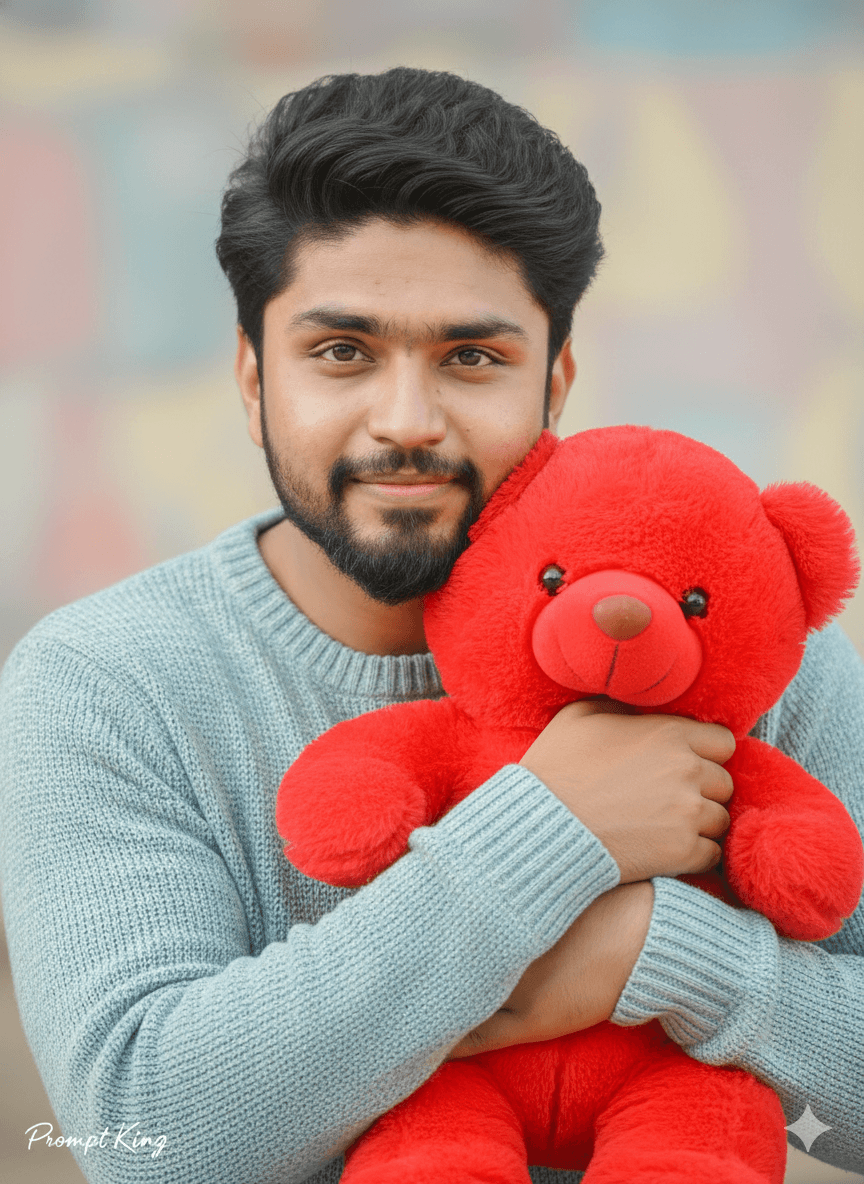
Young Man With Red Teddy Bear in Pastel Light
AI Photo Prompt
Want more trending photo prompts? Discover them in the Prompt King Android app on Google Play.
About this prompt
This Teddy Day prompt creates a soft, close-up portrait of a young man holding a plush red teddy bear near his chest. His expression is gentle, with a small, innocent smile that keeps the mood light rather than dramatic. The skin is rendered with a bright, even glow often described as a Korean glass-skin look, while the rest of the frame stays in soft pastel tones so the red bear becomes the clear point of colour. Natural, diffused light falls on the face without harsh shadows, and the background melts into a dreamy blur. The prompt asks for an 85mm lens look, which gives a flattering, compressed perspective and a shallow depth of field that separates the subject from the backdrop. The output is set to a vertical 9:16 frame, which fits phone wallpapers, social media stories and messaging app status updates. It works well for men who want a sweet, approachable photo to share during Valentine's week, to send to a partner on Teddy Day, or to use as a playful seasonal profile picture. Upload a clear, front-facing photo with even lighting for the closest likeness, and keep the outfit simple so the teddy bear and the warm colour grading remain the focus of the image.
Lighting, colour and composition
Soft, diffused daylight wraps the face evenly with no hard shadows. The palette is built on pastel creams and blush tones, with the red teddy bear acting as the single saturated accent. A tight vertical crop, centred subject and shallow depth of field keep attention on the face and bear, while warm cinematic grading adds a gentle romantic tint.
Ways to make it your own
- Swap the red teddy for a white or beige one if you want an even softer, all-pastel look.
- Add a small handwritten 'Happy Teddy Day' text line in the corner for a ready-to-share greeting.
- Change the aspect ratio to 4:5 if you plan to post it on a social media feed instead of stories.
Best for
Valentine's day photo ideas and creative portrait inspiration.
Suggested framing
Use the aspect ratio or framing described in the prompt, then adapt it for your intended platform.
Customization ideas
Adjust the clothing, background, lighting, colors and composition to match your own idea.
How to use
Copy the prompt, adapt it to your idea, and paste it into your preferred compatible AI tool. Follow that tool’s instructions for reference photos.
A few helpful answers.
What type of image does this prompt create?
In a compatible AI tool, this prompt is intended as a starting point for this Teddy Day prompt creates a soft, close-up portrait of a young man holding a plush red teddy bear near his chest. His expression is gentle, with a small, innocent smile that keeps the mood light rather than dramatic. The skin is rendered with a bright, even glow often described as a Korean glass-skin look, while the rest of the frame stays in soft pastel tones so the red bear becomes the clear point of colour. Natural, diffused light falls on the face without harsh shadows, and the background melts into a dreamy blur. The prompt asks for an 85mm lens look, which gives a flattering, compressed perspective and a shallow depth of field that separates the subject from the backdrop. The output is set to a vertical 9:16 frame, which fits phone wallpapers, social media stories and messaging app status updates. It works well for men who want a sweet, approachable photo to share during Valentine's week, to send to a partner on Teddy Day, or to use as a playful seasonal profile picture. Upload a clear, front-facing photo with even lighting for the closest likeness, and keep the outfit simple so the teddy bear and the warm colour grading remain the focus of the image. Results depend on the tool, settings and references you use.
Can I customize the clothing or background?
Yes. Replace the clothing, setting or colors in the prompt with your own choices. Keep descriptions consistent and adjust one detail at a time.
What aspect ratio works best?
Start with Use the aspect ratio or framing described in the prompt, then adapt it for your intended platform.. A 4:5 ratio works well for a portrait feed post. Adjust the crop for your intended platform and your tool’s available settings.
Does Prompt King generate the image?
No. Prompt King helps users discover and copy prompts that can be used with compatible AI tools.
Can I use this for social media ideas?
Yes. Use it as creative inspiration and customize the result for your audience. Use photos you have permission to upload, and check your chosen tool’s terms before publishing.