Sunset Beach Proposal Under a Rose Heart Arch
AI Photo Prompt
Want more trending photo prompts? Discover them in the Prompt King Android app on Google Play.
About this prompt
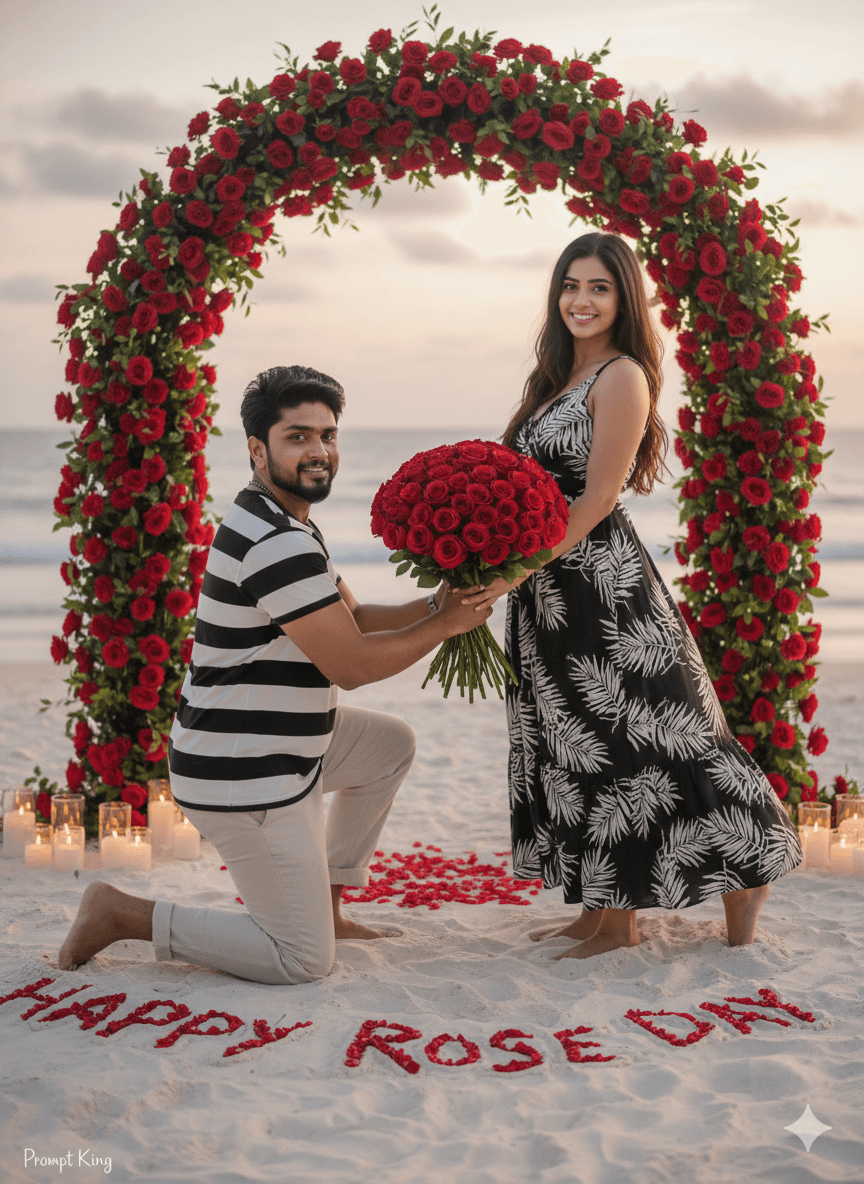
This prompt creates a romantic beach proposal scene at sunset in a 2:3 portrait frame. A barefoot man kneels on white sand wearing a black-and-white striped shirt and beige trousers, offering a large bouquet of red roses. The woman, also barefoot, wears a black sleeveless dress with a white tropical leaf print and smiles softly. Behind them stands a heart-shaped arch made of deep red roses, with glowing candles and petals arranged on the sand, along with the words 'Happy Rose Day'. The sky is a soft pastel gradient, and the calm ocean stretches into the background. Cinematic golden light and a shallow depth of field give the image an 85mm DSLR look, and both partners face the camera, so it reads as a posed celebration photo rather than a candid moment. This style is well suited to couples who love beach holidays, those planning a seaside proposal or engagement announcement, and anyone wanting a destination-style Rose Day image. It also works for anniversary posts. Upload a clear reference of both partners for accurate faces, and adjust the outfit details if you want them to match clothes you already own or plan to wear.
Lighting, colour and composition
Warm golden sunset light mixes with candle glow for soft highlights on faces and sand. The palette blends pastel peach and lavender sky, white sand, deep red roses and monochrome clothing. A 2:3 vertical frame centres the couple under the rose arch, with candles leading the eye from the foreground inward.
Ways to make it your own
- Replace the greeting text with 'Will You Marry Me' for a proposal announcement.
- Switch outfits to all-white linen for a classic beach-wedding style palette.
- Ask for the arch in white roses if you want a softer, more bridal look.
Best for
Valentine's day photo ideas and creative portrait inspiration.
Suggested framing
Use the aspect ratio or framing described in the prompt, then adapt it for your intended platform.
Customization ideas
Adjust the clothing, background, lighting, colors and composition to match your own idea.
How to use
Copy the prompt, adapt it to your idea, and paste it into your preferred compatible AI tool. Follow that tool’s instructions for reference photos.
A few helpful answers.
What type of image does this prompt create?
In a compatible AI tool, this prompt is intended as a starting point for this prompt creates a romantic beach proposal scene at sunset in a 2:3 portrait frame. A barefoot man kneels on white sand wearing a black-and-white striped shirt and beige trousers, offering a large bouquet of red roses. The woman, also barefoot, wears a black sleeveless dress with a white tropical leaf print and smiles softly. Behind them stands a heart-shaped arch made of deep red roses, with glowing candles and petals arranged on the sand, along with the words 'Happy Rose Day'. The sky is a soft pastel gradient, and the calm ocean stretches into the background. Cinematic golden light and a shallow depth of field give the image an 85mm DSLR look, and both partners face the camera, so it reads as a posed celebration photo rather than a candid moment. This style is well suited to couples who love beach holidays, those planning a seaside proposal or engagement announcement, and anyone wanting a destination-style Rose Day image. It also works for anniversary posts. Upload a clear reference of both partners for accurate faces, and adjust the outfit details if you want them to match clothes you already own or plan to wear. Results depend on the tool, settings and references you use.
Can I customize the clothing or background?
Yes. Replace the clothing, setting or colors in the prompt with your own choices. Keep descriptions consistent and adjust one detail at a time.
What aspect ratio works best?
Start with Use the aspect ratio or framing described in the prompt, then adapt it for your intended platform.. A 4:5 ratio works well for a portrait feed post. Adjust the crop for your intended platform and your tool’s available settings.
Does Prompt King generate the image?
No. Prompt King helps users discover and copy prompts that can be used with compatible AI tools.
Can I use this for social media ideas?
Yes. Use it as creative inspiration and customize the result for your audience. Use photos you have permission to upload, and check your chosen tool’s terms before publishing.