Playful Chocolate Rain Scene for Couples
AI Photo Prompt
Want more trending photo prompts? Discover them in the Prompt King Android app on Google Play.
About this prompt
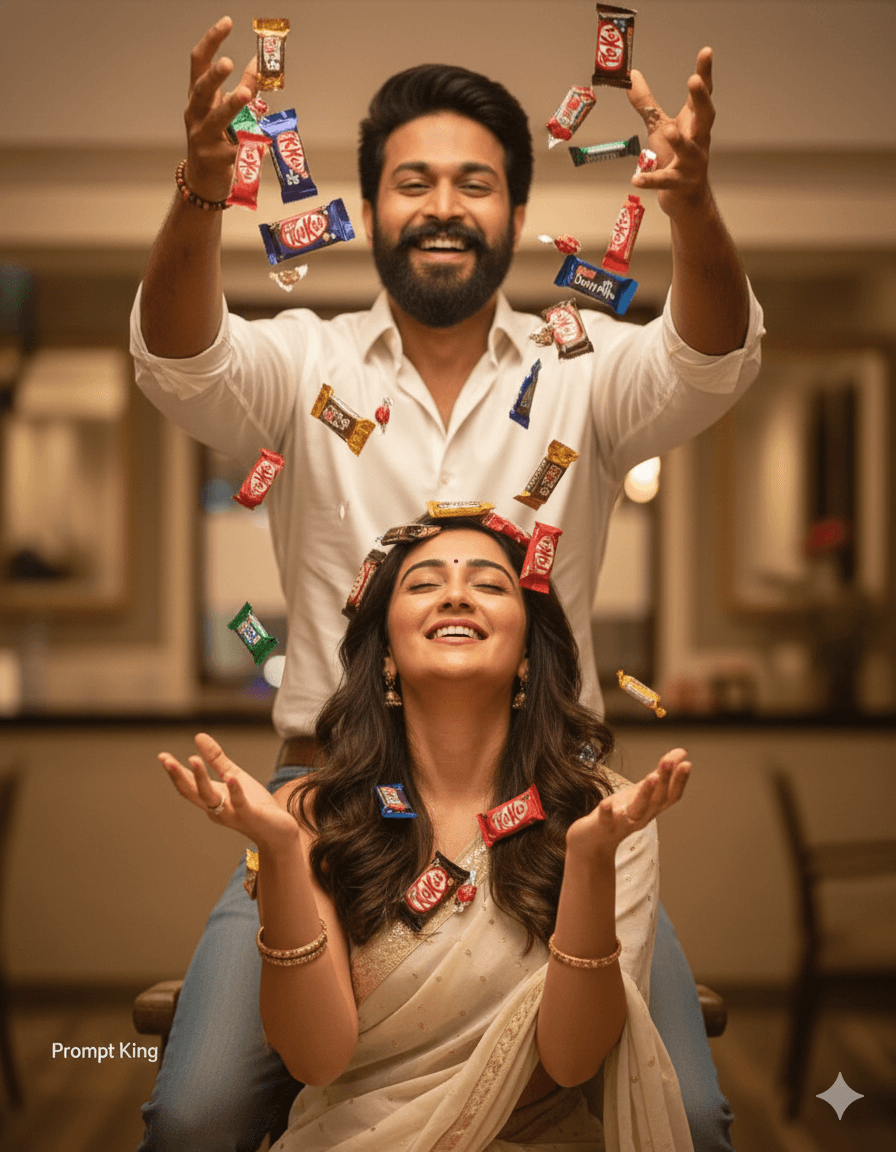
This prompt captures a joyful, playful moment between a young couple on Chocolate Day. The man stands slightly above or in front of the woman and tosses handfuls of wrapped chocolates into the air with both hands, creating a shower of falling treats. The woman stands below him, smiling happily with her eyes slightly closed, enjoying the moment as chocolates drop around her and into her open hands. The image is ultra-realistic, with motion frozen mid-air so individual chocolates are visible as they fall. The scene feels lively and cheerful rather than formal, making it ideal for couples who want a fun, energetic picture instead of a standard posed portrait. It works especially well for Chocolate Day on 9 February, Valentine's week stories, or a light-hearted anniversary post. Because the action is the main focus, a simple, softly blurred background suits it best, such as a bright room or an outdoor garden. The prompt is designed for two people, so a reference photo showing both faces clearly will give a more accurate result. Keep both partners in casual or semi-formal outfits so the colourful wrappers stand out in the frame and the mood stays playful.
Lighting, colour and composition
Bright, even lighting freezes the falling chocolates with crisp detail. Colourful wrappers in red, gold and purple add scattered pops of colour against neutral clothing. The vertical composition stacks the man's raised hands at the top and the smiling woman below, with motion leading the eye downward through the frame.
Ways to make it your own
- Mix in falling rose petals with the chocolates for a softer romantic effect.
- Specify a pastel studio backdrop to make the colourful wrappers stand out clearly.
- Ask for slight motion blur on the chocolates to make the action feel more dynamic.
Best for
Valentine's day photo ideas and creative portrait inspiration.
Suggested framing
Use the aspect ratio or framing described in the prompt, then adapt it for your intended platform.
Customization ideas
Adjust the clothing, background, lighting, colors and composition to match your own idea.
How to use
Copy the prompt, adapt it to your idea, and paste it into your preferred compatible AI tool. Follow that tool’s instructions for reference photos.
A few helpful answers.
What type of image does this prompt create?
In a compatible AI tool, this prompt is intended as a starting point for this prompt captures a joyful, playful moment between a young couple on Chocolate Day. The man stands slightly above or in front of the woman and tosses handfuls of wrapped chocolates into the air with both hands, creating a shower of falling treats. The woman stands below him, smiling happily with her eyes slightly closed, enjoying the moment as chocolates drop around her and into her open hands. The image is ultra-realistic, with motion frozen mid-air so individual chocolates are visible as they fall. The scene feels lively and cheerful rather than formal, making it ideal for couples who want a fun, energetic picture instead of a standard posed portrait. It works especially well for Chocolate Day on 9 February, Valentine's week stories, or a light-hearted anniversary post. Because the action is the main focus, a simple, softly blurred background suits it best, such as a bright room or an outdoor garden. The prompt is designed for two people, so a reference photo showing both faces clearly will give a more accurate result. Keep both partners in casual or semi-formal outfits so the colourful wrappers stand out in the frame and the mood stays playful. Results depend on the tool, settings and references you use.
Can I customize the clothing or background?
Yes. Replace the clothing, setting or colors in the prompt with your own choices. Keep descriptions consistent and adjust one detail at a time.
What aspect ratio works best?
Start with Use the aspect ratio or framing described in the prompt, then adapt it for your intended platform.. A 4:5 ratio works well for a portrait feed post. Adjust the crop for your intended platform and your tool’s available settings.
Does Prompt King generate the image?
No. Prompt King helps users discover and copy prompts that can be used with compatible AI tools.
Can I use this for social media ideas?
Yes. Use it as creative inspiration and customize the result for your audience. Use photos you have permission to upload, and check your chosen tool’s terms before publishing.