Navy Suit Ring Proposal With Champagne Gown
AI Photo Prompt
Want more trending photo prompts? Discover them in the Prompt King Android app on Google Play.
About this prompt
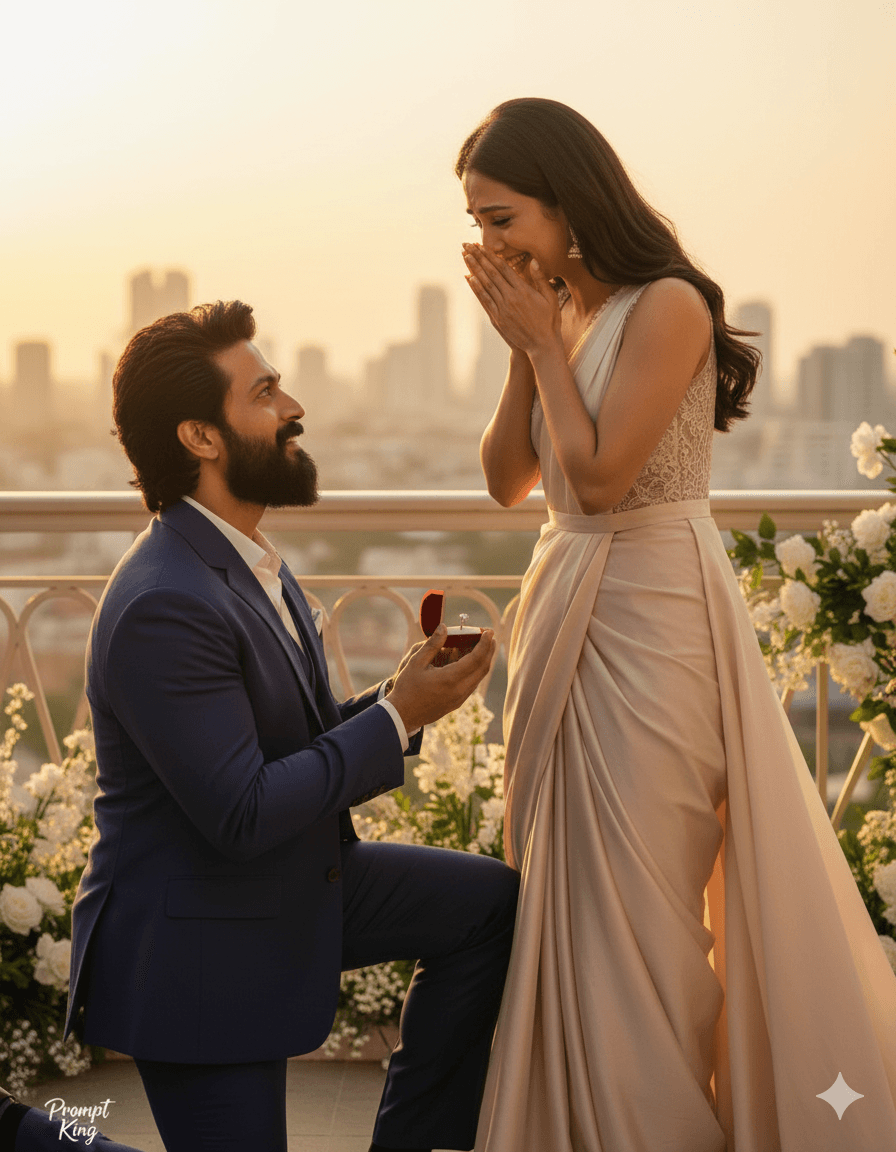
This prompt creates an emotional, high-end proposal scene. A man in a tailored dark blue suit presents a ring, while the woman, dressed in a pastel champagne-coloured gown, reacts with visible emotion and happiness. Both are rendered with bright, smooth, glowing skin in a Korean beauty style, and the prompt emphasises storytelling through their expressions. Warm golden light bathes the couple, and a shallow depth of field blurs the background so that the focus stays on their faces and the ring. The colour grading is cinematic and warm, giving the image a polished, film-still appearance. An 85mm lens look adds natural compression and flattering proportions. The output is set to a vertical frame, which suits phone screens and social media stories. This style is well suited to Propose Day, engagement announcements, anniversary posts or couples who simply want a formal, elegant romantic image. The luxurious outfits make it feel more like a premium photoshoot than a casual snapshot. Upload a reference image showing both partners clearly, and consider describing a location such as a ballroom, garden or terrace to further personalise the background while keeping the warm golden tone.
Lighting, colour and composition
Warm golden key light gives a soft glow to faces and fabrics. The palette pairs deep navy with champagne, ivory and gold, creating elegant contrast. The couple is framed at medium distance in a vertical crop, with shallow depth of field and warm, cinematic colour grading supporting the emotional storytelling.
Ways to make it your own
- Specify a grand staircase or ballroom background for a more formal, luxury setting.
- Switch the gown colour to blush pink or ivory to match a bridal-style theme.
- Ask for the ring to sparkle with a small highlight so it reads clearly in the frame.
Best for
Valentine's day photo ideas and creative portrait inspiration.
Suggested framing
Use the aspect ratio or framing described in the prompt, then adapt it for your intended platform.
Customization ideas
Adjust the clothing, background, lighting, colors and composition to match your own idea.
How to use
Copy the prompt, adapt it to your idea, and paste it into your preferred compatible AI tool. Follow that tool’s instructions for reference photos.
A few helpful answers.
What type of image does this prompt create?
In a compatible AI tool, this prompt is intended as a starting point for this prompt creates an emotional, high-end proposal scene. A man in a tailored dark blue suit presents a ring, while the woman, dressed in a pastel champagne-coloured gown, reacts with visible emotion and happiness. Both are rendered with bright, smooth, glowing skin in a Korean beauty style, and the prompt emphasises storytelling through their expressions. Warm golden light bathes the couple, and a shallow depth of field blurs the background so that the focus stays on their faces and the ring. The colour grading is cinematic and warm, giving the image a polished, film-still appearance. An 85mm lens look adds natural compression and flattering proportions. The output is set to a vertical frame, which suits phone screens and social media stories. This style is well suited to Propose Day, engagement announcements, anniversary posts or couples who simply want a formal, elegant romantic image. The luxurious outfits make it feel more like a premium photoshoot than a casual snapshot. Upload a reference image showing both partners clearly, and consider describing a location such as a ballroom, garden or terrace to further personalise the background while keeping the warm golden tone. Results depend on the tool, settings and references you use.
Can I customize the clothing or background?
Yes. Replace the clothing, setting or colors in the prompt with your own choices. Keep descriptions consistent and adjust one detail at a time.
What aspect ratio works best?
Start with Use the aspect ratio or framing described in the prompt, then adapt it for your intended platform.. A 4:5 ratio works well for a portrait feed post. Adjust the crop for your intended platform and your tool’s available settings.
Does Prompt King generate the image?
No. Prompt King helps users discover and copy prompts that can be used with compatible AI tools.
Can I use this for social media ideas?
Yes. Use it as creative inspiration and customize the result for your audience. Use photos you have permission to upload, and check your chosen tool’s terms before publishing.