Kneeling Birthday Portrait With Cake and Golden Balloons
AI Photo Prompt
Want more trending photo prompts? Discover them in the Prompt King Android app on Google Play.
About this prompt
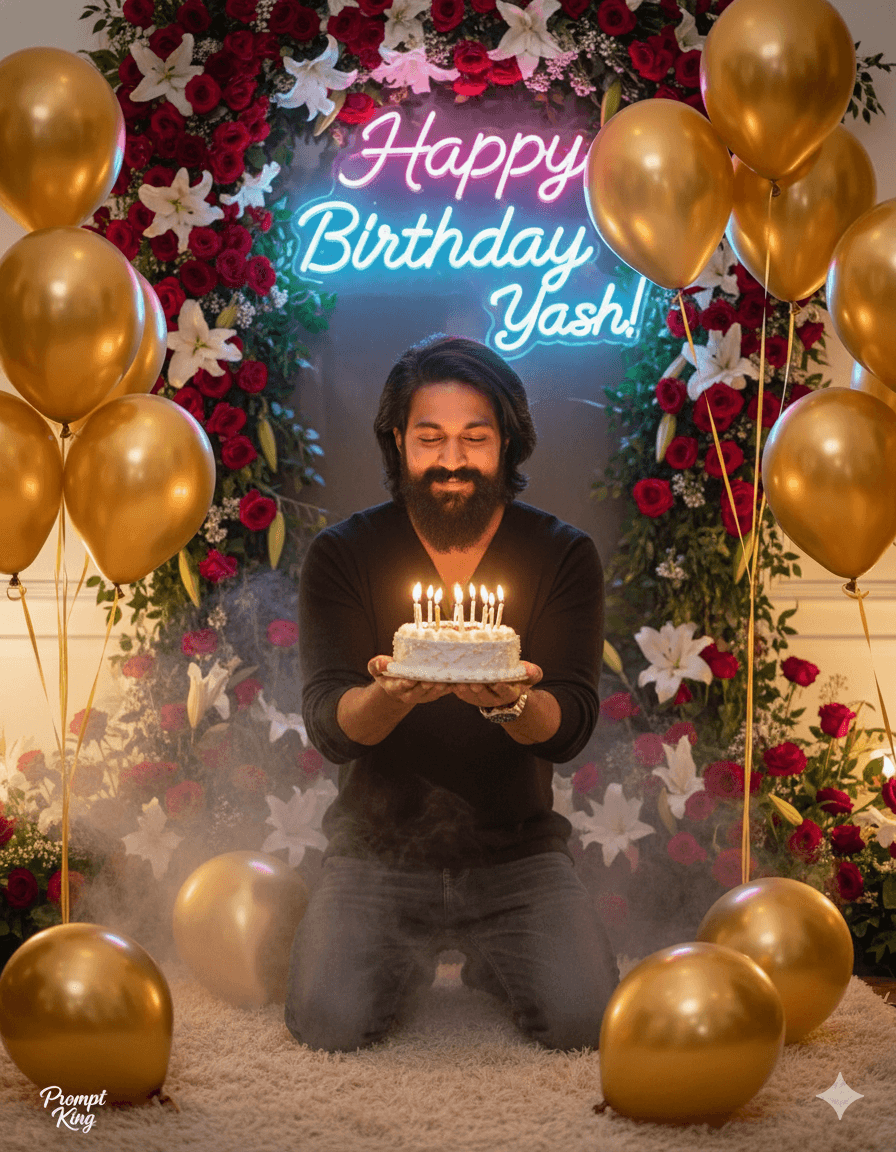
This birthday prompt creates a close-up of a young man kneeling in a decorated celebration space while holding a small cake with lit candles. Golden balloons surround him, and behind him a glowing neon sign spells out a birthday greeting with a name. Arrangements of red and white flowers fill the background, and a light haze of smoke softens the scene so the neon and candle glow stand out. The kneeling pose and the cake held close to the chest give the image a warm, personal feeling, as if the subject is about to make a wish. Framing is tight enough to keep the face prominent while still showing the balloons and sign. The prompt suits personal birthday posts, WhatsApp status updates, party invitations and thank-you messages after a celebration. Friends can also use it to make a surprise greeting for someone else, as long as they have permission to use that person's photo. The original prompt includes a specific first name on the neon sign; replace it with your own name or the birthday person's name before generating. A small Prompt King signature appears in the lower left corner and can be edited out.
Lighting, colour and composition
Warm candlelight and the pink-white glow of the neon sign set a festive, intimate mood. Gold balloons and red-white florals form a rich celebratory palette, softened by a faint smoke effect. The tight close-up composition centres the kneeling subject and cake, with background decorations softly blurred to keep focus on the face.
Ways to make it your own
- Change the neon text to your own name and age, for example 'Happy 25th Birthday Arjun'.
- Swap golden balloons for silver, rose-gold or pastel balloons to match your party theme.
- Use a 9:16 aspect ratio if you plan to share the image as a story or status.
Best for
Birthday photo ideas and creative portrait inspiration.
Suggested framing
Use the aspect ratio or framing described in the prompt, then adapt it for your intended platform.
Customization ideas
Adjust the clothing, background, lighting, colors and composition to match your own idea.
How to use
Copy the prompt, adapt it to your idea, and paste it into your preferred compatible AI tool. Follow that tool’s instructions for reference photos.
A few helpful answers.
What type of image does this prompt create?
In a compatible AI tool, this prompt is intended as a starting point for this birthday prompt creates a close-up of a young man kneeling in a decorated celebration space while holding a small cake with lit candles. Golden balloons surround him, and behind him a glowing neon sign spells out a birthday greeting with a name. Arrangements of red and white flowers fill the background, and a light haze of smoke softens the scene so the neon and candle glow stand out. The kneeling pose and the cake held close to the chest give the image a warm, personal feeling, as if the subject is about to make a wish. Framing is tight enough to keep the face prominent while still showing the balloons and sign. The prompt suits personal birthday posts, WhatsApp status updates, party invitations and thank-you messages after a celebration. Friends can also use it to make a surprise greeting for someone else, as long as they have permission to use that person's photo. The original prompt includes a specific first name on the neon sign; replace it with your own name or the birthday person's name before generating. A small Prompt King signature appears in the lower left corner and can be edited out. Results depend on the tool, settings and references you use.
Can I customize the clothing or background?
Yes. Replace the clothing, setting or colors in the prompt with your own choices. Keep descriptions consistent and adjust one detail at a time.
What aspect ratio works best?
Start with Use the aspect ratio or framing described in the prompt, then adapt it for your intended platform.. A 4:5 ratio works well for a portrait feed post. Adjust the crop for your intended platform and your tool’s available settings.
Does Prompt King generate the image?
No. Prompt King helps users discover and copy prompts that can be used with compatible AI tools.
Can I use this for social media ideas?
Yes. Use it as creative inspiration and customize the result for your audience. Use photos you have permission to upload, and check your chosen tool’s terms before publishing.