Checked Shirt Couple Under a Tree With Rose
AI Photo Prompt
Want more trending photo prompts? Discover them in the Prompt King Android app on Google Play.
About this prompt
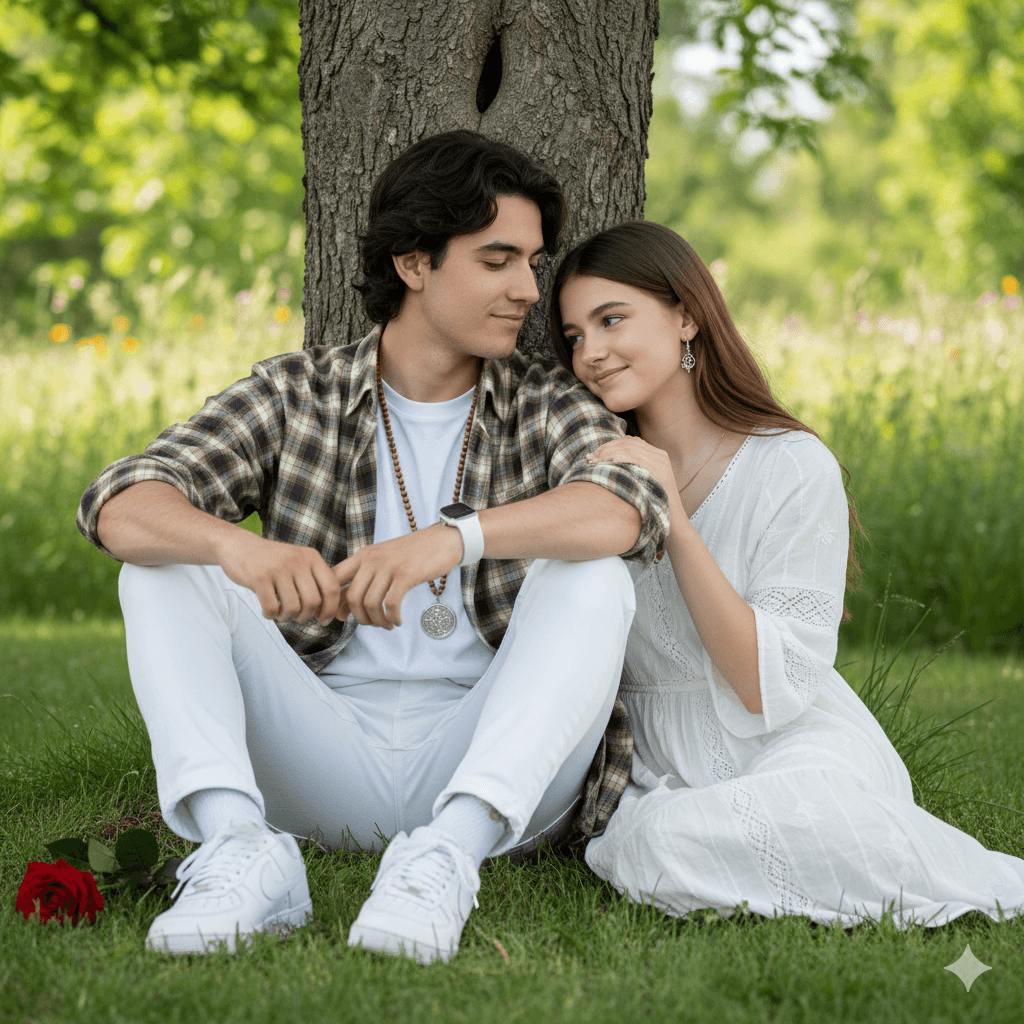
This outdoor prompt shows a young man sitting on the grass with his back against a tree. He wears a brown checked shirt over a white T-shirt, white slim-fit trousers and white sneakers, with a white smartwatch on his left wrist and a mala-style locket around his neck. A red rose lies on the grass beside him. Soft natural light and blurred greenery create a calm, dreamy scene, and the prompt ends by introducing a young woman sitting nearby, making it a couple image. The face, hairstyle, nose and lips are meant to match the reference closely, so use a clear photo. This prompt suits Valentine's Day, Rose Day, anniversary posts and casual couple profile pictures. The original version is cut off just after introducing the woman, so add details about where she sits, what she wears and how they interact, for example 'sitting beside him in a pastel kurti, smiling as he offers her the rose'. The prompt names a sneaker brand and smartwatch brand, which can be kept or described generically. A small Prompt King signature is requested in the corner.
Lighting, colour and composition
Soft, natural daylight under the tree gives gentle shadows and an even glow. Brown checks, white clothing and a single red rose sit against fresh green grass and foliage. The composition centres the seated man against the tree trunk, leaving space beside him for the second person.
Ways to make it your own
- Finish the cut-off line by describing the woman's outfit and pose.
- Have him offer the rose to her for a clear romantic moment.
- Describe generic white sneakers and smartwatch if you prefer no brand names.
Best for
Couple photo ideas and creative portrait inspiration.
Suggested framing
Use the aspect ratio or framing described in the prompt, then adapt it for your intended platform.
Customization ideas
Adjust the clothing, background, lighting, colors and composition to match your own idea.
How to use
Copy the prompt, adapt it to your idea, and paste it into your preferred compatible AI tool. Follow that tool’s instructions for reference photos.
A few helpful answers.
What type of image does this prompt create?
In a compatible AI tool, this prompt is intended as a starting point for this outdoor prompt shows a young man sitting on the grass with his back against a tree. He wears a brown checked shirt over a white T-shirt, white slim-fit trousers and white sneakers, with a white smartwatch on his left wrist and a mala-style locket around his neck. A red rose lies on the grass beside him. Soft natural light and blurred greenery create a calm, dreamy scene, and the prompt ends by introducing a young woman sitting nearby, making it a couple image. The face, hairstyle, nose and lips are meant to match the reference closely, so use a clear photo. This prompt suits Valentine's Day, Rose Day, anniversary posts and casual couple profile pictures. The original version is cut off just after introducing the woman, so add details about where she sits, what she wears and how they interact, for example 'sitting beside him in a pastel kurti, smiling as he offers her the rose'. The prompt names a sneaker brand and smartwatch brand, which can be kept or described generically. A small Prompt King signature is requested in the corner. Results depend on the tool, settings and references you use.
Can I customize the clothing or background?
Yes. Replace the clothing, setting or colors in the prompt with your own choices. Keep descriptions consistent and adjust one detail at a time.
What aspect ratio works best?
Start with Use the aspect ratio or framing described in the prompt, then adapt it for your intended platform.. A 4:5 ratio works well for a portrait feed post. Adjust the crop for your intended platform and your tool’s available settings.
Does Prompt King generate the image?
No. Prompt King helps users discover and copy prompts that can be used with compatible AI tools.
Can I use this for social media ideas?
Yes. Use it as creative inspiration and customize the result for your audience. Use photos you have permission to upload, and check your chosen tool’s terms before publishing.