Cartoon Cat and Mouse Selfie With a Young Girl
AI Photo Prompt
Want more trending photo prompts? Discover them in the Prompt King Android app on Google Play.
About this prompt
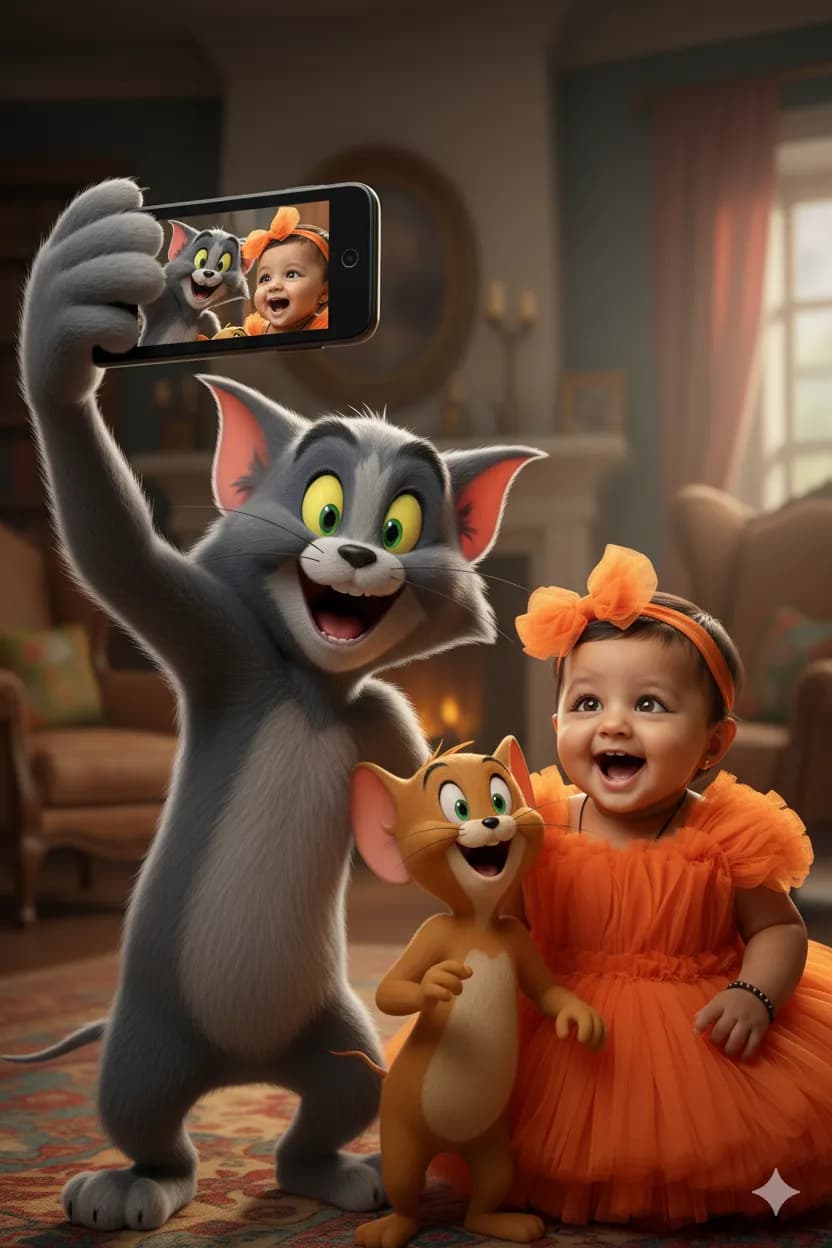
This playful children's prompt creates a selfie scene featuring a young girl alongside a well-known cartoon cat and mouse pair. The grey cat with yellow eyes holds a black smartphone in his paw, angled toward the camera, with a wide, excited grin. The brown mouse stands beside him smiling with his mouth open, and the girl stands next to the mouse, copying the same position and cheerful expression from the uploaded photo. The result is a mix of real-life photography and cartoon characters, which makes it fun for kids' birthday posts, school holiday photos and family sharing. Because the characters are trademarked, this image is best kept for private, personal use rather than printed merchandise or commercial posts. You can also replace the characters with a generic grey cat and small brown mouse to keep the same playful idea without the specific cartoon designs. Use a clear, front-facing photo of the child with good lighting. The prompt asks for the same face, body and hair as the uploaded image, so a full-body reference gives the most accurate result.
Lighting, colour and composition
Bright, even lighting suits the cheerful cartoon-meets-real look. The palette uses the cat's grey, the mouse's brown and the child's outfit colours against a simple background. A tight, selfie-style composition places all three characters close together, with the phone angled toward the viewer in the foreground.
Ways to make it your own
- Replace the cartoon characters with a generic cat and mouse to avoid trademarked designs.
- Add colourful birthday hats and confetti around everyone for a party-themed selfie.
- Use a full-body reference photo so the child's outfit is carried over accurately.
Best for
Children photo ideas and creative portrait inspiration.
Suggested framing
Use the aspect ratio or framing described in the prompt, then adapt it for your intended platform.
Customization ideas
Adjust the clothing, background, lighting, colors and composition to match your own idea.
How to use
Copy the prompt, adapt it to your idea, and paste it into your preferred compatible AI tool. Follow that tool’s instructions for reference photos.
A few helpful answers.
What type of image does this prompt create?
In a compatible AI tool, this prompt is intended as a starting point for this playful children's prompt creates a selfie scene featuring a young girl alongside a well-known cartoon cat and mouse pair. The grey cat with yellow eyes holds a black smartphone in his paw, angled toward the camera, with a wide, excited grin. The brown mouse stands beside him smiling with his mouth open, and the girl stands next to the mouse, copying the same position and cheerful expression from the uploaded photo. The result is a mix of real-life photography and cartoon characters, which makes it fun for kids' birthday posts, school holiday photos and family sharing. Because the characters are trademarked, this image is best kept for private, personal use rather than printed merchandise or commercial posts. You can also replace the characters with a generic grey cat and small brown mouse to keep the same playful idea without the specific cartoon designs. Use a clear, front-facing photo of the child with good lighting. The prompt asks for the same face, body and hair as the uploaded image, so a full-body reference gives the most accurate result. Results depend on the tool, settings and references you use.
Can I customize the clothing or background?
Yes. Replace the clothing, setting or colors in the prompt with your own choices. Keep descriptions consistent and adjust one detail at a time.
What aspect ratio works best?
Start with Use the aspect ratio or framing described in the prompt, then adapt it for your intended platform.. A 4:5 ratio works well for a portrait feed post. Adjust the crop for your intended platform and your tool’s available settings.
Does Prompt King generate the image?
No. Prompt King helps users discover and copy prompts that can be used with compatible AI tools.
Can I use this for social media ideas?
Yes. Use it as creative inspiration and customize the result for your audience. Use photos you have permission to upload, and check your chosen tool’s terms before publishing.