Blue Chiffon Saree Couple Back-to-Back in Cloud Garden
AI Photo Prompt
Want more trending photo prompts? Discover them in the Prompt King Android app on Google Play.
About this prompt
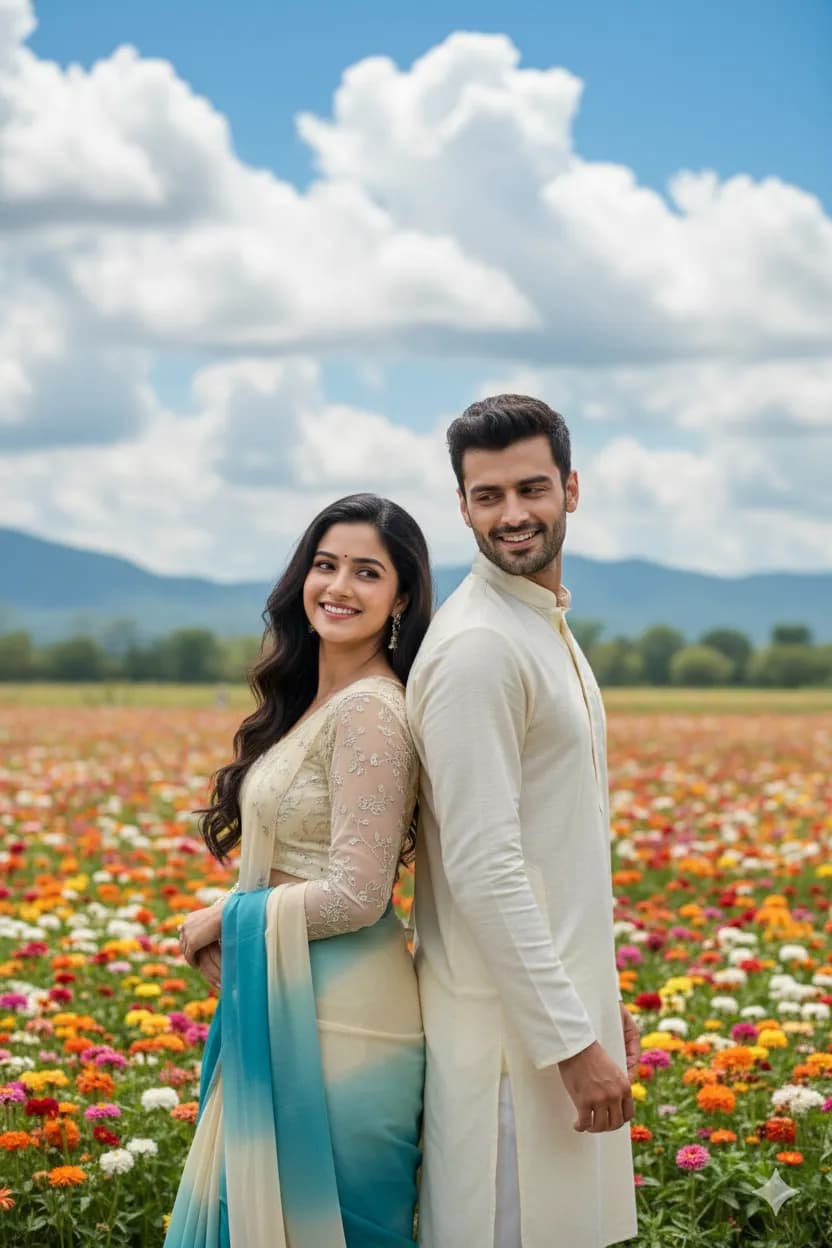
This couple prompt shows a woman with long, dark, wavy hair in a dual blue and cream chiffon saree with a full-sleeve blouse, posing joyfully in the style of a classic Bollywood song sequence. Her partner stands back-to-back with her in a cream kurta, looking sideways. The background is a dreamy flower garden with clouds drifting through, giving the scene a filmy, fantasy feel. Both faces are meant to stay the same as the uploaded photos, so clear images of each person are important. This style suits anniversary posts, pre-wedding save-the-date images, Valentine's Day greetings and couple profile pictures. The playful pose and soft colours make it feel light and romantic rather than formal. Because the prompt includes two people, results may need a couple of attempts to get both likenesses right; uploading a single photo of the couple together often helps. The coordinated blue and cream palette ties the two outfits together. If you prefer a different look, the chiffon saree can be swapped for a lehenga, or the kurta changed to a sherwani for a wedding theme.
Lighting, colour and composition
Soft, bright daylight with a hazy glow suits the dreamy setting. Blue and cream outfits are coordinated against colourful flowers and white clouds. A back-to-back composition places the couple in the centre with the woman slightly forward, framed by flowers and drifting clouds for a filmy fantasy look.
Ways to make it your own
- Upload one clear photo of the couple together to improve both likenesses.
- Change the saree to red and the kurta to gold for a wedding anniversary theme.
- Add falling rose petals for a more romantic film-song moment.
Best for
Couple photo ideas and creative portrait inspiration.
Suggested framing
Use the aspect ratio or framing described in the prompt, then adapt it for your intended platform.
Customization ideas
Adjust the clothing, background, lighting, colors and composition to match your own idea.
How to use
Copy the prompt, adapt it to your idea, and paste it into your preferred compatible AI tool. Follow that tool’s instructions for reference photos.
A few helpful answers.
What type of image does this prompt create?
In a compatible AI tool, this prompt is intended as a starting point for this couple prompt shows a woman with long, dark, wavy hair in a dual blue and cream chiffon saree with a full-sleeve blouse, posing joyfully in the style of a classic Bollywood song sequence. Her partner stands back-to-back with her in a cream kurta, looking sideways. The background is a dreamy flower garden with clouds drifting through, giving the scene a filmy, fantasy feel. Both faces are meant to stay the same as the uploaded photos, so clear images of each person are important. This style suits anniversary posts, pre-wedding save-the-date images, Valentine's Day greetings and couple profile pictures. The playful pose and soft colours make it feel light and romantic rather than formal. Because the prompt includes two people, results may need a couple of attempts to get both likenesses right; uploading a single photo of the couple together often helps. The coordinated blue and cream palette ties the two outfits together. If you prefer a different look, the chiffon saree can be swapped for a lehenga, or the kurta changed to a sherwani for a wedding theme. Results depend on the tool, settings and references you use.
Can I customize the clothing or background?
Yes. Replace the clothing, setting or colors in the prompt with your own choices. Keep descriptions consistent and adjust one detail at a time.
What aspect ratio works best?
Start with Use the aspect ratio or framing described in the prompt, then adapt it for your intended platform.. A 4:5 ratio works well for a portrait feed post. Adjust the crop for your intended platform and your tool’s available settings.
Does Prompt King generate the image?
No. Prompt King helps users discover and copy prompts that can be used with compatible AI tools.
Can I use this for social media ideas?
Yes. Use it as creative inspiration and customize the result for your audience. Use photos you have permission to upload, and check your chosen tool’s terms before publishing.