
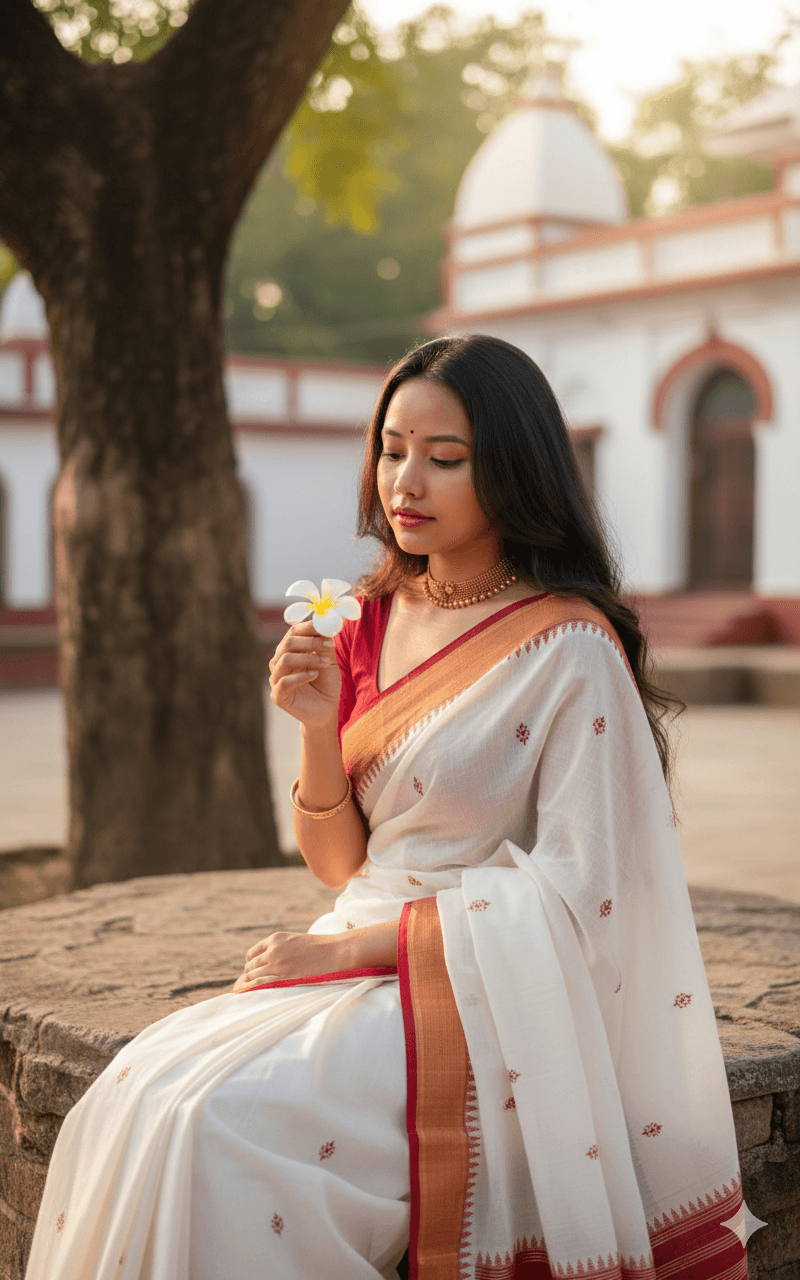
White Saree With Red Border and Plumeria Flower
AI Photo Prompt
Want more trending photo prompts? Discover them in the Prompt King Android app on Google Play.
About this prompt
A candid, sunlit portrait of a young woman, based on your uploaded image, with long, dark wavy hair cascading over one shoulder. She looks down softly at a white plumeria, also called frangipani, held delicately in her right hand. She wears a traditional white saree with a deep red border, white embroidery along the border and small red woven motifs, a style associated with Bengali and Assamese weaves. A gold choker and a simple gold bangle on her right wrist complete the look. She sits on a stone platform beneath a large, textured tree trunk on the left, and in the blurred background stands a traditional building with white and red accents, suggesting a temple courtyard or old home. Warm golden late-afternoon light casts a soft glow on her face, and the mood is serene, contemplative and graceful. Professional portrait framing with shallow depth of field keeps the focus on her and the flower. It suits Durga Puja and Pohela Boishakh greetings, Bihu posts, a calm traditional profile picture, or a heritage-themed photography series.
Lighting, colour and composition
Warm golden-hour light from the side gives a soft glow on skin and a gentle shine on the gold choker. The palette is white and deep red with warm stone, bark brown and soft green. A seated medium composition uses the tree trunk as a natural frame on the left, with background architecture blurred.
Ways to make it your own
- Change the white plumeria to a red hibiscus to echo the saree border colour.
- Add a red bindi and sindoor-inspired styling for a Durga Puja look.
- Use a 3:4 vertical crop to include more of the tree trunk and courtyard.
Best for
Girls photo ideas and creative portrait inspiration.
Suggested framing
Use the aspect ratio or framing described in the prompt, then adapt it for your intended platform.
Customization ideas
Adjust the clothing, background, lighting, colors and composition to match your own idea.
How to use
Copy the prompt, adapt it to your idea, and paste it into your preferred compatible AI tool. Follow that tool’s instructions for reference photos.
A few helpful answers.
What type of image does this prompt create?
In a compatible AI tool, this prompt is intended as a starting point for a candid, sunlit portrait of a young woman, based on your uploaded image, with long, dark wavy hair cascading over one shoulder. She looks down softly at a white plumeria, also called frangipani, held delicately in her right hand. She wears a traditional white saree with a deep red border, white embroidery along the border and small red woven motifs, a style associated with Bengali and Assamese weaves. A gold choker and a simple gold bangle on her right wrist complete the look. She sits on a stone platform beneath a large, textured tree trunk on the left, and in the blurred background stands a traditional building with white and red accents, suggesting a temple courtyard or old home. Warm golden late-afternoon light casts a soft glow on her face, and the mood is serene, contemplative and graceful. Professional portrait framing with shallow depth of field keeps the focus on her and the flower. It suits Durga Puja and Pohela Boishakh greetings, Bihu posts, a calm traditional profile picture, or a heritage-themed photography series. Results depend on the tool, settings and references you use.
Can I customize the clothing or background?
Yes. Replace the clothing, setting or colors in the prompt with your own choices. Keep descriptions consistent and adjust one detail at a time.
What aspect ratio works best?
Start with Use the aspect ratio or framing described in the prompt, then adapt it for your intended platform.. A 4:5 ratio works well for a portrait feed post. Adjust the crop for your intended platform and your tool’s available settings.
Does Prompt King generate the image?
No. Prompt King helps users discover and copy prompts that can be used with compatible AI tools.
Can I use this for social media ideas?
Yes. Use it as creative inspiration and customize the result for your audience. Use photos you have permission to upload, and check your chosen tool’s terms before publishing.




