White and Gold Saree Portrait Near Temple
AI Photo Prompt
Want more trending photo prompts? Discover them in the Prompt King Android app on Google Play.
About this prompt
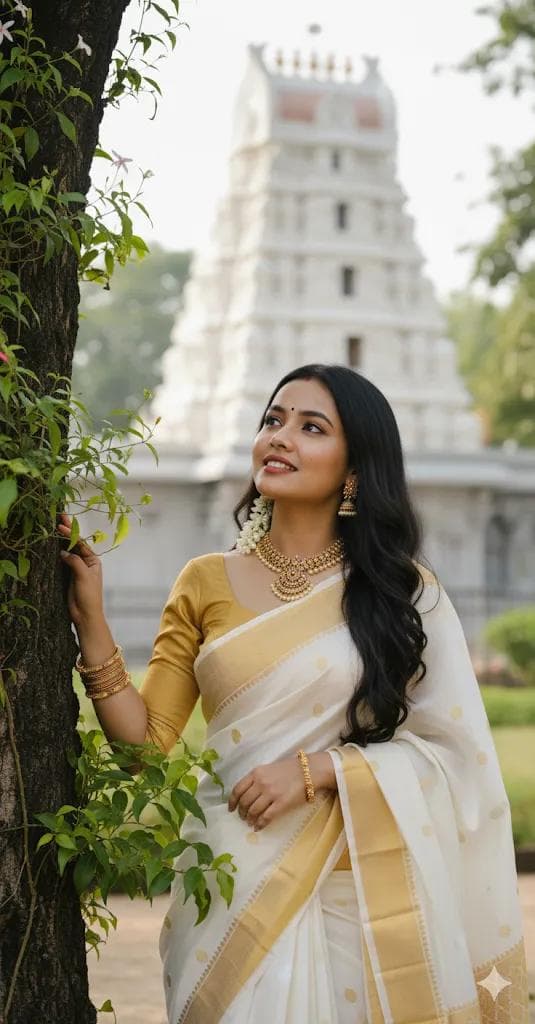
This South Indian portrait prompt places your face onto a young woman standing outdoors, leaning gently against a tree while lush green leaves frame her face. She has long, dark hair decorated with a fresh jasmine gajra and wears a traditional white and gold saree paired with a golden full-sleeve blouse. Her jewellery includes a statement necklace, jhumka earrings and bangles, all in intricate gold work that complements the saree border. She looks upward with a gentle smile, giving the image a hopeful, devotional feel. In the background stands a white temple in the southern style, inspired by the Balaji shrines, which ties the portrait to a sense of place and tradition. The prompt specifically asks to keep the exact face from the uploaded image, so likeness is a priority. This makes it a good choice for festival greetings, temple visit memories, or a traditional profile picture during occasions such as Onam, Pongal or Ugadi. Upload a clear photo with your face fully visible and evenly lit. A slight upward angle in the reference helps the pose look natural, though a straight front-facing shot also works well for most users.
Lighting, colour and composition
Natural daylight filters through green foliage, creating a fresh, gentle frame around the face. Ivory and gold dominate the outfit, balanced by deep green leaves and the bright white temple behind. A soft background blur keeps the shrine recognisable without distracting from the upward gaze and warm, devotional expression.
Ways to make it your own
- Upload a clear, evenly lit photo, since the prompt asks to keep the exact face from your image.
- A reference with a slight upward glance helps the gentle, skyward pose look natural.
- Replace the temple in the prompt with a local shrine if you want a more personal background.
Best for
South India photo ideas and creative portrait inspiration.
Suggested framing
Use the aspect ratio or framing described in the prompt, then adapt it for your intended platform.
Customization ideas
Adjust the clothing, background, lighting, colors and composition to match your own idea.
How to use
Copy the prompt, adapt it to your idea, and paste it into your preferred compatible AI tool. Follow that tool’s instructions for reference photos.
A few helpful answers.
What type of image does this prompt create?
In a compatible AI tool, this prompt is intended as a starting point for this South Indian portrait prompt places your face onto a young woman standing outdoors, leaning gently against a tree while lush green leaves frame her face. She has long, dark hair decorated with a fresh jasmine gajra and wears a traditional white and gold saree paired with a golden full-sleeve blouse. Her jewellery includes a statement necklace, jhumka earrings and bangles, all in intricate gold work that complements the saree border. She looks upward with a gentle smile, giving the image a hopeful, devotional feel. In the background stands a white temple in the southern style, inspired by the Balaji shrines, which ties the portrait to a sense of place and tradition. The prompt specifically asks to keep the exact face from the uploaded image, so likeness is a priority. This makes it a good choice for festival greetings, temple visit memories, or a traditional profile picture during occasions such as Onam, Pongal or Ugadi. Upload a clear photo with your face fully visible and evenly lit. A slight upward angle in the reference helps the pose look natural, though a straight front-facing shot also works well for most users. Results depend on the tool, settings and references you use.
Can I customize the clothing or background?
Yes. Replace the clothing, setting or colors in the prompt with your own choices. Keep descriptions consistent and adjust one detail at a time.
What aspect ratio works best?
Start with Use the aspect ratio or framing described in the prompt, then adapt it for your intended platform.. A 4:5 ratio works well for a portrait feed post. Adjust the crop for your intended platform and your tool’s available settings.
Does Prompt King generate the image?
No. Prompt King helps users discover and copy prompts that can be used with compatible AI tools.
Can I use this for social media ideas?
Yes. Use it as creative inspiration and customize the result for your audience. Use photos you have permission to upload, and check your chosen tool’s terms before publishing.