
Sky Blue Net Saree Dreamy Movie Poster
AI Photo Prompt
Want more trending photo prompts? Discover them in the Prompt King Android app on Google Play.
About this prompt
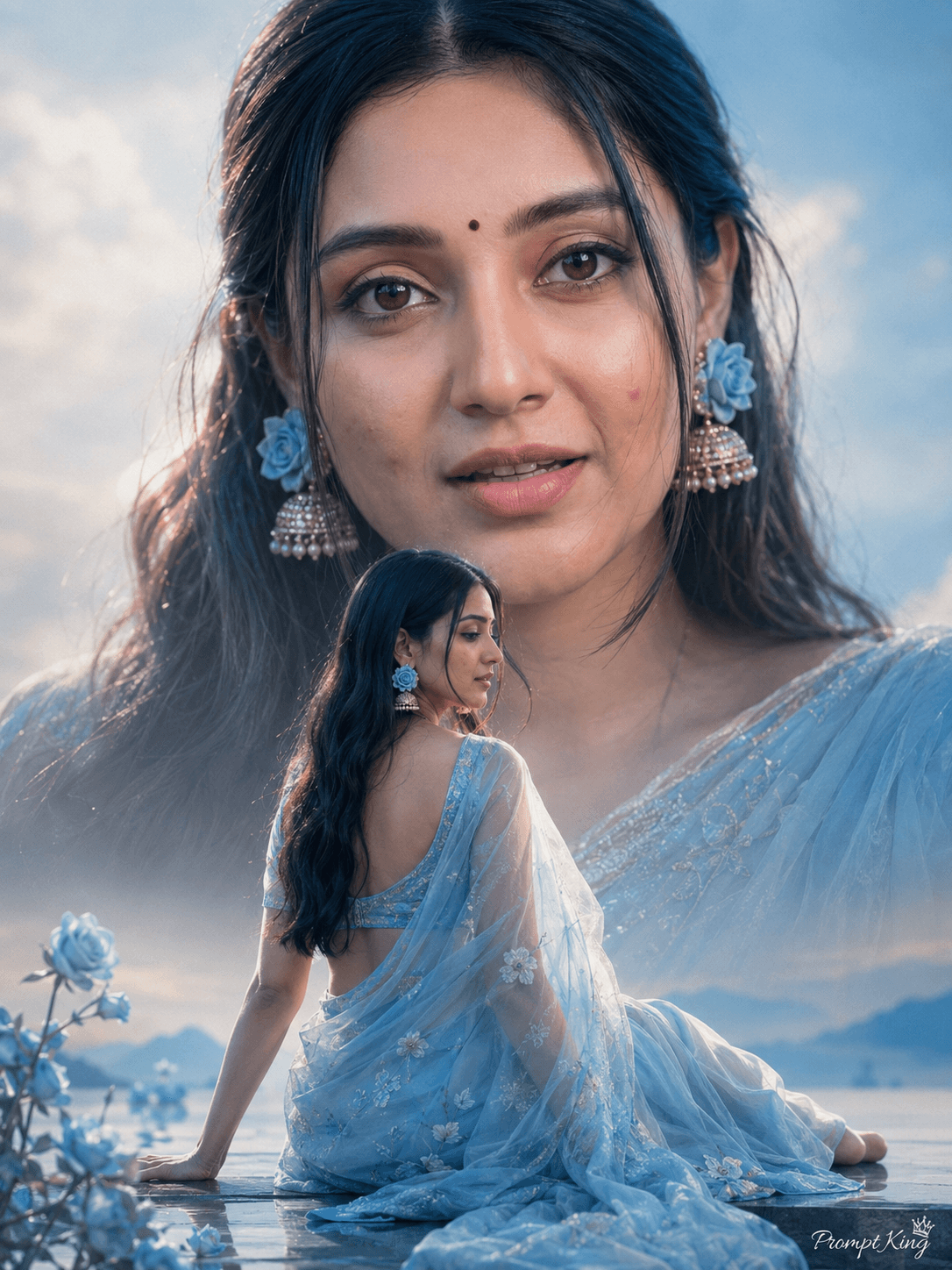
This prompt creates a cinematic, film-poster style image built around a woman in a sky-blue net saree. Her hair is left open and styled softly, and she wears jhumka earrings decorated with small sky-blue roses. In the lower part of the poster she sits in a full-body, back-facing pose from head to toe, turned slightly toward her earrings, looking elegant and dreamy. Above her, in the sky, a large close-up of the same woman's face appears, softly lit and zoomed in, which gives the classic layered look of a romantic movie poster. The background is clean, the lighting is soft and the mood is cinematic, with no text added. The prompt uses your uploaded photo for the face and sets the frame to a 3:4 ratio. This style suits a birthday post, a Saree Day image, a fan-poster style edit for friends, or a romantic, dreamy profile picture. It is a good choice if you like soft pastels and nostalgic film aesthetics. Use a clear, front-facing reference so the large face in the sky stays recognisable.
Lighting, colour and composition
Soft, diffused light on both the seated figure and the floating close-up keeps the poster gentle and romantic. The palette is pastel sky blue and white with warm skin tones and small blue floral accents. A two-layer composition places a back-facing full-body figure below a large face in the sky.
Ways to make it your own
- Swap sky blue for blush pink and match the roses on the jhumkas to the new colour.
- Add a title or your name in elegant script if you want it to read like a real poster.
- Change the ratio to 9:16 for stories, giving more space between the two layers.
Best for
Girls photo ideas and creative portrait inspiration.
Suggested framing
Use the aspect ratio or framing described in the prompt, then adapt it for your intended platform.
Customization ideas
Adjust the clothing, background, lighting, colors and composition to match your own idea.
How to use
Copy the prompt, adapt it to your idea, and paste it into your preferred compatible AI tool. Follow that tool’s instructions for reference photos.
A few helpful answers.
What type of image does this prompt create?
In a compatible AI tool, this prompt is intended as a starting point for this prompt creates a cinematic, film-poster style image built around a woman in a sky-blue net saree. Her hair is left open and styled softly, and she wears jhumka earrings decorated with small sky-blue roses. In the lower part of the poster she sits in a full-body, back-facing pose from head to toe, turned slightly toward her earrings, looking elegant and dreamy. Above her, in the sky, a large close-up of the same woman's face appears, softly lit and zoomed in, which gives the classic layered look of a romantic movie poster. The background is clean, the lighting is soft and the mood is cinematic, with no text added. The prompt uses your uploaded photo for the face and sets the frame to a 3:4 ratio. This style suits a birthday post, a Saree Day image, a fan-poster style edit for friends, or a romantic, dreamy profile picture. It is a good choice if you like soft pastels and nostalgic film aesthetics. Use a clear, front-facing reference so the large face in the sky stays recognisable. Results depend on the tool, settings and references you use.
Can I customize the clothing or background?
Yes. Replace the clothing, setting or colors in the prompt with your own choices. Keep descriptions consistent and adjust one detail at a time.
What aspect ratio works best?
Start with Use the aspect ratio or framing described in the prompt, then adapt it for your intended platform.. A 4:5 ratio works well for a portrait feed post. Adjust the crop for your intended platform and your tool’s available settings.
Does Prompt King generate the image?
No. Prompt King helps users discover and copy prompts that can be used with compatible AI tools.
Can I use this for social media ideas?
Yes. Use it as creative inspiration and customize the result for your audience. Use photos you have permission to upload, and check your chosen tool’s terms before publishing.




