
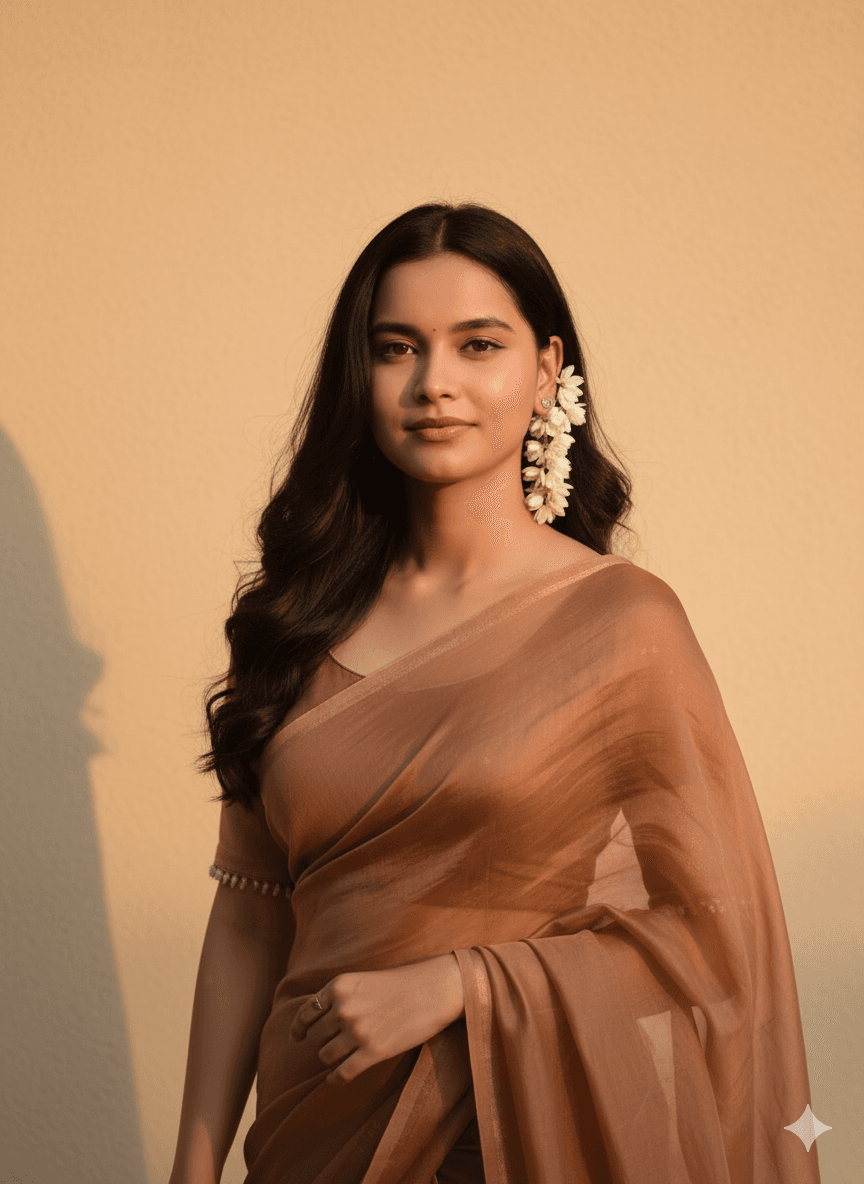
Sheer Brown Saree Portrait Against a Warm Lit Wall
AI Photo Prompt
Want more trending photo prompts? Discover them in the Prompt King Android app on Google Play.
About this prompt
This prompt creates a soft studio-style portrait of a young Indian woman with long, dark, wavy hair falling over her shoulders. She wears a translucent brown saree draped over one shoulder with a fitted blouse, and white flowers are tucked behind her right ear. She looks forward with a soft, calm expression. The background is a plain wall lit with warm light, which gives the whole image an amber glow and keeps attention on the subject. The prompt asks for the face to remain exactly the same as the uploaded photo, so a clear, front-facing reference is recommended. The simple background and warm tones give the portrait a timeless, minimalist feel. For a more classic result, describe an opaque silk or cotton saree in brown or rust instead. That adjusted version would suit saree day photos, festive greetings and elegant profile pictures. The white flowers behind the ear add a gentle traditional touch that pairs well with warm lighting. Consider a medium close-up frame for profile pictures.
Lighting, colour and composition
Warm, soft light on a plain wall creates an amber glow with gentle shadows. A brown saree, dark hair and white flowers form an earthy, minimal palette. A front-facing medium composition centres the subject, with the plain background keeping the image calm and uncluttered.
Ways to make it your own
- Describe an opaque silk saree in rust or brown for a more classic portrait.
- Change white flowers to jasmine strands in the hair for a festive look.
- Use a medium close-up frame if you want it as a profile picture.
Best for
Girls photo ideas and creative portrait inspiration.
Suggested framing
Use the aspect ratio or framing described in the prompt, then adapt it for your intended platform.
Customization ideas
Adjust the clothing, background, lighting, colors and composition to match your own idea.
How to use
Copy the prompt, adapt it to your idea, and paste it into your preferred compatible AI tool. Follow that tool’s instructions for reference photos.
A few helpful answers.
What type of image does this prompt create?
In a compatible AI tool, this prompt is intended as a starting point for this prompt creates a soft studio-style portrait of a young Indian woman with long, dark, wavy hair falling over her shoulders. She wears a translucent brown saree draped over one shoulder with a fitted blouse, and white flowers are tucked behind her right ear. She looks forward with a soft, calm expression. The background is a plain wall lit with warm light, which gives the whole image an amber glow and keeps attention on the subject. The prompt asks for the face to remain exactly the same as the uploaded photo, so a clear, front-facing reference is recommended. The simple background and warm tones give the portrait a timeless, minimalist feel. For a more classic result, describe an opaque silk or cotton saree in brown or rust instead. That adjusted version would suit saree day photos, festive greetings and elegant profile pictures. The white flowers behind the ear add a gentle traditional touch that pairs well with warm lighting. Consider a medium close-up frame for profile pictures. Results depend on the tool, settings and references you use.
Can I customize the clothing or background?
Yes. Replace the clothing, setting or colors in the prompt with your own choices. Keep descriptions consistent and adjust one detail at a time.
What aspect ratio works best?
Start with Use the aspect ratio or framing described in the prompt, then adapt it for your intended platform.. A 4:5 ratio works well for a portrait feed post. Adjust the crop for your intended platform and your tool’s available settings.
Does Prompt King generate the image?
No. Prompt King helps users discover and copy prompts that can be used with compatible AI tools.
Can I use this for social media ideas?
Yes. Use it as creative inspiration and customize the result for your audience. Use photos you have permission to upload, and check your chosen tool’s terms before publishing.




