Royal Jodhpuri Achkan With Multicolour Safa
AI Photo Prompt
Want more trending photo prompts? Discover them in the Prompt King Android app on Google Play.
About this prompt
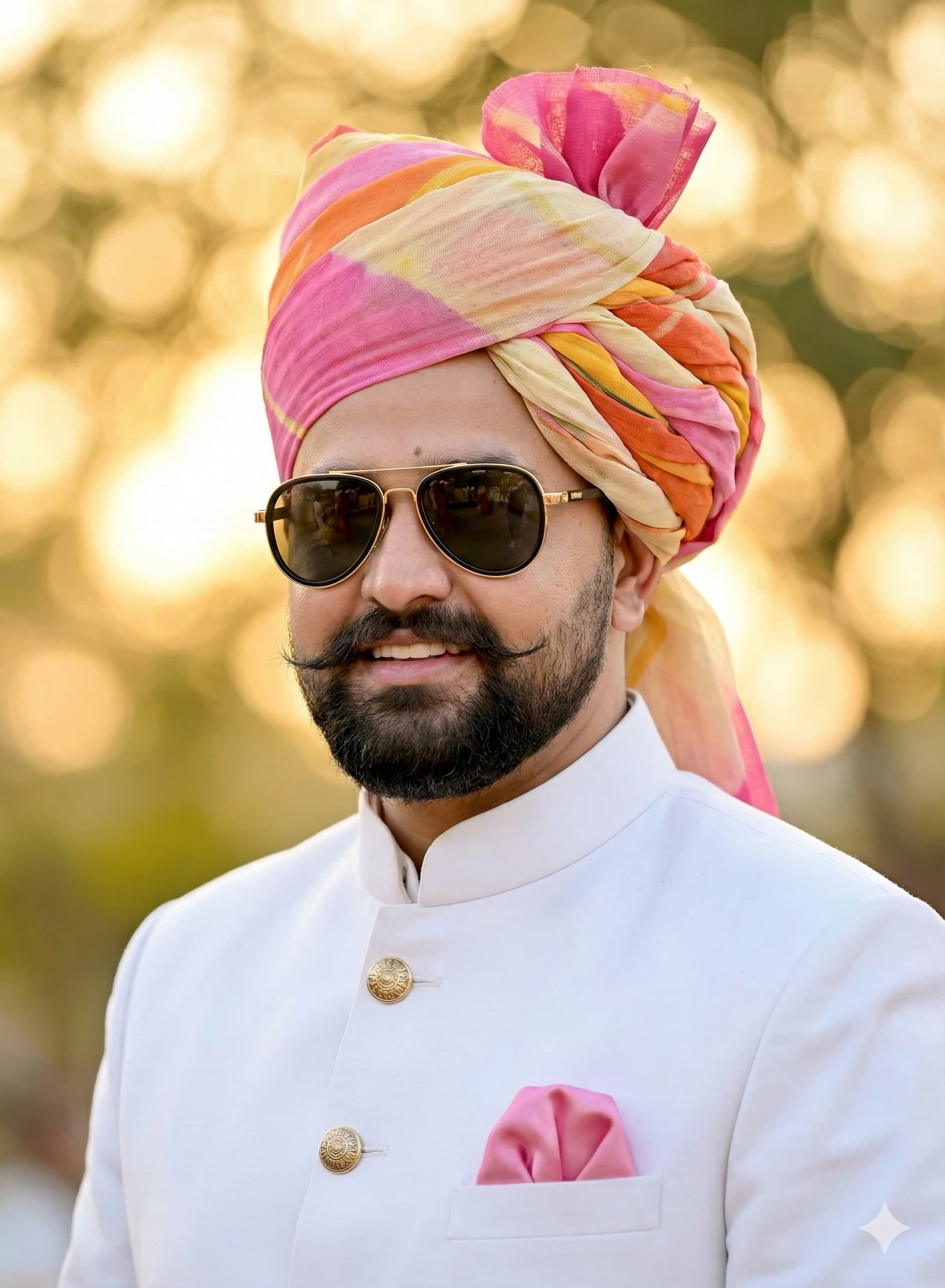
This prompt creates a realistic portrait of an Indian man, matching your uploaded photo, dressed in regal Rajasthani wedding attire. He wears a white Jodhpuri achkan with golden buttons and a pink pocket square, and a traditional Rajputi safa wrapped in bright shades of pink, orange, yellow and cream. Gold and black sunglasses add a contemporary twist to the classic outfit. The background is softly blurred golden light, giving the image a warm, celebratory and traditional wedding atmosphere without distracting details. The result looks like a groom or wedding guest portrait from a heritage celebration in Rajasthan. It suits grooms planning their look, brothers and friends dressing for a baraat, sangeet or reception, Rajasthan Day or Teej greetings, and anyone wanting a royal-themed profile picture. Tailors and ethnic wear brands can use it to visualise a white achkan paired with a multicolour safa before a fitting. Because the setting is simple, the outfit stays the clear subject, and you can easily change colours, add a sehra, or include a sword or brooch for a fuller groom look.
Lighting, colour and composition
Warm, golden background light creates a soft glow and gentle separation around the subject. The palette is crisp white and gold from the achkan, with vibrant pink, orange and yellow in the safa. A medium, centred portrait composition keeps the turban and buttons in frame against a softly blurred golden background.
Ways to make it your own
- Change the achkan to ivory or pastel blue and match the pocket square to the safa.
- Add a kalgi brooch and pearl mala to the turban for a groom's look.
- Use a 4:5 crop to keep the full safa and achkan buttons visible.
Best for
Rajasthan photo ideas and creative portrait inspiration.
Suggested framing
Use the aspect ratio or framing described in the prompt, then adapt it for your intended platform.
Customization ideas
Adjust the clothing, background, lighting, colors and composition to match your own idea.
How to use
Copy the prompt, adapt it to your idea, and paste it into your preferred compatible AI tool. Follow that tool’s instructions for reference photos.
A few helpful answers.
What type of image does this prompt create?
In a compatible AI tool, this prompt is intended as a starting point for this prompt creates a realistic portrait of an Indian man, matching your uploaded photo, dressed in regal Rajasthani wedding attire. He wears a white Jodhpuri achkan with golden buttons and a pink pocket square, and a traditional Rajputi safa wrapped in bright shades of pink, orange, yellow and cream. Gold and black sunglasses add a contemporary twist to the classic outfit. The background is softly blurred golden light, giving the image a warm, celebratory and traditional wedding atmosphere without distracting details. The result looks like a groom or wedding guest portrait from a heritage celebration in Rajasthan. It suits grooms planning their look, brothers and friends dressing for a baraat, sangeet or reception, Rajasthan Day or Teej greetings, and anyone wanting a royal-themed profile picture. Tailors and ethnic wear brands can use it to visualise a white achkan paired with a multicolour safa before a fitting. Because the setting is simple, the outfit stays the clear subject, and you can easily change colours, add a sehra, or include a sword or brooch for a fuller groom look. Results depend on the tool, settings and references you use.
Can I customize the clothing or background?
Yes. Replace the clothing, setting or colors in the prompt with your own choices. Keep descriptions consistent and adjust one detail at a time.
What aspect ratio works best?
Start with Use the aspect ratio or framing described in the prompt, then adapt it for your intended platform.. A 4:5 ratio works well for a portrait feed post. Adjust the crop for your intended platform and your tool’s available settings.
Does Prompt King generate the image?
No. Prompt King helps users discover and copy prompts that can be used with compatible AI tools.
Can I use this for social media ideas?
Yes. Use it as creative inspiration and customize the result for your audience. Use photos you have permission to upload, and check your chosen tool’s terms before publishing.