
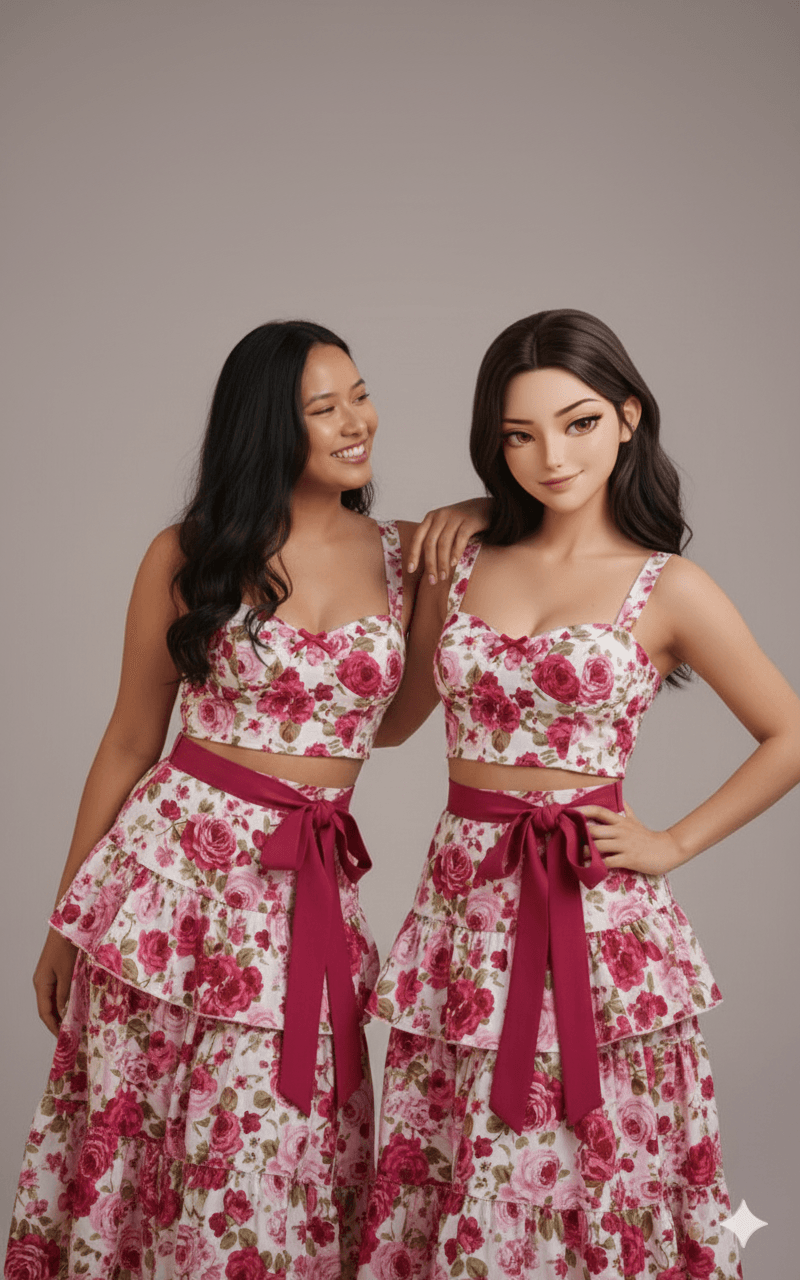
Real Person Posing With Their 3D Anime-Style Twin
AI Photo Prompt
Want more trending photo prompts? Discover them in the Prompt King Android app on Google Play.
About this prompt
This prompt creates a hyper-realistic image featuring a real person standing alongside an anime-inspired 3D realistic version of themselves. The 3D twin is not a flat cartoon or 2D anime drawing; it is fully volumetric and cinematic, with only a subtle anime influence in the eyes. Both figures share the exact same face, hairstyle, height, proportions and outfit, which is taken directly from the uploaded photo. The prompt contains a detailed identity lock, instructing the model not to beautify, age, smooth or reshape the face and to preserve features such as jawline, nose, lips and skin details like pores and freckles. The two figures interact naturally: the real person might lean toward the 3D version, give a playful shoulder bump, drape an arm or mirror a gesture, while the 3D twin responds with complementary poses such as leaning back-to-back or pointing playfully. The result feels fun and creative, like a real-meets-digital photoshoot. This style suits anyone who enjoys anime, gaming or digital art and wants a unique profile picture, a creative social media post or a playful birthday image. Upload a clear, full-body or half-body reference photo for best results.
Lighting, colour and composition
Even, cinematic studio lighting keeps both figures consistent in tone and shadow. The palette follows the uploaded outfit, with the 3D twin showing slightly smoother shading and brighter eye highlights. A side-by-side composition places both figures at equal scale, with their interactive poses linking the two halves of the frame.
Ways to make it your own
- Choose a pose like back-to-back for a strong, symmetrical composition.
- Ask for a neon-lit city background to suit the anime-inspired theme.
- Use a full-body reference photo so both figures' outfits render correctly.
Best for
Girls photo ideas and creative portrait inspiration.
Suggested framing
Use the aspect ratio or framing described in the prompt, then adapt it for your intended platform.
Customization ideas
Adjust the clothing, background, lighting, colors and composition to match your own idea.
How to use
Copy the prompt, adapt it to your idea, and paste it into your preferred compatible AI tool. Follow that tool’s instructions for reference photos.
A few helpful answers.
What type of image does this prompt create?
In a compatible AI tool, this prompt is intended as a starting point for this prompt creates a hyper-realistic image featuring a real person standing alongside an anime-inspired 3D realistic version of themselves. The 3D twin is not a flat cartoon or 2D anime drawing; it is fully volumetric and cinematic, with only a subtle anime influence in the eyes. Both figures share the exact same face, hairstyle, height, proportions and outfit, which is taken directly from the uploaded photo. The prompt contains a detailed identity lock, instructing the model not to beautify, age, smooth or reshape the face and to preserve features such as jawline, nose, lips and skin details like pores and freckles. The two figures interact naturally: the real person might lean toward the 3D version, give a playful shoulder bump, drape an arm or mirror a gesture, while the 3D twin responds with complementary poses such as leaning back-to-back or pointing playfully. The result feels fun and creative, like a real-meets-digital photoshoot. This style suits anyone who enjoys anime, gaming or digital art and wants a unique profile picture, a creative social media post or a playful birthday image. Upload a clear, full-body or half-body reference photo for best results. Results depend on the tool, settings and references you use.
Can I customize the clothing or background?
Yes. Replace the clothing, setting or colors in the prompt with your own choices. Keep descriptions consistent and adjust one detail at a time.
What aspect ratio works best?
Start with Use the aspect ratio or framing described in the prompt, then adapt it for your intended platform.. A 4:5 ratio works well for a portrait feed post. Adjust the crop for your intended platform and your tool’s available settings.
Does Prompt King generate the image?
No. Prompt King helps users discover and copy prompts that can be used with compatible AI tools.
Can I use this for social media ideas?
Yes. Use it as creative inspiration and customize the result for your audience. Use photos you have permission to upload, and check your chosen tool’s terms before publishing.




