
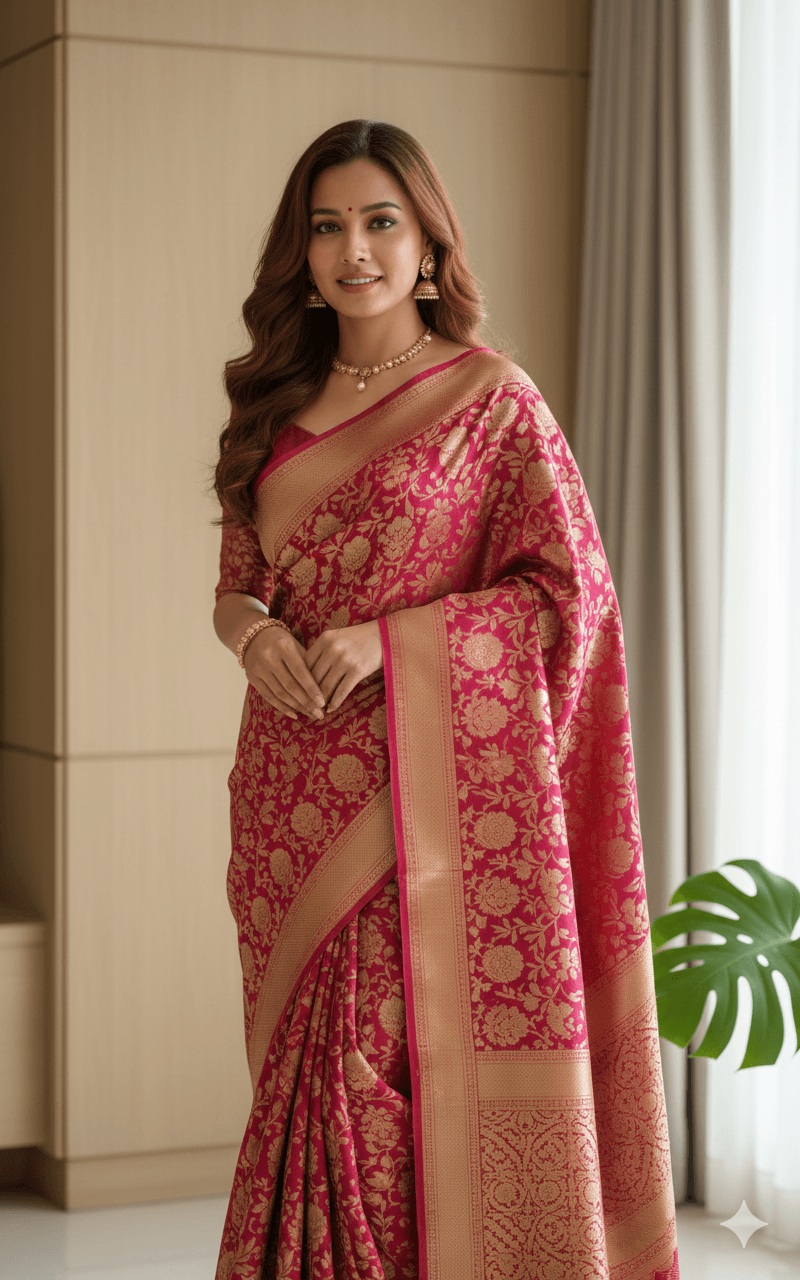
Raspberry Banarasi Silk Saree in a Modern Interior
AI Photo Prompt
Want more trending photo prompts? Discover them in the Prompt King Android app on Google Play.
About this prompt
This prompt creates a photorealistic portrait of a woman standing elegantly in a modern interior, wearing a heavy Banarasi silk saree in deep raspberry pink and magenta. The saree is covered with intricate antique gold zari floral brocade and finished with a thick, ornate gold border that catches the light. Her hair is styled in voluminous, soft mahogany waves falling over one shoulder, and she wears traditional gold jewellery including a delicate kundan necklace, statement earrings and a broad gold bangle. Soft, cinematic side lighting creates gentle shadows and brings out the metallic sheen of the silk. The background is minimal and contemporary, with light wooden wall panelling, neutral curtains and a hint of a green Monstera leaf in the corner. The shot is a medium-to-full-body composition with a shallow depth of field and an 85mm lens look, giving a sophisticated, poised atmosphere. This style suits women attending weddings, receptions, Diwali or Karva Chauth celebrations, and anyone who wants a refined saree portrait for a profile picture or festive post. It also helps visualise a Banarasi saree before buying. Upload a clear, front-facing reference photo for the best result.
Lighting, colour and composition
Soft side lighting creates gentle shadows and makes the gold zari shimmer. The palette pairs raspberry pink and magenta with antique gold, light wood, neutral fabrics and a touch of green. A medium-full vertical composition places her centrally, with minimal interior details keeping the frame clean and elegant.
Ways to make it your own
- Change the saree to emerald green with gold zari for a festive alternative.
- Add a soft window light from behind for a gentle rim glow on her hair.
- Replace the Monstera with a brass diya for a Diwali-themed setting.
Best for
Girls photo ideas and creative portrait inspiration.
Suggested framing
Use the aspect ratio or framing described in the prompt, then adapt it for your intended platform.
Customization ideas
Adjust the clothing, background, lighting, colors and composition to match your own idea.
How to use
Copy the prompt, adapt it to your idea, and paste it into your preferred compatible AI tool. Follow that tool’s instructions for reference photos.
A few helpful answers.
What type of image does this prompt create?
In a compatible AI tool, this prompt is intended as a starting point for this prompt creates a photorealistic portrait of a woman standing elegantly in a modern interior, wearing a heavy Banarasi silk saree in deep raspberry pink and magenta. The saree is covered with intricate antique gold zari floral brocade and finished with a thick, ornate gold border that catches the light. Her hair is styled in voluminous, soft mahogany waves falling over one shoulder, and she wears traditional gold jewellery including a delicate kundan necklace, statement earrings and a broad gold bangle. Soft, cinematic side lighting creates gentle shadows and brings out the metallic sheen of the silk. The background is minimal and contemporary, with light wooden wall panelling, neutral curtains and a hint of a green Monstera leaf in the corner. The shot is a medium-to-full-body composition with a shallow depth of field and an 85mm lens look, giving a sophisticated, poised atmosphere. This style suits women attending weddings, receptions, Diwali or Karva Chauth celebrations, and anyone who wants a refined saree portrait for a profile picture or festive post. It also helps visualise a Banarasi saree before buying. Upload a clear, front-facing reference photo for the best result. Results depend on the tool, settings and references you use.
Can I customize the clothing or background?
Yes. Replace the clothing, setting or colors in the prompt with your own choices. Keep descriptions consistent and adjust one detail at a time.
What aspect ratio works best?
Start with Use the aspect ratio or framing described in the prompt, then adapt it for your intended platform.. A 4:5 ratio works well for a portrait feed post. Adjust the crop for your intended platform and your tool’s available settings.
Does Prompt King generate the image?
No. Prompt King helps users discover and copy prompts that can be used with compatible AI tools.
Can I use this for social media ideas?
Yes. Use it as creative inspiration and customize the result for your audience. Use photos you have permission to upload, and check your chosen tool’s terms before publishing.




