
Plum Georgette Saree With Colour-Blocked Blouse
AI Photo Prompt
Want more trending photo prompts? Discover them in the Prompt King Android app on Google Play.
About this prompt
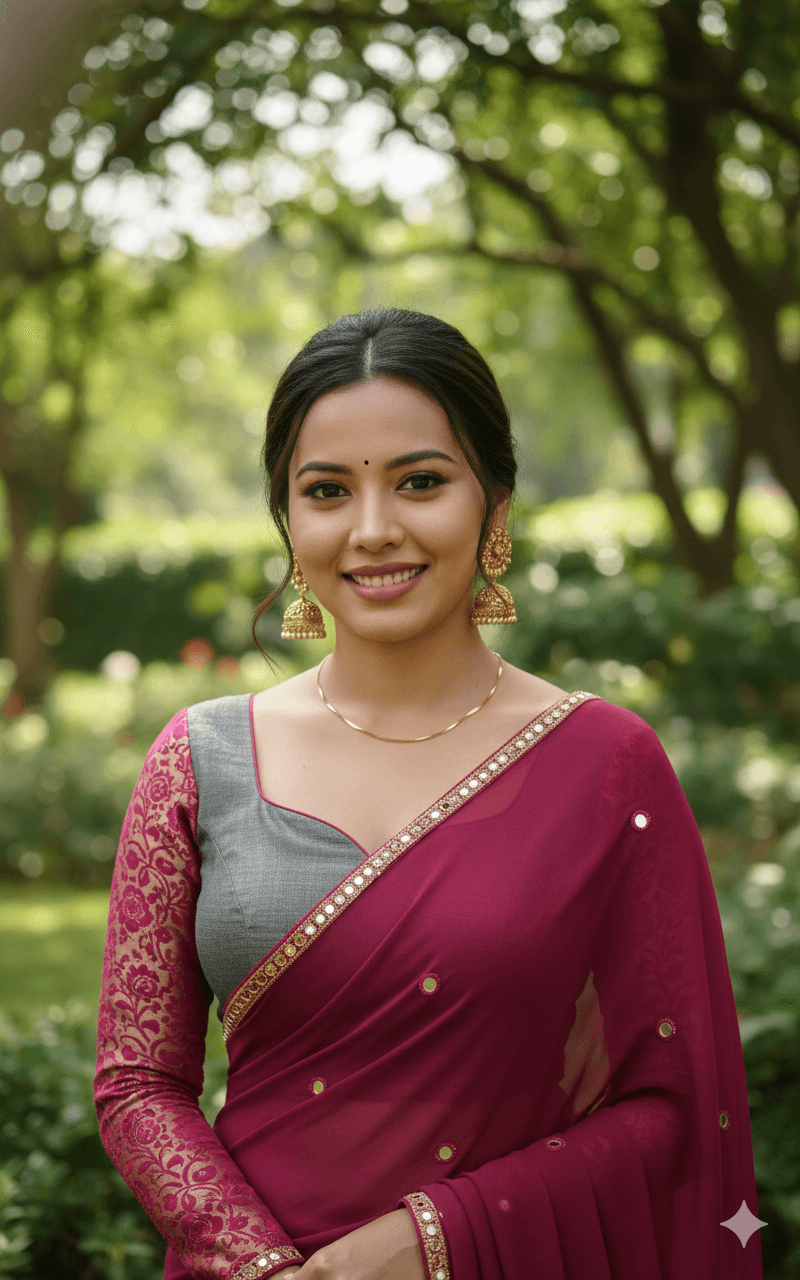
This prompt creates a high-quality cinematic portrait of a woman smiling warmly in a deep plum-pink georgette saree. The saree has a thin gold sequinned border and small circular mirror-work motifs that catch the light. Her blouse is a fashionable colour-blocked design, combining a grey structured bodice with contrasting magenta floral brocade sleeves and a sweetheart neckline. She wears gold jhumka earrings and coordinated accessories that complement the plum and magenta tones. The styling is contemporary and festive, mixing traditional fabrics with a modern blouse cut, which makes it a good reference for designer saree looks. Lighting is soft and flattering, highlighting her face and the sheen of the georgette, while the background remains softly blurred so the outfit details stay prominent. The overall mood is warm, confident and celebratory. This style suits women attending weddings, receptions, Diwali parties or family functions, as well as anyone wanting a polished festive portrait for social media or a profile picture. It is also useful for visualising a blouse design idea before tailoring. Upload a clear, front-facing reference photo in good lighting for the most accurate result.
Lighting, colour and composition
Soft, warm key light flatters the face and brings out the georgette's sheen and mirror-work sparkle. The palette pairs plum pink and magenta with cool grey and gold accents. A medium portrait frame centres the subject, showing the blouse design clearly, with a creamy, out-of-focus background.
Ways to make it your own
- Change the blouse bodice colour to gold or black for a different contrast.
- Add a small potli bag in hand for a complete wedding-guest look.
- Use warm fairy-light bokeh behind her for a Diwali party feel.
Best for
Girls photo ideas and creative portrait inspiration.
Suggested framing
Use the aspect ratio or framing described in the prompt, then adapt it for your intended platform.
Customization ideas
Adjust the clothing, background, lighting, colors and composition to match your own idea.
How to use
Copy the prompt, adapt it to your idea, and paste it into your preferred compatible AI tool. Follow that tool’s instructions for reference photos.
A few helpful answers.
What type of image does this prompt create?
In a compatible AI tool, this prompt is intended as a starting point for this prompt creates a high-quality cinematic portrait of a woman smiling warmly in a deep plum-pink georgette saree. The saree has a thin gold sequinned border and small circular mirror-work motifs that catch the light. Her blouse is a fashionable colour-blocked design, combining a grey structured bodice with contrasting magenta floral brocade sleeves and a sweetheart neckline. She wears gold jhumka earrings and coordinated accessories that complement the plum and magenta tones. The styling is contemporary and festive, mixing traditional fabrics with a modern blouse cut, which makes it a good reference for designer saree looks. Lighting is soft and flattering, highlighting her face and the sheen of the georgette, while the background remains softly blurred so the outfit details stay prominent. The overall mood is warm, confident and celebratory. This style suits women attending weddings, receptions, Diwali parties or family functions, as well as anyone wanting a polished festive portrait for social media or a profile picture. It is also useful for visualising a blouse design idea before tailoring. Upload a clear, front-facing reference photo in good lighting for the most accurate result. Results depend on the tool, settings and references you use.
Can I customize the clothing or background?
Yes. Replace the clothing, setting or colors in the prompt with your own choices. Keep descriptions consistent and adjust one detail at a time.
What aspect ratio works best?
Start with Use the aspect ratio or framing described in the prompt, then adapt it for your intended platform.. A 4:5 ratio works well for a portrait feed post. Adjust the crop for your intended platform and your tool’s available settings.
Does Prompt King generate the image?
No. Prompt King helps users discover and copy prompts that can be used with compatible AI tools.
Can I use this for social media ideas?
Yes. Use it as creative inspiration and customize the result for your audience. Use photos you have permission to upload, and check your chosen tool’s terms before publishing.




