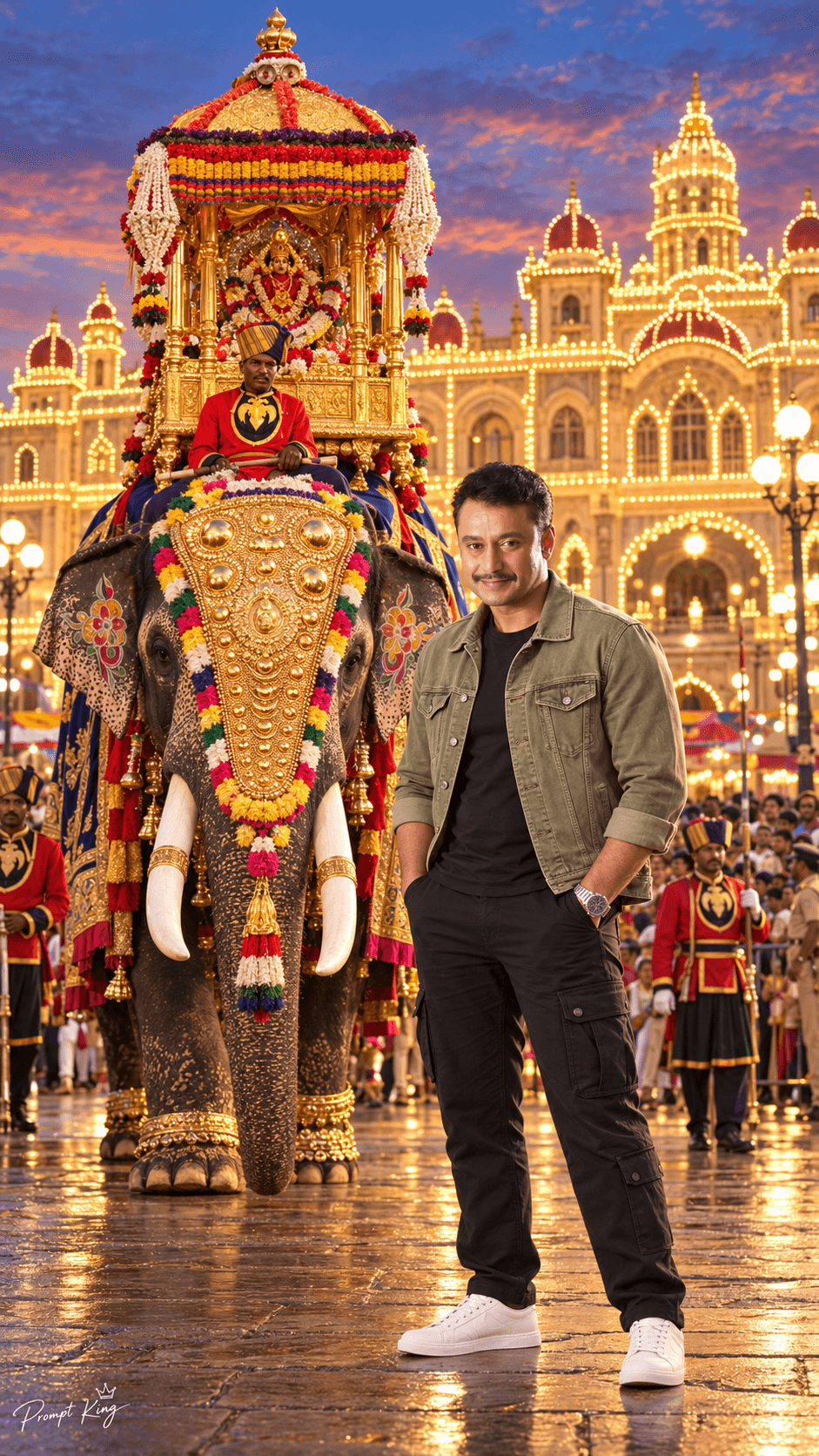
Olive Denim Jacket Look With Dasara Elephant
AI Photo Prompt
Want more trending photo prompts? Discover them in the Prompt King Android app on Google Play.
About this prompt
This prompt places a man in front of a decorated elephant during the Mysore Dasara Jumbo Savari procession, with Mysore Palace lit up by thousands of warm golden lights in the background. Unlike the traditional versions, the outfit here is modern casual: a light olive-green denim jacket with visible stitching and chest pockets, a plain black crew-neck T-shirt, relaxed black cargo pants, clean white sneakers and a silver wristwatch. He stands with both hands in his pockets, shoulders relaxed and a subtle smile, and the complete body from head to shoes is shown. The elephant is positioned behind and slightly to the left, creating depth between the subject and the illuminated palace. Your uploaded face photo is the only identity reference, and the prompt asks to preserve your face shape, hairline, beard and skin tone without retouching. The vertical 9:16 format suits stories and reels. It works well for a Dasara visit post, a festival travel diary, a casual but festive profile photo, or a greeting to friends during Navaratri. A sharp, front-facing selfie gives the best likeness.
Lighting, colour and composition
Warm golden festival lights backlight the scene and add soft rim light on the jacket and shoulders. Olive green, black and white form a calm modern palette against the gold-lit palace and the elephant's colourful decorations. The subject is centred and full length, with the elephant offset left to create layered depth.
Ways to make it your own
- Switch the denim jacket to a beige linen shirt for a lighter daytime festival feel.
- Add a traditional Mysore peta to mix casual wear with a festive cultural touch.
- Ask for a closer, waist-up framing if you want the face and jacket details to stand out.
Best for
Festival photo ideas and creative portrait inspiration.
Suggested framing
Use the aspect ratio or framing described in the prompt, then adapt it for your intended platform.
Customization ideas
Adjust the clothing, background, lighting, colors and composition to match your own idea.
How to use
Copy the prompt, adapt it to your idea, and paste it into your preferred compatible AI tool. Follow that tool’s instructions for reference photos.
A few helpful answers.
What type of image does this prompt create?
In a compatible AI tool, this prompt is intended as a starting point for this prompt places a man in front of a decorated elephant during the Mysore Dasara Jumbo Savari procession, with Mysore Palace lit up by thousands of warm golden lights in the background. Unlike the traditional versions, the outfit here is modern casual: a light olive-green denim jacket with visible stitching and chest pockets, a plain black crew-neck T-shirt, relaxed black cargo pants, clean white sneakers and a silver wristwatch. He stands with both hands in his pockets, shoulders relaxed and a subtle smile, and the complete body from head to shoes is shown. The elephant is positioned behind and slightly to the left, creating depth between the subject and the illuminated palace. Your uploaded face photo is the only identity reference, and the prompt asks to preserve your face shape, hairline, beard and skin tone without retouching. The vertical 9:16 format suits stories and reels. It works well for a Dasara visit post, a festival travel diary, a casual but festive profile photo, or a greeting to friends during Navaratri. A sharp, front-facing selfie gives the best likeness. Results depend on the tool, settings and references you use.
Can I customize the clothing or background?
Yes. Replace the clothing, setting or colors in the prompt with your own choices. Keep descriptions consistent and adjust one detail at a time.
What aspect ratio works best?
Start with Use the aspect ratio or framing described in the prompt, then adapt it for your intended platform.. A 4:5 ratio works well for a portrait feed post. Adjust the crop for your intended platform and your tool’s available settings.
Does Prompt King generate the image?
No. Prompt King helps users discover and copy prompts that can be used with compatible AI tools.
Can I use this for social media ideas?
Yes. Use it as creative inspiration and customize the result for your audience. Use photos you have permission to upload, and check your chosen tool’s terms before publishing.