
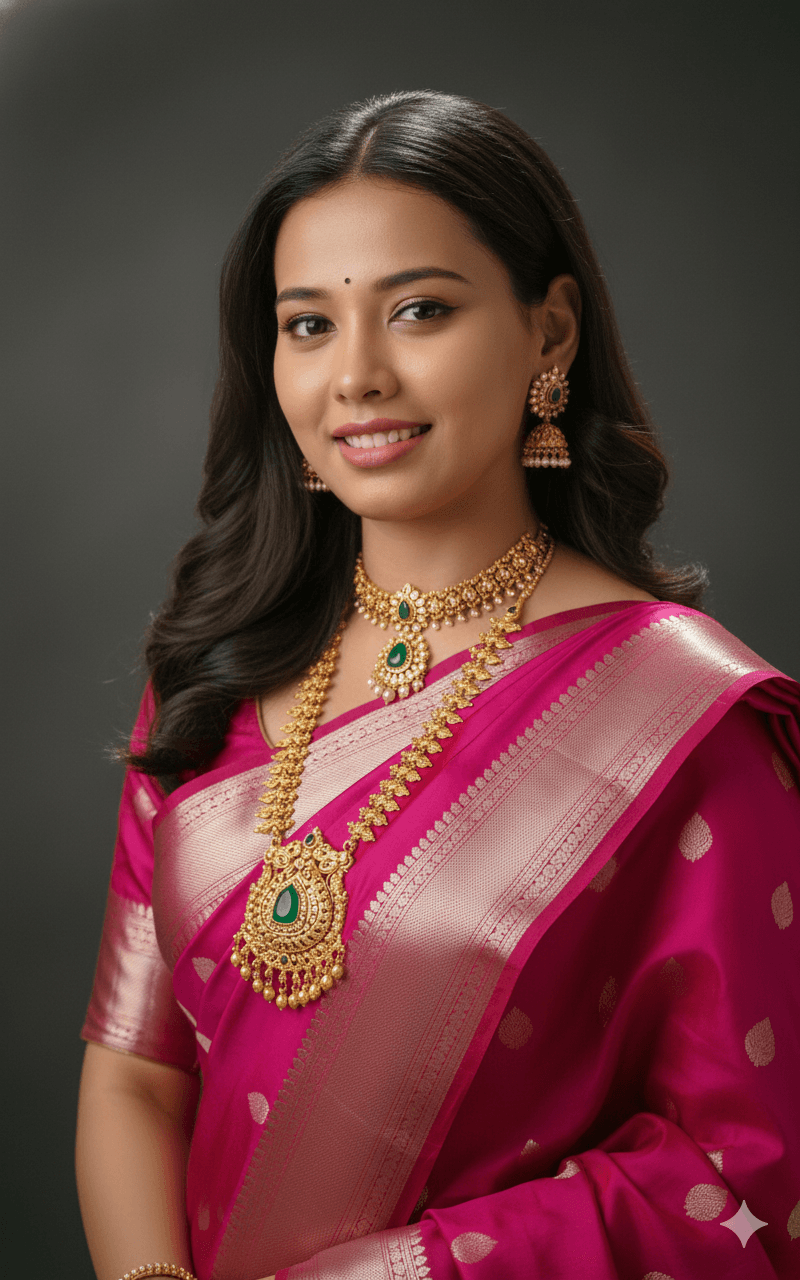
Fuchsia Silk Saree With Temple Jewellery Necklace
AI Photo Prompt
Want more trending photo prompts? Discover them in the Prompt King Android app on Google Play.
About this prompt
This prompt creates a vibrant, high-resolution portrait of a smiling young woman with wavy dark hair, dressed in a rich fuchsia-pink silk saree with an intricate silver-gold zari border. She wears heavy traditional South Indian temple jewellery, including a thick, ornate gold necklace with a large emerald and ruby pendant and matching earrings. Soft, warm studio lighting highlights her glowing skin and the texture and shine of the silk. The background is a minimal, dark, moody grey, chosen specifically to make the bright pink saree and gold jewellery stand out with high contrast. The composition is cinematic and elegant, with a graceful pose that shows both the face and the jewellery clearly. The prompt includes notes on why each element is specified, such as naming the exact saree shade and pendant stones so the model renders them accurately. This style suits women preparing for South Indian weddings, Varalakshmi Vratham, Navratri, Diwali or family functions, as well as anyone wanting a polished studio-style festive portrait. It also helps preview a jewellery and saree combination. Upload a clear front-facing reference photo in good light for an accurate likeness.
Lighting, colour and composition
Soft, warm studio key light creates a glow on skin and silk with gentle falloff. The palette is bright fuchsia and gold with emerald and ruby accents against a dark slate-grey backdrop. A medium close-up centres the subject, keeping the necklace and saree border in sharp focus.
Ways to make it your own
- Swap the fuchsia saree for mustard yellow to change the colour contrast.
- Use a deep maroon backdrop instead of grey for a warmer festive tone.
- Add jasmine flowers in her hair for a classic South Indian finish.
Best for
Girls photo ideas and creative portrait inspiration.
Suggested framing
Use the aspect ratio or framing described in the prompt, then adapt it for your intended platform.
Customization ideas
Adjust the clothing, background, lighting, colors and composition to match your own idea.
How to use
Copy the prompt, adapt it to your idea, and paste it into your preferred compatible AI tool. Follow that tool’s instructions for reference photos.
A few helpful answers.
What type of image does this prompt create?
In a compatible AI tool, this prompt is intended as a starting point for this prompt creates a vibrant, high-resolution portrait of a smiling young woman with wavy dark hair, dressed in a rich fuchsia-pink silk saree with an intricate silver-gold zari border. She wears heavy traditional South Indian temple jewellery, including a thick, ornate gold necklace with a large emerald and ruby pendant and matching earrings. Soft, warm studio lighting highlights her glowing skin and the texture and shine of the silk. The background is a minimal, dark, moody grey, chosen specifically to make the bright pink saree and gold jewellery stand out with high contrast. The composition is cinematic and elegant, with a graceful pose that shows both the face and the jewellery clearly. The prompt includes notes on why each element is specified, such as naming the exact saree shade and pendant stones so the model renders them accurately. This style suits women preparing for South Indian weddings, Varalakshmi Vratham, Navratri, Diwali or family functions, as well as anyone wanting a polished studio-style festive portrait. It also helps preview a jewellery and saree combination. Upload a clear front-facing reference photo in good light for an accurate likeness. Results depend on the tool, settings and references you use.
Can I customize the clothing or background?
Yes. Replace the clothing, setting or colors in the prompt with your own choices. Keep descriptions consistent and adjust one detail at a time.
What aspect ratio works best?
Start with Use the aspect ratio or framing described in the prompt, then adapt it for your intended platform.. A 4:5 ratio works well for a portrait feed post. Adjust the crop for your intended platform and your tool’s available settings.
Does Prompt King generate the image?
No. Prompt King helps users discover and copy prompts that can be used with compatible AI tools.
Can I use this for social media ideas?
Yes. Use it as creative inspiration and customize the result for your audience. Use photos you have permission to upload, and check your chosen tool’s terms before publishing.




