
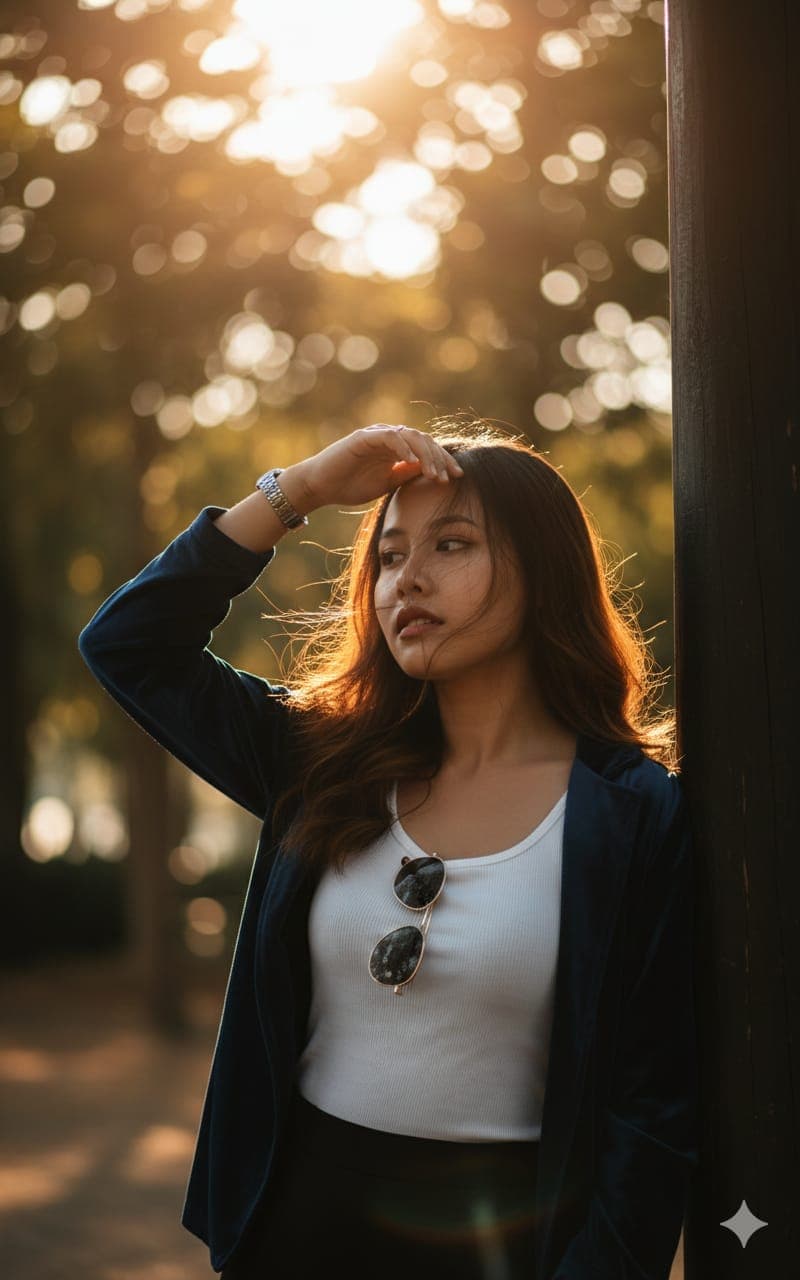
Backlit Park Portrait Shielding Eyes From the Sun
AI Photo Prompt
Want more trending photo prompts? Discover them in the Prompt King Android app on Google Play.
About this prompt
This prompt creates a close-up vertical portrait of a young woman with long, dark, slightly wavy hair standing in a park or wooded area. She wears a white tank top with a dark blue velvet layer, with sunglasses hanging from the neckline. She leans against a dark vertical post on the right side of the frame and raises her right hand to shield her forehead and eyes from the sun; the hand wears a watch and rings. Her hair is slightly windswept across her face, adding a casual, candid feel. Strong backlighting is the key element: golden sunlight filters through the trees, creating a hazy, dreamy atmosphere with lens flare and bokeh behind her. The foreground sits in soft shadow while a bright rim light outlines her hair and shoulders. The colour grading is deep, warm and moody, and the prompt asks for a telephoto look such as an 85mm lens with shallow depth of field. This style suits women who like relaxed, lifestyle-style photos for social media, profile pictures or a casual photo series. It needs no festival theme. Upload a clear reference photo; a three-quarter angle works well with the hand-raised pose.
Lighting, colour and composition
Strong golden backlight through trees creates rim light, flare and hazy bokeh. The palette is warm amber and honey with deep navy velvet and crisp white. A vertical close-up places the subject left of centre, leaning on a post at the right edge, with the raised hand adding a strong diagonal.
Ways to make it your own
- Change the velvet layer to a denim jacket for a more casual everyday look.
- Reduce the lens flare if you want clearer detail in the face.
- Try a cooler morning light for a fresher, less moody variation.
Best for
Girls photo ideas and creative portrait inspiration.
Suggested framing
Use the aspect ratio or framing described in the prompt, then adapt it for your intended platform.
Customization ideas
Adjust the clothing, background, lighting, colors and composition to match your own idea.
How to use
Copy the prompt, adapt it to your idea, and paste it into your preferred compatible AI tool. Follow that tool’s instructions for reference photos.
A few helpful answers.
What type of image does this prompt create?
In a compatible AI tool, this prompt is intended as a starting point for this prompt creates a close-up vertical portrait of a young woman with long, dark, slightly wavy hair standing in a park or wooded area. She wears a white tank top with a dark blue velvet layer, with sunglasses hanging from the neckline. She leans against a dark vertical post on the right side of the frame and raises her right hand to shield her forehead and eyes from the sun; the hand wears a watch and rings. Her hair is slightly windswept across her face, adding a casual, candid feel. Strong backlighting is the key element: golden sunlight filters through the trees, creating a hazy, dreamy atmosphere with lens flare and bokeh behind her. The foreground sits in soft shadow while a bright rim light outlines her hair and shoulders. The colour grading is deep, warm and moody, and the prompt asks for a telephoto look such as an 85mm lens with shallow depth of field. This style suits women who like relaxed, lifestyle-style photos for social media, profile pictures or a casual photo series. It needs no festival theme. Upload a clear reference photo; a three-quarter angle works well with the hand-raised pose. Results depend on the tool, settings and references you use.
Can I customize the clothing or background?
Yes. Replace the clothing, setting or colors in the prompt with your own choices. Keep descriptions consistent and adjust one detail at a time.
What aspect ratio works best?
Start with Use the aspect ratio or framing described in the prompt, then adapt it for your intended platform.. A 4:5 ratio works well for a portrait feed post. Adjust the crop for your intended platform and your tool’s available settings.
Does Prompt King generate the image?
No. Prompt King helps users discover and copy prompts that can be used with compatible AI tools.
Can I use this for social media ideas?
Yes. Use it as creative inspiration and customize the result for your audience. Use photos you have permission to upload, and check your chosen tool’s terms before publishing.




