
Autumn Park Bench Portrait in Plaid Shacket
AI Photo Prompt
Want more trending photo prompts? Discover them in the Prompt King Android app on Google Play.
About this prompt
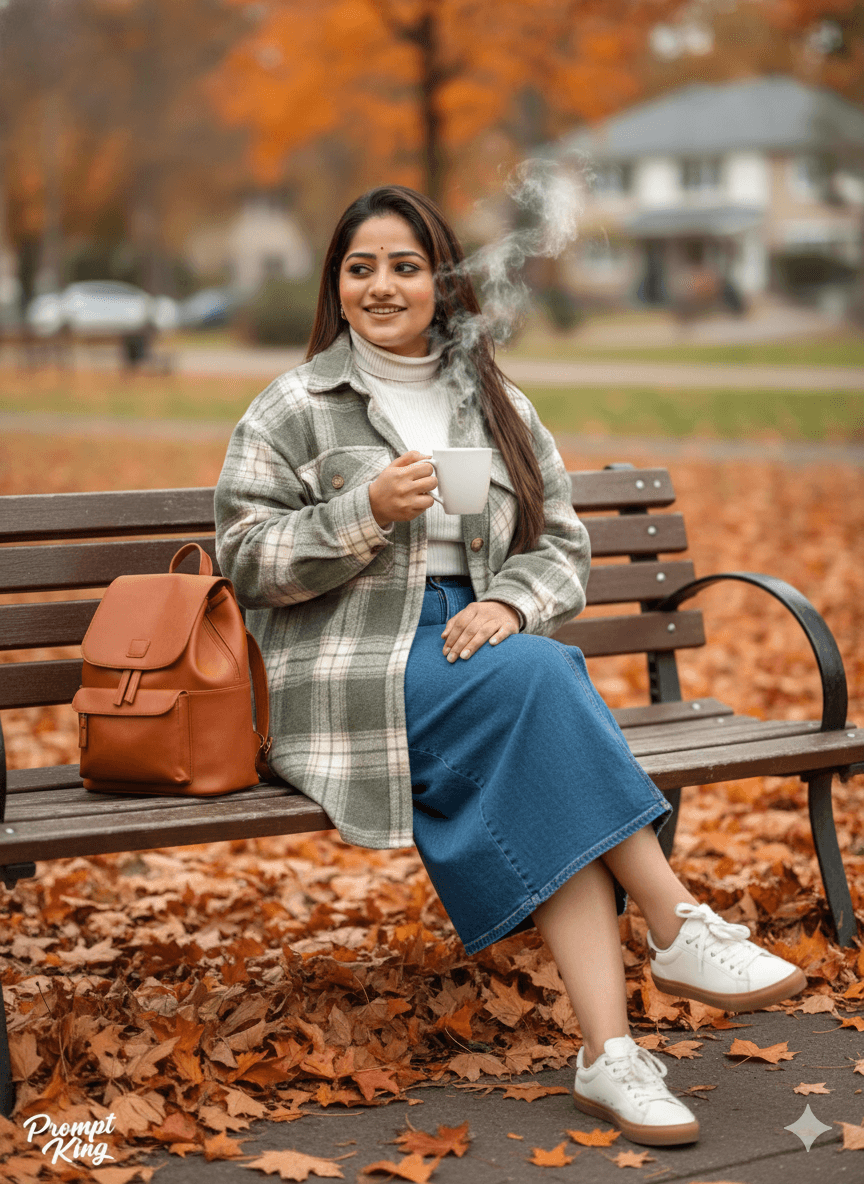
This prompt creates a realistic lifestyle portrait shot as if on an 85mm lens at f/1.8, giving a creamy, blurred background. A stylish woman, using your uploaded face as reference, sits casually on a wooden park bench. She wears a cosy autumn outfit: an oversized sage green and cream plaid flannel shacket worn open over a fitted white ribbed turtleneck, a long blue denim midi skirt with a front slit and clean white leather sneakers with gum soles. In her right hand she holds a white ceramic mug with steam rising from it, and a structured cognac-brown leather backpack rests on the bench beside her. The park is at peak autumn, with the ground covered in crisp orange and brown maple leaves. Soft, diffused daylight brings out the textures of flannel, denim and leather, and the background shows blurred fall foliage and distant houses. The image feels relaxed and warm. It suits fashion and lifestyle creators, travel posts, winter or autumn-themed profile pictures and anyone who likes cosy, Pinterest-style everyday portraits.
Lighting, colour and composition
Diffused overcast light gives even skin tones and soft shadows. The palette blends sage green, cream, denim blue and cognac brown with orange leaves. She sits slightly off-centre on the bench, with the backpack balancing the frame and foliage blurring into the background.
Ways to make it your own
- Swap the plaid shacket for a mustard or rust sweater for a warmer autumn palette.
- Replace the mug with a book or camera to show a hobby you enjoy.
- Change the setting to a café terrace for a city version of the same cosy look.
Best for
Girls photo ideas and creative portrait inspiration.
Suggested framing
Use the aspect ratio or framing described in the prompt, then adapt it for your intended platform.
Customization ideas
Adjust the clothing, background, lighting, colors and composition to match your own idea.
How to use
Copy the prompt, adapt it to your idea, and paste it into your preferred compatible AI tool. Follow that tool’s instructions for reference photos.
A few helpful answers.
What type of image does this prompt create?
In a compatible AI tool, this prompt is intended as a starting point for this prompt creates a realistic lifestyle portrait shot as if on an 85mm lens at f/1.8, giving a creamy, blurred background. A stylish woman, using your uploaded face as reference, sits casually on a wooden park bench. She wears a cosy autumn outfit: an oversized sage green and cream plaid flannel shacket worn open over a fitted white ribbed turtleneck, a long blue denim midi skirt with a front slit and clean white leather sneakers with gum soles. In her right hand she holds a white ceramic mug with steam rising from it, and a structured cognac-brown leather backpack rests on the bench beside her. The park is at peak autumn, with the ground covered in crisp orange and brown maple leaves. Soft, diffused daylight brings out the textures of flannel, denim and leather, and the background shows blurred fall foliage and distant houses. The image feels relaxed and warm. It suits fashion and lifestyle creators, travel posts, winter or autumn-themed profile pictures and anyone who likes cosy, Pinterest-style everyday portraits. Results depend on the tool, settings and references you use.
Can I customize the clothing or background?
Yes. Replace the clothing, setting or colors in the prompt with your own choices. Keep descriptions consistent and adjust one detail at a time.
What aspect ratio works best?
Start with Use the aspect ratio or framing described in the prompt, then adapt it for your intended platform.. A 4:5 ratio works well for a portrait feed post. Adjust the crop for your intended platform and your tool’s available settings.
Does Prompt King generate the image?
No. Prompt King helps users discover and copy prompts that can be used with compatible AI tools.
Can I use this for social media ideas?
Yes. Use it as creative inspiration and customize the result for your audience. Use photos you have permission to upload, and check your chosen tool’s terms before publishing.




